Depending on the screen orientation, the captured image may need to be rotated to ensure it appears in the correct direction on the screen, as illustrated in the figure below.
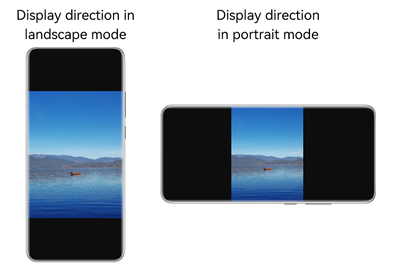
This topic describes how to adjust the camera's rotation angle in preview, photo capture, and video recording scenarios.
-
During preview, the image rotation angle is related to the screen rotation angle (NativeDisplayManager_Rotation). For details about the operation, see Creating a Session > Preview.
-
During photo capture or video recording, the image rotation angle is related to the gravity direction of the device (specified by the device rotation angle.
For details about the operation in photo capture scenarios, see Creating a Session > Calculating the Device Rotation Angle > Photographing.
For details about the operation in video recording scenarios, see Creating a Session > Calculating the Device Rotation Angle > Video Recording.
This development guide provides two solutions for obtaining the rotation angles for preview, photographing, and video recording:
-
Solution 1: The application needs to obtain screen rotation angle of the display through the OH_NativeDisplayManager_GetDefaultDisplayRotation API, and calculate the device rotation angle through the gravity sensor.
-
Solution 2: Since API version 23, the rotation angle can be obtained through the OH_PreviewOutput_GetPreviewRotationWithoutDisplayRotation, OH_PhotoOutput_GetPhotoRotationWithoutDeviceDegree, and OH_VideoOutput_GetVideoRotationWithoutDeviceDegree APIs. The system side obtains the screen rotation angle of the display device and calculates the device rotation angle. If the application uses a USB camera or in multi-screen scenarios, solution 2 is recommended.
For details about the APIs, see Camera API Reference.
Creating a Session
-
Import the camera module and other related modules.
#include "hilog/log.h"
#include "ohcamera/camera.h"
#include "ohcamera/camera_manager.h"
#include "ohcamera/capture_session.h"
-
Create a session.
Before using functions such as preview, you need to create a camera session. Call the OH_CameraManager_CreateCaptureSession API in camera_manager.h to create a session. When creating a session, set Camera_SceneMode to NORMAL_PHOTO or NORMAL_VIDEO. The created session is in photographing or video recording mode.
void createPhotosession(Camera_Manager *cameraManager) {
    Camera_CaptureSession *captureSession;
    Camera_SceneMode sceneMode = NORMAL_PHOTO;
    Camera_ErrorCode ret = OH_CameraManager_CreateCaptureSession(cameraManager, &captureSession);
    if (captureSession == nullptr || ret != CAMERA_OK) {
        OH_LOG_ERROR(LOG_APP, "Create captureSession failed.");
    }
    ret = OH_CaptureSession_SetSessionMode(captureSession, sceneMode);
    if (ret != CAMERA_OK) {
        OH_LOG_ERROR(LOG_APP, "OH_CaptureSession_SetSessionMode failed.");
    }
}

void createVideosession(Camera_Manager *cameraManager) {
    Camera_CaptureSession *captureSession;
    Camera_SceneMode sceneMode = NORMAL_VIDEO;
    Camera_ErrorCode ret = OH_CameraManager_CreateCaptureSession(cameraManager, &captureSession);
    if (captureSession == nullptr || ret != CAMERA_OK) {
        OH_LOG_ERROR(LOG_APP, "Create captureSession failed.");
    }
    ret = OH_CaptureSession_SetSessionMode(captureSession, sceneMode);
    if (ret != CAMERA_OK) {
        OH_LOG_ERROR(LOG_APP, "OH_CaptureSession_SetSessionMode failed.");
    }
}
Preview
After the session is created, you can configure output streams as required.
-
Obtain and set the preview rotation angle during session management. That is, call this API after submitting related configurations using the OH_CaptureSession_CommitConfig API. You are advised to call this API before starting streams in OH_CaptureSession_Start.
API Description-
Call the OH_PreviewOutput_GetPreviewRotation or OH_PreviewOutput_GetPreviewRotationWithoutDisplayRotation API in preview_output.h to obtain the preview rotation angle.
-
Call the OH_PreviewOutput_SetPreviewRotation API in preview_output.h to set the preview rotation angle. If this API is called multiple times, the latest preview rotation angle takes effect.
-
The preceding three APIs must be called after the session calls OH_CaptureSession_CommitConfig to configure the stream. If the APIs are called asynchronously, previewOutput is not added to the session or OH_CaptureSession_Release has been called. As a result, the session is not bound to previewOutput, and the API call fails with the error code CAMERA_SERVICE_FATAL_ERROR.
-
Solution 1:
The application obtains displayRotation (that is, screen rotation angle of the display device) through the OH_NativeDisplayManager_GetDefaultDisplayRotation API and fills the corresponding angle in the OH_PreviewOutput_GetPreviewRotation API.
For example, if the value obtained by OH_NativeDisplayManager_GetDefaultDisplayRotation is 1, the display device screen rotates 90 degrees clockwise. In this case, set displayRotation to 90.
-
isDisplayLocked: whether the surface direction is locked when the screen is rotated. If this parameter is set to false, the screen orientation is not locked, and the preview rotation angle is calculated based on the sum of the camera lens installation angle and screen rotation angle. If this parameter is set to true, the surface rotation is locked and does not change with the window movements, and the preview rotation angle is calculated only based on the camera lens installation angle.
int32_t NDKCamera::GetDefaultDisplayRotation()
{
    int32_t imageRotation = 0;
    NativeDisplayManager_Rotation displayRotation = DISPLAY_MANAGER_ROTATION_0;
    int32_t ret = OH_NativeDisplayManager_GetDefaultDisplayRotation(&displayRotation);
    if (ret != DISPLAY_MANAGER_OK) {
        OH_LOG_ERROR(LOG_APP, "OH_NativeDisplayManager_GetDefaultDisplayRotation failed.");
    }
    imageRotation = displayRotation * IAMGE_ROTATION_90;
    return imageRotation;
}

void NDKCamera::GetAndSetPreviewRotation()
{
    // previewOutput is the created preview output.
    Camera_ImageRotation previewRotation = IAMGE_ROTATION_0;
    int32_t imageRotation = GetDefaultDisplayRotation();
    Camera_ErrorCode ret = OH_PreviewOutput_GetPreviewRotation(previewOutput_, imageRotation, &previewRotation);
    if (ret != CAMERA_OK) {
        OH_LOG_ERROR(LOG_APP, "OH_PreviewOutput_GetPreviewRotation failed.");
    }
    bool isDisplayLocked = false; // It is recommended that the value be the same as the lock attribute of the input parameter setXComponentSurfaceRotation.
    ret = OH_PreviewOutput_SetPreviewRotation(previewOutput_, previewRotation, isDisplayLocked);
    if (ret != CAMERA_OK) {
        OH_LOG_ERROR(LOG_APP, "OH_PreviewOutput_SetPreviewRotation failed.");
    }
}
-
-
Solution 2
Since API version 23, the preview rotation angle can be obtained through the OH_PreviewOutput_GetPreviewRotationWithoutDisplayRotation API. In this solution, the system obtains displayRotation and calculates the preview rotation angle. If the application uses a USB camera or in multi-screen scenarios, solution 2 is recommended.
-
isDisplayLocked: whether the surface direction is locked when the screen is rotated. If this parameter is set to false, the screen orientation is not locked, and the preview rotation angle is calculated based on the sum of the camera lens installation angle and screen rotation angle. If this parameter is set to true, the surface rotation is locked and does not change with the window movements, and the preview rotation angle is calculated only based on the camera lens installation angle.
void NDKCamera::GetAndSetPreviewRotationWithoutDisplayRotation()
{
    // previewOutput is the created preview output.
    Camera_ImageRotation previewRotation = IAMGE_ROTATION_0;
    Camera_ErrorCode ret = OH_PreviewOutput_GetPreviewRotationWithoutDisplayRotation(previewOutput_, &previewRotation);
    if (ret != CAMERA_OK) {
        OH_LOG_ERROR(LOG_APP, "OH_PreviewOutput_GetPreviewRotationWithoutDisplayRotation failed.");
    }
    bool isDisplayLocked = false; // It is recommended that the value be the same as the lock attribute of the input parameter setXComponentSurfaceRotation.
    ret = OH_PreviewOutput_SetPreviewRotation(previewOutput_, previewRotation, isDisplayLocked);
    if (ret != CAMERA_OK) {
        OH_LOG_ERROR(LOG_APP, "OH_PreviewOutput_SetPreviewRotation failed.");
    }
}
-
-
-
Listen to the screen status change to detect the current status of the window. For example, when the current camera window rotates, the angle of the preview stream needs to be corrected. You are advised to create a listener after the preview stream rotation API is called in the session management.
-
Solution 1:
The application obtains displayRotation (screen rotation angle of the display device) and fills the corresponding angle in the OH_PreviewOutput_GetPreviewRotation API.
// The application needs to listen to the screen status change. Use the following callback function to correct the angle of the preview stream: void NDKCamera::DisplayChangeCallback(uint64_t displayId) { // previewOutput is the created preview output. OH_LOG_INFO(LOG_APP, "DisplayChangeCallback displayId=%{public}lu.", displayId); Camera_ImageRotation previewRotation = IAMGE_ROTATION_0; int32_t imageRotation = GetDefaultDisplayRotation(); Camera_ErrorCode ret = OH_PreviewOutput_GetPreviewRotation(previewOutput_, imageRotation, &previewRotation); if (ret != CAMERA_OK) { OH_LOG_ERROR(LOG_APP, "OH_PreviewOutput_GetPreviewRotation failed."); } bool isDisplayLocked = false; // It is recommended that the value be the same as the lock attribute of the input parameter setXComponentSurfaceRotation. ret = OH_PreviewOutput_SetPreviewRotation(previewOutput_, previewRotation, isDisplayLocked); if (ret != CAMERA_OK) { OH_LOG_ERROR(LOG_APP, "OH_PreviewOutput_SetPreviewRotation failed."); } } -
Solution 2
Since API version 23, the preview rotation angle can be obtained through the OH_PreviewOutput_GetPreviewRotationWithoutDisplayRotation API. In this solution, the system obtains displayRotation and calculates the preview rotation angle. If the application uses a USB camera or in multi-screen scenarios, solution 2 is recommended.
// The application needs to listen to the screen status change. Use the following callback function to correct the angle of the preview stream:
void NDKCamera::DisplayChangeCallback(uint64_t displayId)
{
    // previewOutput is the created preview output.
    OH_LOG_INFO(LOG_APP, "DisplayChangeCallback displayId=%{public}lu.", displayId);
    Camera_ImageRotation previewRotation = IAMGE_ROTATION_0;
    int32_t imageRotation = GetDefaultDisplayRotation();
    Camera_ErrorCode ret = OH_PreviewOutput_GetPreviewRotation(previewOutput_, imageRotation, &previewRotation);
    if (ret != CAMERA_OK) {
        OH_LOG_ERROR(LOG_APP, "OH_PreviewOutput_GetPreviewRotation failed.");
    }
    bool isDisplayLocked = false; // It is recommended that the value be the same as the lock attribute of the input parameter setXComponentSurfaceRotation.
    ret = OH_PreviewOutput_SetPreviewRotation(previewOutput_, previewRotation, isDisplayLocked);
    if (ret != CAMERA_OK) {
        OH_LOG_ERROR(LOG_APP, "OH_PreviewOutput_SetPreviewRotation failed.");
    }
}
-
Photographing
After the session is created, you can configure output streams as required.
-
Obtains the photo rotation angle.
-
Solution 1:
Call OH_PhotoOutput_GetPhotoRotation in photo_output.h to obtain the rotation angle. This API needs to be called after the session calls OH_CaptureSession_CommitConfig to complete stream configuration.
In the API, the deviceDegree parameter specifies the device rotation angle. The photo rotation angle is related to the gravity direction (that is, rotation angle of the device). For details about how to obtain the value, see Calculating the Device Rotation Angle.
Camera_ImageRotation NDKCamera::GetPhotoRotation(Camera_PhotoOutput* photoOutput, int32_t deviceDegree) { Camera_ImageRotation photoRotation = IAMGE_ROTATION_0; Camera_ErrorCode ret = OH_PhotoOutput_GetPhotoRotation(photoOutput, deviceDegree, &photoRotation); if (ret != CAMERA_OK) { OH_LOG_ERROR(LOG_APP, "OH_PhotoOutput_GetPhotoRotation failed."); } return photoRotation; } -
Solution 2
Since API version 23, you can call OH_PhotoOutput_GetPhotoRotationWithoutDeviceDegree in photo_output.h to obtain the rotation angle. The system obtains deviceDegree to calculate the rotation angle. If the gravity sensor data is invalid and deviceDegree cannot be calculated, the system uses the last valid deviceDegree. If the application uses a USB camera or in multi-screen scenarios, solution 2 is recommended.
This API needs to be called after the session calls OH_CaptureSession_CommitConfig to complete stream configuration.
Camera_ImageRotation NDKCamera::GetPhotoRotationWithoutDeviceDegree(Camera_PhotoOutput* photoOutput)
{
    Camera_ImageRotation photoRotation = IAMGE_ROTATION_0;
    Camera_ErrorCode ret = OH_PhotoOutput_GetPhotoRotationWithoutDeviceDegree(photoOutput, &photoRotation);
    if (ret != CAMERA_OK) {
        OH_LOG_ERROR(LOG_APP, "OH_PhotoOutput_GetPhotoRotationWithoutDeviceDegree failed.");
    }
    return photoRotation;
}
-
-
The application writes the photographing angle to rotation of Camera_PhotoCaptureSetting.
-
Follow the instructions provided in Photo Capture (C/C++) to configure other parameters and start photo capture.
Video Recording
After the session is created, you can configure output streams as required.
-
Obtains the video rotation angle.
-
Solution 1:
You can call OH_VideoOutput_GetVideoRotation in video_output.h to obtain the rotation angle of the recording. This API needs to be called after the session calls OH_CaptureSession_CommitConfig to complete stream configuration.
In the API, the deviceDegree parameter specifies the device rotation angle. The video rotation angle is related to the gravity direction (that is, rotation angle of the device). For details about how to obtain the value, see Calculating the Device Rotation Angle.
Camera_ImageRotation NDKCamera::GetVideoRotation(int32_t deviceDegree) { Camera_ImageRotation videoRotation = IAMGE_ROTATION_0; Camera_ErrorCode ret = OH_VideoOutput_GetVideoRotation(videoOutput_, deviceDegree, &videoRotation); if (ret != CAMERA_OK) { OH_LOG_ERROR(LOG_APP, "OH_VideoOutput_GetVideoRotation failed."); } return videoRotation; } -
Solution 2
Since API version 23, you can call OH_VideoOutput_GetVideoRotationWithoutDeviceDegree in video_output.h to obtain the rotation angle of the recording. The system obtains deviceDegree to calculate the recording rotation angle. If the gravity sensor data is invalid and deviceDegree cannot be calculated, the system uses the last valid deviceDegree. If the application uses a USB camera or in multi-screen scenarios, solution 2 is recommended.
This API needs to be called after the session calls OH_CaptureSession_CommitConfig to complete stream configuration.
Camera_ImageRotation NDKCamera::GetVideoRotationWithoutDeviceDegree()
{
    Camera_ImageRotation videoRotation = IAMGE_ROTATION_0;
    Camera_ErrorCode ret = OH_VideoOutput_GetVideoRotationWithoutDeviceDegree(videoOutput_, &videoRotation);
    if (ret != CAMERA_OK) {
        OH_LOG_ERROR(LOG_APP, "OH_VideoOutput_GetVideoRotationWithoutDeviceDegree failed.");
    }
    return videoRotation;
}
-
-
Use OH_AVRecorder_UpdateRotation following OH_AVRecorder_Prepare to set the recording angle.
-
Follow the instructions provided in Video Recording (C++) to configure other parameters and start video recording.
Calculating the Device Rotation Angle
Currently, you can listen to OH_Sensor_Subscribe to obtain the data of the gravity sensor in the x, y, and z directions and calculate the rotation angle deviceDegree. The following is an example:
If accelerometer data cannot be obtained, request the permission ohos.permission.ACCELEROMETER. For details about how to request permissions, see Declaring Permissions. For details about how to obtain sensor data, see Sensor Development (C/C++).
Sensor_SubscriptionId *id;
Sensor_Subscriber *subscriber;
Sensor_SubscriptionAttribute *attr;

// The sensor obtains data by registering a listener. After obtaining the data, the sensor unregisters the listener. The listener callback is triggered asynchronously. If g_isDegreeReady is set to true, the device angle is successfully obtained.
// The angle is stored in g_deviceDegree. After the angle is used, set g_isDegreeReady to false.
float g_deviceDegree = 0.0f;
bool g_isDegreeReady = false;

float GetDeviceDegreeFromXYZ(float x, float y, float z)
{
    // Judgment condition (x * x + y * y) * 3 < z * z
    if ((x * x + y * y) * 3 < z * z) {
        return -1.0f;
    } else {
        // Calculate atan2(y, -x) and convert it to an angle.
        float sd = std::atan2(y, -x);                      // Return the radian.
        float sc = std::round(sd / 3.141592653589f * 180); // Convert to an angle and round it.
        float getDeviceDegree = 90.0f - sc;

        // Ensure that the angle is between 0 and 360 degrees.
        if (getDeviceDegree >= 0) {
            getDeviceDegree = fmod(getDeviceDegree, 360.0f); // Take the modulo to ensure that the result is between 0 and 360 degrees.
        } else {
            getDeviceDegree = fmod(getDeviceDegree, 360.0f) + 360.0f; // If the value is less than 0, add 360.
        }
        OH_LOG_INFO(LOG_APP, "GetDeviceDegreeFromXYZ getDeviceDegree:%{public}f", getDeviceDegree);
        return getDeviceDegree;
    }
}

void SensorDataCallback(Sensor_Event *event)
{
    OH_LOG_INFO(LOG_APP, "SensorDataCallbackImpl start");
    // SENSOR_TYPE_GRAVITY: data[0], data[1], and data[2], indicating the gravitational acceleration around the x, y, and z axes of a device, respectively, in m/s².
    float *data = nullptr;
    uint32_t length = 0;
    OH_SensorEvent_GetData(event, &data, &length); // Obtain sensor data.
    for (uint32_t i = 0; i < length; ++i) {
        OH_LOG_INFO(LOG_APP, "SensorDataCallbackImpl data[%{public}d]:%{public}f", i, data[i]);
    }
    float x = data[0];
    float y = data[1];
    float z = data[2];
    g_deviceDegree = GetDeviceDegreeFromXYZ(x, y, z);
    g_isDegreeReady = true;

    OH_Sensor_Unsubscribe(id, subscriber); // Unsubscribe from sensor data.
    if (id != nullptr) {
        OH_Sensor_DestroySubscriptionId(id); // Destroy the Sensor_SubscriptionId instance and reclaim the memory.
    }
    if (attr != nullptr) {
        OH_Sensor_DestroySubscriptionAttribute(attr); // Destroy the Sensor_SubscriptionAttribute instance and reclaim the memory.
    }
    if (subscriber != nullptr) {
        OH_Sensor_DestroySubscriber(subscriber); // Destroy the Sensor_Subscriber instance and reclaim the memory.
        subscriber = nullptr;
    }
}

void GetCurGravity()
{
    Sensor_Type SENSOR_ID{ SENSOR_TYPE_GRAVITY };
    id = OH_Sensor_CreateSubscriptionId(); // Create a Sensor_SubscriptionId instance.
    if (id == nullptr) {
        OH_LOG_ERROR(LOG_APP, "OH_Sensor_CreateSubscriptionId error");
    }
    int32_t res = OH_SensorSubscriptionId_SetType(id, SENSOR_ID); // Set the sensor type to gravity.
    if (res != 0) {
        OH_LOG_ERROR(LOG_APP, "OH_SensorSubscriptionId_SetType error");
    }
    attr = OH_Sensor_CreateSubscriptionAttribute(); // Create a Sensor_SubscriptionAttribute instance.
    if (attr == nullptr) {
        OH_LOG_ERROR(LOG_APP, "OH_Sensor_CreateSubscriptionAttribute error");
    }
    int64_t sensorSamplePeriod = 15000000;
    res = OH_SensorSubscriptionAttribute_SetSamplingInterval(attr, sensorSamplePeriod); // Set the interval for reporting sensor data.
    if (res != 0) {
        OH_LOG_ERROR(LOG_APP, "OH_SensorSubscriptionAttribute_SetSamplingInterval error");
    }
    subscriber = OH_Sensor_CreateSubscriber();
    if (subscriber == nullptr) {
        OH_LOG_ERROR(LOG_APP, "OH_Sensor_CreateSubscriber error");
    }

    OH_SensorSubscriber_SetCallback(subscriber, SensorDataCallback);
    Sensor_Result sensorRes = OH_Sensor_Subscribe(id, attr, subscriber); // Subscribe to sensor data.
    if (sensorRes != SENSOR_SUCCESS) {
        OH_LOG_INFO(LOG_APP, "OH_Sensor_Subscribe error");
    }
}

int32_t CalDeviceDegree()
{
    float deviceDegree = 0.0f;
    GetCurGravity();
    while (!g_isDegreeReady) {
        std::this_thread::sleep_for(std::chrono::milliseconds(NUM_TEN));
    }
    deviceDegree = g_deviceDegree;
    g_isDegreeReady = false;
    return deviceDegree;
}
Correcting the Video Orientation in Video Calls
During video calls between two devices, there might be discrepancies in how each device is held. To address this, it is recommended that you correct the video orientation on the local device before transmitting it to the remote device over the network.
Lossless Image Output from the Camera
On some foldable devices, the device natural directions under different folding states change. As a result, the actual camera lens installation angles vary according to the folding states. To shield the differences between the devices and make the camera lens installation angles to be the same in different folding states, the system automatically adjusts the directions of the images captured by the cameras in some folding states (by rotation and cutting) and the camera lens installation angles. Therefore, there is a field of view (FOV) loss, which may reduce the visible range of the preview, photographing, and recording by the cameras. Therefore, to implement lossless image output, you can call OH_CameraInput_UsePhysicalCameraOrientation. Specifically:
Check whether the camera lens installation angles of the devices are variable through OH_CameraInput_IsPhysicalCameraOrientationVariable.
-
When the camera lens installation angles are not variable, the image output of the cameras in different folding states is lossless.
-
When the camera lens installation angles are variable:
To implement lossless image output, call OH_CameraInput_GetPhysicalCameraOrientation to obtain the actual camera lens installation angles of the devices in the current folding state after the application completes [camera rotation adaptation)(#top), because the camera lens installation angles are related the camera rotation. Then call OH_CameraInput_UsePhysicalCameraOrientation to output lossless images. (When the camera lens installation angles are not variable, calling OH_CameraInput_UsePhysicalCameraOrientation will return error code 7400102. Implementing lossless image output of the cameras when the camera rotation is not adapted will result in an error in preview, photographing, and recording.) You are advised to call OH_CameraInput_UsePhysicalCameraOrientation following OH_CameraManager_CreateCameraInput to implement lossless image output.
The sample code is as follows:
Camera_ErrorCode NDKCamera::EnablePhysicalCameraOrientation(Camera_Input* cameraInput)
{
    bool isVariable = false;
    // Query whether the camera lens installation angle is variable.
    Camera_ErrorCode ret = OH_CameraInput_IsPhysicalCameraOrientationVariable(cameraInput, &isVariable);
    if (ret != CAMERA_OK) {
        OH_LOG_ERROR(LOG_APP, "OH_CameraInput_IsPhysicalCameraOrientationVariable failed.");
        return ret;
    }
    if (!isVariable) {
        OH_LOG_INFO(LOG_APP, "Physical Camera Orientation is not variable.");
        return CAMERA_OK;
    }
    // Obtain the actual camera lens installation angle in the current folding state.
    uint32_t physicalOrientation = 0;
    ret = OH_CameraInput_GetPhysicalCameraOrientation(cameraInput, &physicalOrientation);
    if (ret != CAMERA_OK) {
        OH_LOG_ERROR(LOG_APP, "OH_CameraInput_GetPhysicalCameraOrientation failed.");
        return ret;
    }
    // Select whether to use the actual camera lens installation angle to achieve lossless image output.
    bool isUsed = true;
    ret = OH_CameraInput_UsePhysicalCameraOrientation(cameraInput, isUsed);
    if (ret != CAMERA_OK) {
        OH_LOG_ERROR(LOG_APP, "OH_CameraInput_UsePhysicalCameraOrientation failed.");
        return ret;
    }
    return ret;
}