Use Cases
This section describes how to draw a BuildingOverlay on a map.
BuildingOverlays are mainly used to showcase urban architectural appearances, helping users intuitively understand the cityscape. They can also be used to render 3D models of real estate projects and residential communities, assisting users in comprehensively understanding the surrounding environment. In addition, BuildingOverlays are widely used in scenarios such as navigation and positioning, tourism guiding, and commercial site selection analysis, delivering a more realistic and intuitive map experience for users.
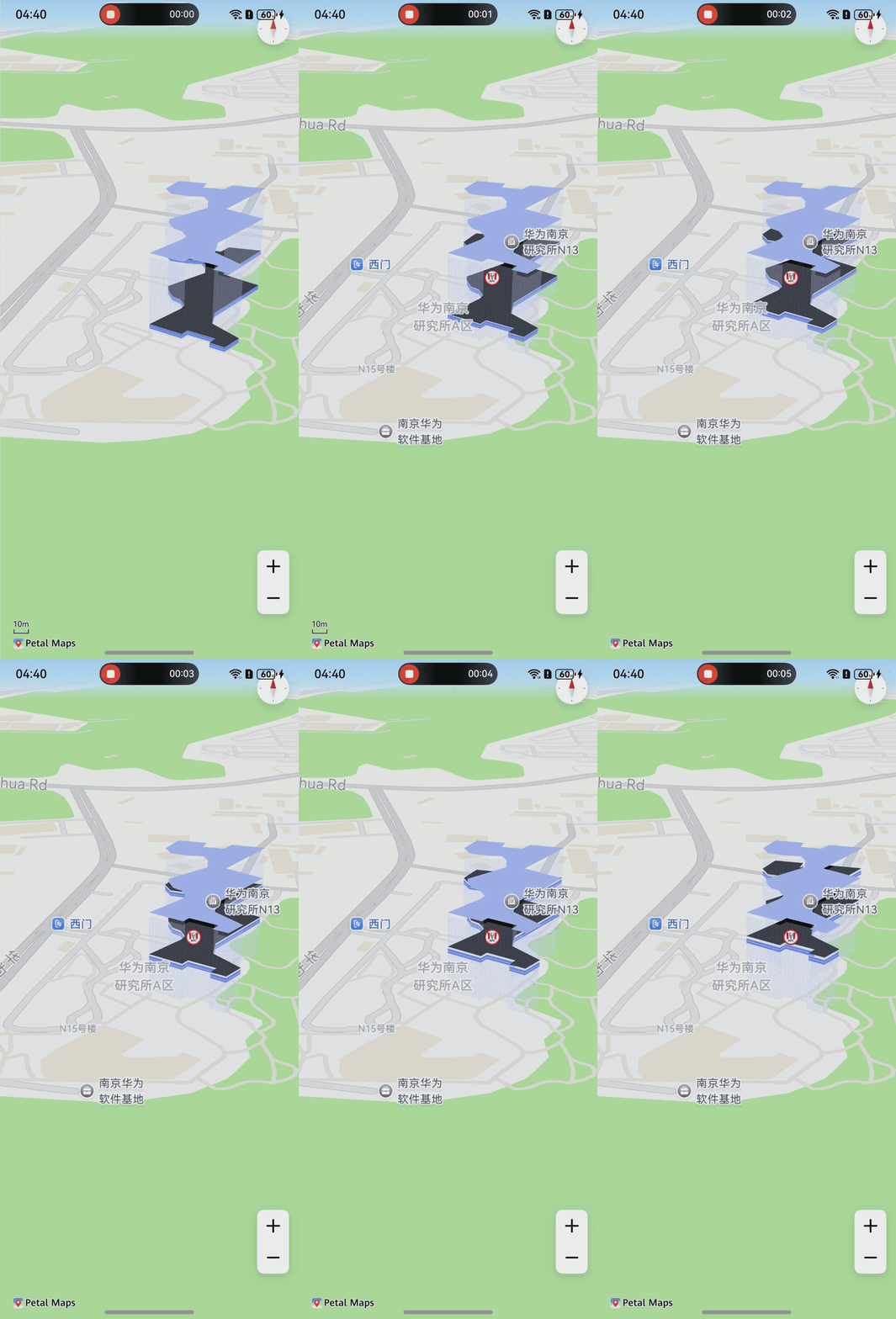
API Description
The BuildingOverlay adding function is mainly provided by BuildingOverlayParams, addBuildingOverlay, and BuildingOverlay. For more information about the APIs, please refer to API Reference.
| API | Description |
|---|---|
| BuildingOverlayParams | BuildingOverlay parameters. |
| addBuildingOverlay(params: mapCommon.BuildingOverlayParams): Promise<BuildingOverlay> | Adds a BuildingOverlay to a map. |
| BuildingOverlay | BuildingOverlay. This API supports updating and querying BuildingOverlay attributes. |
[h2]Adding a BuildingOverlay
-
Import required modules.
import { mapCommon, map, MapComponent } from '@kit.MapKit'; import { AsyncCallback } from '@kit.BasicServicesKit'; -
Add a BuildingOverlay.
@Entry
@Component
struct BuildingOverlayDemo {
  private TAG = "OHMapSDK_BuildingOverlayDemo";
  private mapOptions?: mapCommon.MapOptions;
  private mapController?: map.MapComponentController;
  private callback?: AsyncCallback<map.MapComponentController>;
  private buildingOverlay?: map.BuildingOverlay;

  aboutToAppear(): void {
    // Map initialization parameters.
    this.mapOptions = {
      position: {
        target: {
          latitude: 31.984794,
          longitude: 118.765865
        },
        zoom: 18
      },
      scaleControlsEnabled: true
    }

    this.callback = async (err, mapController) => {
      console.info(this.TAG, "addBuildingOverlay");
      if (!err) {
        this.mapController = mapController;
        // Set of coordinates of the 3D building bottom surface.
        let points: Array<mapCommon.LatLng> = [
          {
            latitude: 31.984794,
            longitude: 118.765865
          },
          {
            latitude: 31.98468,
            longitude: 118.766076
          },
          {
            latitude: 31.98472,
            longitude: 118.766116
          },
          {
            latitude: 31.98463,
            longitude: 118.766292
          },
          {
            latitude: 31.984586,
            longitude: 118.766251
          },
          {
            latitude: 31.984536,
            longitude: 118.766344
          },
          {
            latitude: 31.984633,
            longitude: 118.766446
          },
          {
            latitude: 31.9848,
            longitude: 118.766285
          },
          {
            latitude: 31.984925,
            longitude: 118.766312
          },
          {
            latitude: 31.985282,
            longitude: 118.766661
          },
          {
            latitude: 31.985438,
            longitude: 118.766419
          },
          {
            latitude: 31.985801,
            longitude: 118.766755
          },
          {
            latitude: 31.985856,
            longitude: 118.766504
          },
          {
            latitude: 31.985785,
            longitude: 118.766434
          },
          {
            latitude: 31.985821,
            longitude: 118.766278
          },
          {
            latitude: 31.985897,
            longitude: 118.766311
          },
          {
            latitude: 31.985944,
            longitude: 118.766095
          },
          {
            latitude: 31.985909,
            longitude: 118.766069
          },
          {
            latitude: 31.985794,
            longitude: 118.765989
          },
          {
            latitude: 31.9857,
            longitude: 118.766029
          },
          {
            latitude: 31.985658,
            longitude: 118.766164
          },
          {
            latitude: 31.985647,
            longitude: 118.766271
          },
          {
            latitude: 31.985574,
            longitude: 118.766297
          },
          {
            latitude: 31.985458,
            longitude: 118.766285
          },
          {
            latitude: 31.985271,
            longitude: 118.766002
          },
          {
            latitude: 31.985219,
            longitude: 118.766002
          },
          {
            latitude: 31.985135,
            longitude: 118.766029
          },
          {
            latitude: 31.985093,
            longitude: 118.766083
          },
          {
            latitude: 31.985019,
            longitude: 118.766109
          },
          {
            latitude: 31.984978,
            longitude: 118.766083
          },
          {
            latitude: 31.984794,
            longitude: 118.765865
          }
        ];
        points.reverse();
        // BuildingOverlay parameters.
        let buildingOverlayOptions: mapCommon.BuildingOverlayParams =
          {
            // Scope parameter of the BuildingOverlay (points are drawn in clockwise order).
            points: points,
            // Height of the BuildingOverlay.
            totalHeight: 51,
            // Height of the selected floor in the BuildingOverlay.
            floorBottomHeight: 33,
            // Top color of the BuildingOverlay.
            topFaceColor: 0xffa4b8f7,
            // Side color of the BuildingOverlay.
            sideFaceColor: 0x44a4b8f7,
            // Color of the selected floor in the BuildingOverlay.
            floorColor: 0xff000000,
            // Display level of the BuildingOverlay.
            showLevel: 14,
            // Animation duration for the selected floor in the BuildingOverlay to rise from the bottom.
            animationDuration: 5000,
            // Texture of the BuildingOverlay's lateral surface. Replace the resource image with your own one. Save your resource image in the resources/base/media directory.
            sideTexture: { image: $r("app.media.side_tex"), height: 3, width: 3 },
            // Texture of the selected floor in the BuildingOverlay. Replace the resource image with your own one. Save your resource image in the resources/base/media directory.
            floorTexture: { image: $r("app.media.floor_tex"), height: 3, width: 3 }
          };
        let cameraUpdate = map.newCameraPosition({
          target: {
            latitude: 31.984794,
            longitude: 118.765865
          },
          zoom: 18,
          tilt: 70
        });
        // Move the map camera to the BuildingOverlay area.
        this.mapController?.moveCamera(cameraUpdate);
        // Create a BuildingOverlay.
        try {
          this.buildingOverlay = await this.mapController?.addBuildingOverlay(buildingOverlayOptions);
        } catch (e) {
          console.error(`Failed to create the buildingOverlay. Code: ${e.code}; message: ${e.message}`);
        }
      } else {
        console.error(`Failed to initialize the map. Code: ${err.code}; message: ${err.message}`);
      }
    }
  }

  build() {
    Stack() {
      Column() {
        MapComponent({
          mapOptions: this.mapOptions,
          mapCallback: this.callback,
        }).width('100%').height('100%');
      }.width('100%')
    }.height('100%')
  }
}