Styled strings, implemented by StyledString or MutableStyledString (collectively referred to as StyledString, with MutableStyledString inheriting from StyledString), are powerful markup objects designed to set text styles at the character or paragraph level. By binding a StyledString object to a text component, you can modify the text in various ways, including changing the font size, adding font colors, making the text clickable, and customizing the drawing of text, among others. For details, see Styled String.
Styled strings provide a variety of style objects that cover various common text formatting styles, such as text decorative lines, line height, and text shadows. You can also create a CustomSpan to apply custom styles.
Creating and Applying a StyledString or MutableStyledString Object
You can use the setStyledString method provided by TextController to append the styled string to the Text component. It is recommended that the binding be triggered in the onPageShow or onAppear callback of the Text component.

When the setStyledString method is called in aboutToAppear, the styled string cannot be displayed during page initialization because the component has not been created and mounted to the node tree.
Since API version 15, styled string content can be displayed upon page load when setStyledString is called in aboutToAppear.
@Entry
@Component
struct styled_string_demo1 {
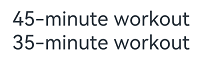
  // Replace $r('app.string.CreateApply_Text_Forty_Five') with the actual resource file. In this sample, the value in the resource file is "45-minute workout."
  styledString1: StyledString = new StyledString( this.getUIContext()
    .getHostContext()!.resourceManager.getStringSync($r('app.string.CreateApply_Text_Forty_Five').id));
  // Replace $r('app.string.CreateApply_Text_Third_Five') with the actual resource file. In this sample, the value in the resource file is "35-minute workout."
  mutableStyledString1: MutableStyledString = new MutableStyledString( this.getUIContext()
    .getHostContext()!.resourceManager.getStringSync($r('app.string.CreateApply_Text_Third_Five').id));
  controller1: TextController = new TextController();
  controller2: TextController = new TextController();

  async onPageShow() {
    // Bind the styled string in the onPageShow lifecycle callback.
    this.controller1.setStyledString(this.styledString1);
  }

  build() {
    Column() {
      // Display the styled string.
      Text(undefined, { controller: this.controller1 })
      Text(undefined, { controller: this.controller2 })
        .onAppear(() => {
          // Bind the styled string in the onAppear callback of the component.
          this.controller2.setStyledString(this.mutableStyledString1);
        })
    }
    .width('100%')
  }
} 
Setting the Text Style
Styled strings offer multiple style objects, such as TextStyle, TextShadowStyle, DecorationStyle, BaselineOffsetStyle, LineHeightStyle, and LetterSpacingStyle, for setting text styles.
-
Creating and applying a TextStyle object
import { LengthMetrics } from '@kit.ArkUI';

@Entry
@Component
struct styled_string_demo2 {
  @State str: string =
    this.getUIContext().getHostContext()?.resourceManager.getStringByNameSync('CreateApply_Text_3') as string;
  textStyleAttrs: TextStyle =
    new TextStyle({
      fontWeight: FontWeight.Bolder,
      fontSize: LengthMetrics.vp(24),
      fontStyle: FontStyle.Italic,
      strokeWidth: LengthMetrics.px(5),
      strokeColor: Color.Green
    });
  mutableStyledString: MutableStyledString = new MutableStyledString(this.str, [
    {
      start: 2,
      length: 2,
      styledKey: StyledStringKey.FONT,
      styledValue: this.textStyleAttrs
    },
    {
      start: 7,
      length: 4,
      styledKey: StyledStringKey.FONT,
      styledValue: new TextStyle({
        fontColor: Color.Orange, fontSize: LengthMetrics.vp(12),
        superscript: SuperscriptStyle.SUPERSCRIPT
      })
    }
  ]);
  controller: TextController = new TextController();

  async onPageShow() {
    this.controller.setStyledString(this.mutableStyledString);
  }

  build() {
    Column() {
      // Display the styled string.
      Text(undefined, { controller: this.controller })
        .margin({ top: 10 })
    }
    .width('100%')
  }
}
-
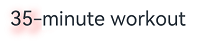
Creating and applying a TextShadowStyle object
// xxx.ets
@Entry
@Component
struct styled_string_demo3 {
  @State str: string =
    this.getUIContext().getHostContext()?.resourceManager.getStringByNameSync('CreateApply_Text_Third_Five') as string;
  mutableStyledString: MutableStyledString = new MutableStyledString(this.str, [
    {
      start: 0,
      length: 3,
      styledKey: StyledStringKey.TEXT_SHADOW,
      styledValue: new TextShadowStyle({
        radius: 5,
        type: ShadowType.COLOR,
        color: Color.Red,
        offsetX: 10,
        offsetY: 10
      })
    }
  ]);
  controller: TextController = new TextController();

  async onPageShow() {
    this.controller.setStyledString(this.mutableStyledString);
  }

  build() {
    Column() {
      // Display the styled string.
      Text(undefined, { controller: this.controller })
    }
    .width('100%')
  }
}
-
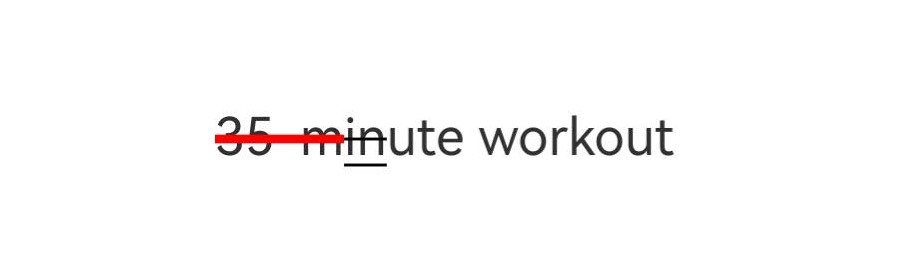
Creating and applying a Text DecorationStyle object
// xxx.ets
@Entry
@Component
struct styled_string_demo4 {
  @State str: string =
    this.getUIContext()
      .getHostContext()?.resourceManager.getStringByNameSync('CreateApply_Text_Third_Five') as string;
  mutableStyledString: MutableStyledString = new MutableStyledString(this.str, [
    {
      start: 0,
      length: 4,
      styledKey: StyledStringKey.DECORATION,
      styledValue: new DecorationStyle({ type: TextDecorationType.LineThrough, color: Color.Red, thicknessScale: 3 })
    },
    {
      start: 4,
      length: 2,
      styledKey: StyledStringKey.DECORATION,
      styledValue: new DecorationStyle(
        {
          type: TextDecorationType.Underline,
        },
        {
          // Enable multiple decoration lines.
          enableMultiType: true
        }
      )
    },
    {
      start: 4,
      length: 2,
      styledKey: StyledStringKey.DECORATION,
      styledValue: new DecorationStyle(
        {
          type: TextDecorationType.LineThrough,
        },
        {
          // Enable multiple decoration lines.
          enableMultiType: true
        }
      )
    },
  ]);
  controller: TextController = new TextController();

  async onPageShow() {
    this.controller.setStyledString(this.mutableStyledString);
  }

  build() {
    Column() {
      // Display the styled string.
      Text(undefined, { controller: this.controller })
    }
    .width('100%')
  }
}
-
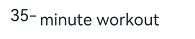
Creating and applying a Text BaselineOffsetStyle object
import { LengthMetrics } from '@kit.ArkUI';

// xxx.ets
@Entry
@Component
struct styled_string_demo5 {
  @State str: string =
    this.getUIContext().getHostContext()?.resourceManager.getStringByNameSync('CreateApply_Text_Third_Five') as string;

  mutableStyledString: MutableStyledString = new MutableStyledString(this.str, [
    {
      start: 0,
      length: 3,
      styledKey: StyledStringKey.BASELINE_OFFSET,
      styledValue: new BaselineOffsetStyle(LengthMetrics.px(20))
    }
  ]);
  controller: TextController = new TextController();

  async onPageShow() {
    this.controller.setStyledString(this.mutableStyledString);
  }

  build() {
    Column() {
      // Display the styled string.
      Text(undefined, { controller: this.controller })
    }
    .width('100%')
  }
}
-
Creating and applying a LineHeightStyle object
import { LengthMetrics } from '@kit.ArkUI';

// xxx.ets
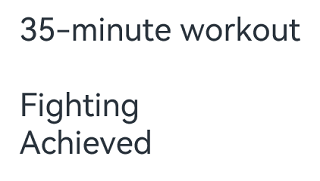
@Entry
@Component
struct styled_string_demo6 {
  @State str: string =
    this.getUIContext()
      .getHostContext()?.resourceManager.getStringByNameSync('StyledStringStyle_Text_5') as string;
  mutableStyledString: MutableStyledString = new MutableStyledString(this.str, [
    {
      start: 8,
      length: 3,
      styledKey: StyledStringKey.LINE_HEIGHT,
      styledValue: new LineHeightStyle(LengthMetrics.vp(50))
    }
  ]);
  controller: TextController = new TextController();

  async onPageShow() {
    this.controller.setStyledString(this.mutableStyledString);
  }

  build() {
    Column() {
      // Display the styled string.
      Text(undefined, { controller: this.controller })
    }
    .width('100%')
    .margin({ top: 10 })
  }
}
-
Creating and applying a LetterSpacingStyle object
import { LengthMetrics, LengthUnit } from '@kit.ArkUI';

// xxx.ets
@Entry
@Component
struct styled_string_demo7 {
  @State str: string =
    this.getUIContext().getHostContext()?.resourceManager.getStringByNameSync('CreateApply_Text_Third_Five') as string;
  mutableStyledString: MutableStyledString = new MutableStyledString(this.str, [
    {
      start: 0,
      length: 2,
      styledKey: StyledStringKey.LETTER_SPACING,
      styledValue: new LetterSpacingStyle(new LengthMetrics(20, LengthUnit.VP))
    }
  ]);
  controller: TextController = new TextController();

  async onPageShow() {
    this.controller.setStyledString(this.mutableStyledString);
  }

  build() {
    Column() {
      // Display the styled string.
      Text(undefined, { controller: this.controller })
    }
    .width('100%')
  }
}
Setting the Paragraph Style
You can set the paragraph style using ParagraphStyle. The figure below shows how to divide paragraphs in the text, with each paragraph ending with a newline character \n.
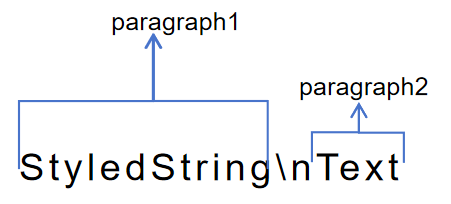
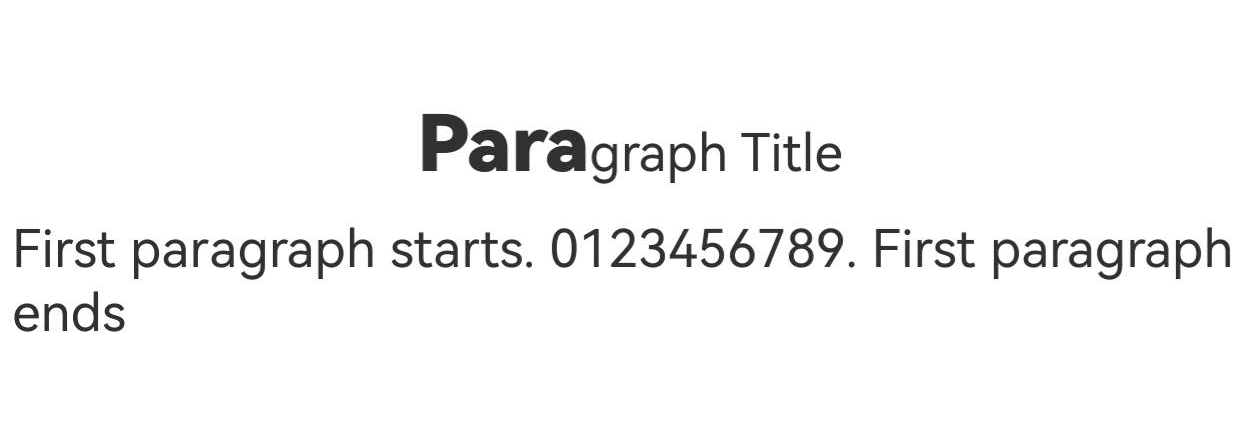
The following example shows how to create and apply a paragraph style. The style is applied to the start, end or any position within a paragraph; it does not apply to non-paragraph areas.
import { LengthMetrics} from '@kit.ArkUI';

// xxx.ets
@Entry
@Component
struct Index {
  @State str: string =
    this.getUIContext()
      .getHostContext()?.resourceManager.getStringByNameSync('StyledStringParagraphStyle_Text_1') as string;
  titleParagraphStyleAttr: ParagraphStyle = new ParagraphStyle({ textAlign: TextAlign.Center });
  // Create a paragraph style for a 15 vp first-line text indent.
  paragraphStyleAttr1: ParagraphStyle = new ParagraphStyle({ textIndent: LengthMetrics.vp(15) });
  // Line height style object
  lineHeightStyle1: LineHeightStyle = new LineHeightStyle(new LengthMetrics(24));
  // Create a paragraph style object paragraphStyledString1.
  paragraphStyledString1: MutableStyledString =
    new MutableStyledString(this.str, [
      {
        start: 0,
        length: 4,
        styledKey: StyledStringKey.PARAGRAPH_STYLE,
        styledValue: this.titleParagraphStyleAttr
      },
      {
        start: 0,
        length: 4,
        styledKey: StyledStringKey.LINE_HEIGHT,
        styledValue: new LineHeightStyle(new LengthMetrics(50))
      }, {
      start: 0,
      length: 4,
      styledKey: StyledStringKey.FONT,
      styledValue: new TextStyle({ fontSize: LengthMetrics.vp(24), fontWeight: FontWeight.Bolder })
    },
      {
        start: 5,
        length: 3,
        styledKey: StyledStringKey.PARAGRAPH_STYLE,
        styledValue: this.paragraphStyleAttr1
      },
      {
        start: 5,
        length: 20,
        styledKey: StyledStringKey.LINE_HEIGHT,
        styledValue: this.lineHeightStyle1
      }
    ]);
  controller: TextController = new TextController();

  async onPageShow() {
    this.controller.setStyledString(this.paragraphStyledString1);
  }

  build() {
    Column() {
      // Display the styled string.
      Text(undefined, { controller: this.controller })
    }
    .width('100%')
  }
} 
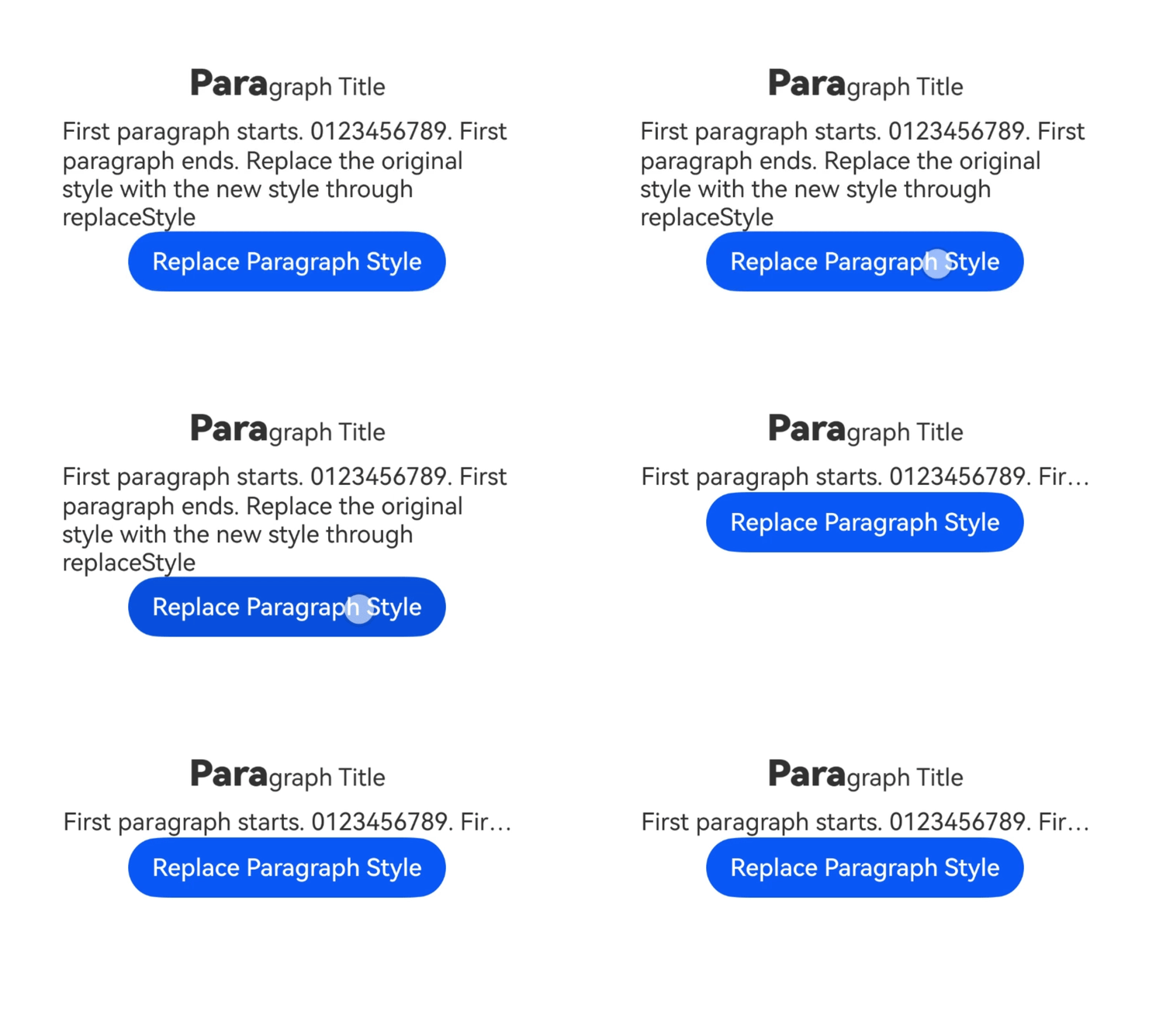
In addition to presetting styles when creating a styled string, you can also clear the original styles and replace them with new ones later using the replaceStyle API. After the replacement, you need to proactively trigger an update to the bound styled string on the attached text component's controller.
import { LengthMetrics } from '@kit.ArkUI';

// xxx.ets
@Entry
@Component
struct Index {
  context = this.getUIContext().getHostContext();
  /* Replace $r('app.string.StyledStringParagraphStyle_Text_2') with the actual resource file. In this example, the value in the resource file is
   * "Paragraph Title\nBody first paragraph starts 0123456789 body first paragraph ends. Clear the original style and replace it with a new style using replaceStyle."
   */
  @State message1: string =
    this.context!.resourceManager.getStringSync($r('app.string.StyledStringParagraphStyle_Text_2').id);
  titleParagraphStyleAttr: ParagraphStyle = new ParagraphStyle({ textAlign: TextAlign.Center });
  // Create a paragraph style for a 15 vp first-line text indent.
  paragraphStyleAttr1: ParagraphStyle = new ParagraphStyle({ textIndent: LengthMetrics.vp(15) });
  // Line height style object
  lineHeightStyle1: LineHeightStyle = new LineHeightStyle(new LengthMetrics(24));
  // Create a paragraph style object paragraphStyledString1.
  paragraphStyledString1: MutableStyledString =
    new MutableStyledString(this.message1, [
      {
        start: 0,
        length: 4,
        styledKey: StyledStringKey.PARAGRAPH_STYLE,
        styledValue: this.titleParagraphStyleAttr
      },
      {
        start: 0,
        length: 4,
        styledKey: StyledStringKey.LINE_HEIGHT,
        styledValue: new LineHeightStyle(new LengthMetrics(50))
      }, {
      start: 0,
      length: 4,
      styledKey: StyledStringKey.FONT,
      styledValue: new TextStyle({ fontSize: LengthMetrics.vp(24), fontWeight: FontWeight.Bolder })
    },
      {
        start: 5,
        length: 3,
        styledKey: StyledStringKey.PARAGRAPH_STYLE,
        styledValue: this.paragraphStyleAttr1
      },
      {
        start: 5,
        length: 20,
        styledKey: StyledStringKey.LINE_HEIGHT,
        styledValue: this.lineHeightStyle1
      }
    ]);
  paragraphStyleAttr3: ParagraphStyle = new ParagraphStyle({
    textAlign: TextAlign.End,
    maxLines: 1,
    wordBreak: WordBreak.BREAK_ALL,
    overflow: TextOverflow.Ellipsis
  });
  controller: TextController = new TextController();

  async onPageShow() {
    this.controller.setStyledString(this.paragraphStyledString1);
  }

  build() {
    Column() {
      // Display the styled string.
      Text(undefined, { controller: this.controller }).width(300)
      // Replace $r('app.string.Replace_paragraph_style') with the actual resource file. In this example, the value in the resource file is "Replace paragraph style."
      Button($r('app.string.Replace_paragraph_style'))
        .onClick(() => {
          this.paragraphStyledString1.replaceStyle({
            start: 5,
            length: 3,
            styledKey: StyledStringKey.PARAGRAPH_STYLE,
            styledValue: this.paragraphStyleAttr3
          });
          this.controller.setStyledString(this.paragraphStyledString1);
        })
    }
    .width('100%')
  }
} 
Converting a Styled String into a Paragraph
You can use getParagraphs to convert styled strings into corresponding Paragraph arrays based on text layout options.
-
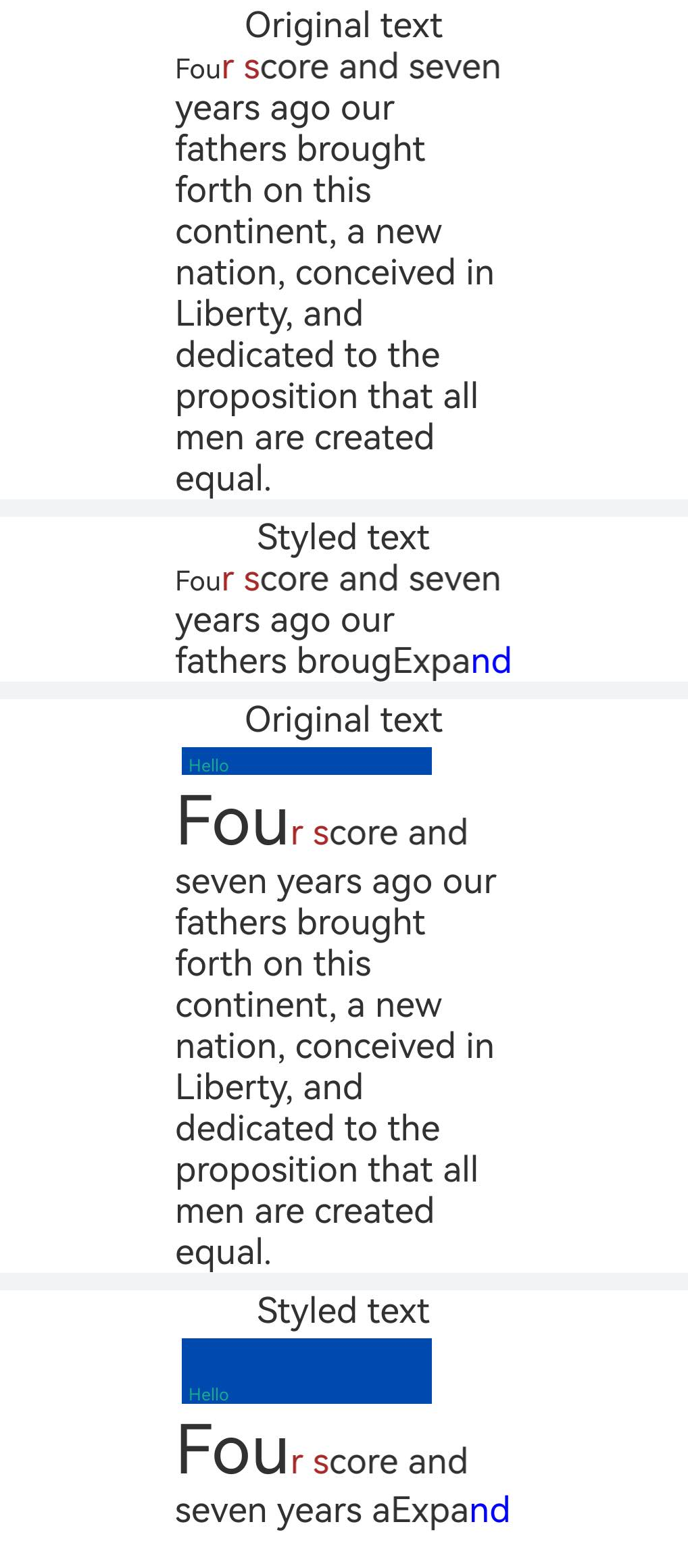
The following example shows how to use the getParagraphs method of MeasureUtils to calculate the text. When the content exceeds the maximum number of lines that can be displayed, the text is truncated and the full text is displayed as "...Expand".
import { LengthMetrics } from '@kit.ArkUI';
import { drawing } from '@kit.ArkGraphics2D';

class MyCustomSpan extends CustomSpan {
  constructor(word: string, width: number, height: number, context: UIContext) {
    super();
    this.word = word;
    this.width = width;
    this.height = height;
    this.context = context;
  }

  onMeasure(measureInfo: CustomSpanMeasureInfo): CustomSpanMetrics {
    return { width: this.width, height: this.height };
  }

  onDraw(context: DrawContext, options: CustomSpanDrawInfo) {
    let canvas = context.canvas;
    const brush = new drawing.Brush();
    brush.setColor({
      alpha: 255,
      red: 0,
      green: 74,
      blue: 175
    });
    const font = new drawing.Font();
    font.setSize(25);
    const textBlob = drawing.TextBlob.makeFromString(this.word, font, drawing.TextEncoding.TEXT_ENCODING_UTF8);
    canvas.attachBrush(brush);
    canvas.drawRect({
      left: options.x + 10,
      right: options.x + this.context.vp2px(this.width) - 10,
      top: options.lineTop + 10,
      bottom: options.lineBottom - 10
    });
    brush.setColor({
      alpha: 255,
      red: 23,
      green: 169,
      blue: 141
    });
    canvas.attachBrush(brush);
    canvas.drawTextBlob(textBlob, options.x + 20, options.lineBottom - 15);
    canvas.detachBrush();
  }

  setWord(word: string) {
    this.word = word;
  }

  public width: number = 160;
  public word: string = 'drawing';
  public height: number = 10;
  public context: UIContext;
}

@Entry
@Component
struct Index {
  // Configure the resource whose name is 'Full_text' and value is a non-empty string in the resources\base\element\string.json file.
  @State fullText: string =
    this.getUIContext().getHostContext()?.resourceManager.getStringByNameSync('Full_text') as string;
  // Replace $r('app.string.Original_text') with the actual resource file. In this example, the value in the resource file is "Original text."
  @State originalText: ResourceStr = $r('app.string.Original_text');
  // Replace $r('app.string.After_typesetting') with the actual resource file. In this example, the value of the resource file is "Styled text."
  @State afterTypesetting: ResourceStr = $r('app.string.After_typesetting');
  str: string =
    'Four score and seven years ago our fathers brought forth on this continent, a new nation, conceived in Liberty, and dedicated to the proposition that all men are created equal.';
  mutableStr2 = new MutableStyledString(this.str, [
    {
      start: 0,
      length: 3,
      styledKey: StyledStringKey.FONT,
      styledValue: new TextStyle({ fontSize: LengthMetrics.px(20) })
    },
    {
      start: 3,
      length: 3,
      styledKey: StyledStringKey.FONT,
      styledValue: new TextStyle({ fontColor: Color.Brown })
    }
  ]);

  // Measure the number of lines a styled string can display within a specified width.
  getLineNum(styledString: StyledString, width: LengthMetrics) {
    let paragraphArr = this.getUIContext().getMeasureUtils().getParagraphs(styledString, { constraintWidth: width });
    let res = 0;
    for (let i = 0; i < paragraphArr.length; ++i) {
      res += paragraphArr[i].getLineCount();
    }
    return res;
  }

  // Determine the maximum character count that can be displayed in maxLines for a styled string.
  getCorrectIndex(styledString: MutableStyledString, maxLines: number, width: LengthMetrics) {
    let low = 0;
    let high = styledString.length - 1;
    // Use binary search.
    while (low <= high) {
      let mid = (low + high) >> 1;
      console.info('demo: get ' + low + ' ' + high + ' ' + mid);
      let moreStyledString = new MutableStyledString(this.fullText, [{
        start: 4,
        length: 2,
        styledKey: StyledStringKey.FONT,
        styledValue: new TextStyle({ fontColor: Color.Blue })
      }]);
      moreStyledString.insertStyledString(0, styledString.subStyledString(0, mid));
      let lineNum = this.getLineNum(moreStyledString, LengthMetrics.px(500));
      if (lineNum <= maxLines) {
        low = mid + 1;
      } else {
        high = mid - 1;
      }
    }
    return high;
  }

  mutableStrAllContent = new MutableStyledString(this.str, [
    {
      start: 0,
      length: 3,
      styledKey: StyledStringKey.FONT,
      styledValue: new TextStyle({ fontSize: LengthMetrics.px(40) })
    },
    {
      start: 3,
      length: 3,
      styledKey: StyledStringKey.FONT,
      styledValue: new TextStyle({ fontColor: Color.Brown })
    }
  ]);
  customSpan1: MyCustomSpan = new MyCustomSpan('Hello', 120, 10, this.getUIContext());
  mutableStrAllContent2 = new MutableStyledString(this.str, [
    {
      start: 0,
      length: 3,
      styledKey: StyledStringKey.FONT,
      styledValue: new TextStyle({ fontSize: LengthMetrics.px(100) })
    },
    {
      start: 3,
      length: 3,
      styledKey: StyledStringKey.FONT,
      styledValue: new TextStyle({ fontColor: Color.Brown })
    }
  ]);
  controller: TextController = new TextController();
  controller2: TextController = new TextController();
  textController: TextController = new TextController();
  textController2: TextController = new TextController();

  aboutToAppear() {
    this.mutableStrAllContent2.insertStyledString(0, new StyledString(this.customSpan1));
    this.mutableStr2.insertStyledString(0, new StyledString(this.customSpan1));
  }

  build() {
    Scroll() {
      Column() {
        Text(this.originalText)
        Text(undefined, { controller: this.controller }).width('500px').onAppear(() => {
          this.controller.setStyledString(this.mutableStrAllContent);
        })
        Divider().strokeWidth(8).color('#F1F3F5')
        Text(this.afterTypesetting)
        Text(undefined, { controller: this.textController }).onAppear(() => {
          let now = this.getCorrectIndex(this.mutableStrAllContent, 3, LengthMetrics.px(500));
          if (now != this.mutableStrAllContent.length - 1) {
            let moreStyledString = new MutableStyledString(this.fullText, [{
              start: 4,
              length: 2,
              styledKey: StyledStringKey.FONT,
              styledValue: new TextStyle({ fontColor: Color.Blue })
            }]);
            moreStyledString.insertStyledString(0, this.mutableStrAllContent.subStyledString(0, now));
            this.textController.setStyledString(moreStyledString);
          } else {
            this.textController.setStyledString(this.mutableStrAllContent);
          }
        })
          .width('500px')
        Divider().strokeWidth(8).color('#F1F3F5')
        Text(this.originalText)
        Text(undefined, { controller: this.controller2 }).width('500px').onAppear(() => {
          this.controller2.setStyledString(this.mutableStrAllContent2);
        })
        Divider().strokeWidth(8).color('#F1F3F5')
        Text(this.afterTypesetting)
        Text(undefined, { controller: this.textController2 }).onAppear(() => {
          let now = this.getCorrectIndex(this.mutableStrAllContent2, 3, LengthMetrics.px(500));
          let moreStyledString = new MutableStyledString(this.fullText, [{
            start: 4,
            length: 2,
            styledKey: StyledStringKey.FONT,
            styledValue: new TextStyle({ fontColor: Color.Blue })
          }]);
          moreStyledString.insertStyledString(0, this.mutableStrAllContent2.subStyledString(0, now));
          this.textController2.setStyledString(moreStyledString);
        })
          .width('500px')
      }.width('100%')
    }
  }
}
Using Images
You can add images using ImageAttachment.
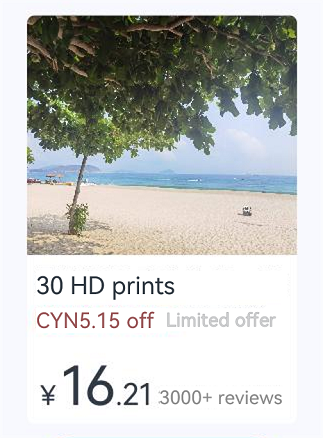
The example below demonstrates how to attach images and text to the same MutableStyledString object to achieve mixed image and text layout.

In the constructor of styled strings, when input parameters are of ImageAttachment or CustomSpan type, the styles parameter does not take effect. To apply styles, use methods such as setStyle and insertStyledString.
// xxx.ets
import { image } from '@kit.ImageKit';
import { LengthMetrics } from '@kit.ArkUI';
import { hilog } from '@kit.PerformanceAnalysisKit';

@Entry
@Component
struct StyledStringImageAttachment {
  @State abled: boolean = true;
  @State message: string = 'Hello World';
  imagePixelMap: image.PixelMap | undefined = undefined;
  @State imagePixelMap3: image.PixelMap | undefined = undefined;
  mutableStr: MutableStyledString = new MutableStyledString('123');
  controller: TextController = new TextController();
  mutableStr2: MutableStyledString = new MutableStyledString('This is set decoration line style to the mutableStr2', [{
    start: 0,
    length: 15,
    styledKey: StyledStringKey.DECORATION,
    styledValue: new DecorationStyle({
      type: TextDecorationType.Overline,
      color: Color.Orange,
      style: TextDecorationStyle.DOUBLE
    })
  }]);

  async aboutToAppear() {
    hilog.info(0x0000, 'testTag', 'aboutToAppear initial imagePixelMap');
    // Replace $r('app.media.sea') with the image resource file you use.
    this.imagePixelMap = await this.getPixmapFromMedia($r('app.media.sea'));
  }

  private async getPixmapFromMedia(resource: Resource) {
    try {
      let unit8Array = await this.getUIContext().getHostContext()?.resourceManager?.getMediaContent(resource.id);
      let imageSource = image.createImageSource(unit8Array?.buffer?.slice(0, unit8Array?.buffer?.byteLength));
      let createPixelMap: image.PixelMap = await imageSource.createPixelMap({
        desiredPixelFormat: image.PixelMapFormat.RGBA_8888
      });
      await imageSource.release();
      return createPixelMap;
    } catch (error) {
      hilog.error(0x0000, 'testTag', `Get Pixmap failed. error code: ${error.code}, error message: ${error.message}`);
    }
    return undefined;
  }

  leadingMarginValue: ParagraphStyle = new ParagraphStyle({ leadingMargin: LengthMetrics.vp(5)});
  // Line height style object.
  lineHeightStyle1: LineHeightStyle = new LineHeightStyle(new LengthMetrics(24));
  // Bold style.
  boldTextStyle: TextStyle = new TextStyle({ fontWeight: FontWeight.Bold });
  // Create the object paragraphStyledString1 with paragraph style.
  // Replace $r('app.string.StyledStringImageAttachment_Text_1') with the actual resource file. In this example, the value in the resource file is "\n30 HD prints\nCYN5.15 off Limited offer."
  paragraphStyledString1: MutableStyledString =
    new MutableStyledString(this.getUIContext()
      .getHostContext()!.resourceManager.getStringSync($r('app.string.StyledStringImageAttachment_Text_1').id), [
    {
      start: 0,
      length: 28,
      styledKey: StyledStringKey.PARAGRAPH_STYLE,
      styledValue: this.leadingMarginValue
    },
    {
      start: 14,
      length: 9,
      styledKey: StyledStringKey.FONT,
      styledValue: new TextStyle({ fontSize: LengthMetrics.vp(14), fontColor: '#B22222' })
    },
    {
      start: 24,
      length: 4,
      styledKey: StyledStringKey.FONT,
      styledValue: new TextStyle({ fontSize: LengthMetrics.vp(14), fontWeight: FontWeight.Lighter })
    },
    {
      start: 11,
      length: 4,
      styledKey: StyledStringKey.LINE_HEIGHT,
      styledValue: this.lineHeightStyle1
    }
  ]);
  // Replace $r('app.string.StyledStringImageAttachment_Text_2') with the actual resource file. In this example, the value in the resource file is "\n¥16.21 3000+ reviews."
  paragraphStyledString2: MutableStyledString =
    new MutableStyledString(this.getUIContext()
      .getHostContext()!.resourceManager.getStringSync($r('app.string.StyledStringImageAttachment_Text_2').id), [
    {
      start: 0,
      length: 5,
      styledKey: StyledStringKey.PARAGRAPH_STYLE,
      styledValue: this.leadingMarginValue
    },
    {
      start: 0,
      length: 4,
      styledKey: StyledStringKey.LINE_HEIGHT,
      styledValue: new LineHeightStyle(new LengthMetrics(60))
    },
    {
      start: 0,
      length: 7,
      styledKey: StyledStringKey.FONT,
      styledValue: this.boldTextStyle
    },
    {
      start: 1,
      length: 1,
      styledKey: StyledStringKey.FONT,
      styledValue: new TextStyle({ fontSize: LengthMetrics.vp(18) })
    },
    {
      start: 2,
      length: 2,
      styledKey: StyledStringKey.FONT,
      styledValue: new TextStyle({ fontSize: LengthMetrics.vp(36) })
    },
    {
      start: 4,
      length: 3,
      styledKey: StyledStringKey.FONT,
      styledValue: new TextStyle({ fontSize: LengthMetrics.vp(20) })
    },
    {
      start: 7,
      length: 9,
      styledKey: StyledStringKey.FONT,
      styledValue: new TextStyle({ fontColor: Color.Grey, fontSize: LengthMetrics.vp(14)})
    }
  ]);

  build() {
    NavDestination() {
      Column({ space: 12 }) {
        // ...
          Row() {
            Column({ space: 10 }) {
              Text(undefined, { controller: this.controller })
                .id('text1')
                .copyOption(CopyOptions.InApp)
                .draggable(true)
                .backgroundColor('#FFFFFF')
                .borderRadius(5)
              // Replace $r('app.string.StyledStringImageAttachment_Button_1') with the actual resource file. In this example, the value in the resource file is "View Product Details."
              Button($r('app.string.StyledStringImageAttachment_Button_1'))
                .enabled(this.abled)
                .onClick(() => {
                  if (this.imagePixelMap !== undefined) {
                    this.mutableStr = new MutableStyledString(new ImageAttachment({
                      value: this.imagePixelMap,
                      size: { width: 180, height: 160 },
                      verticalAlign: ImageSpanAlignment.BASELINE,
                      objectFit: ImageFit.Fill
                    }));
                    this.paragraphStyledString1.appendStyledString(this.paragraphStyledString2);
                    this.mutableStr.appendStyledString(this.paragraphStyledString1);
                    this.controller.setStyledString(this.mutableStr);
                  }
                  this.abled = false;
                })
            }
            .width('100%')
          }
          .height('100%')
          .backgroundColor('#F8F8FF')
        }
        // ...
    }
    .backgroundColor('#f1f2f3')
    // Replace $r('app.string.StyledStringImageAttachment_title') with the actual resource file. In this example, the value in the resource file is "Add Image via ImageAttachment."
    .title($r('app.string.StyledStringImageAttachment_title'))
  }
} 
Setting Events
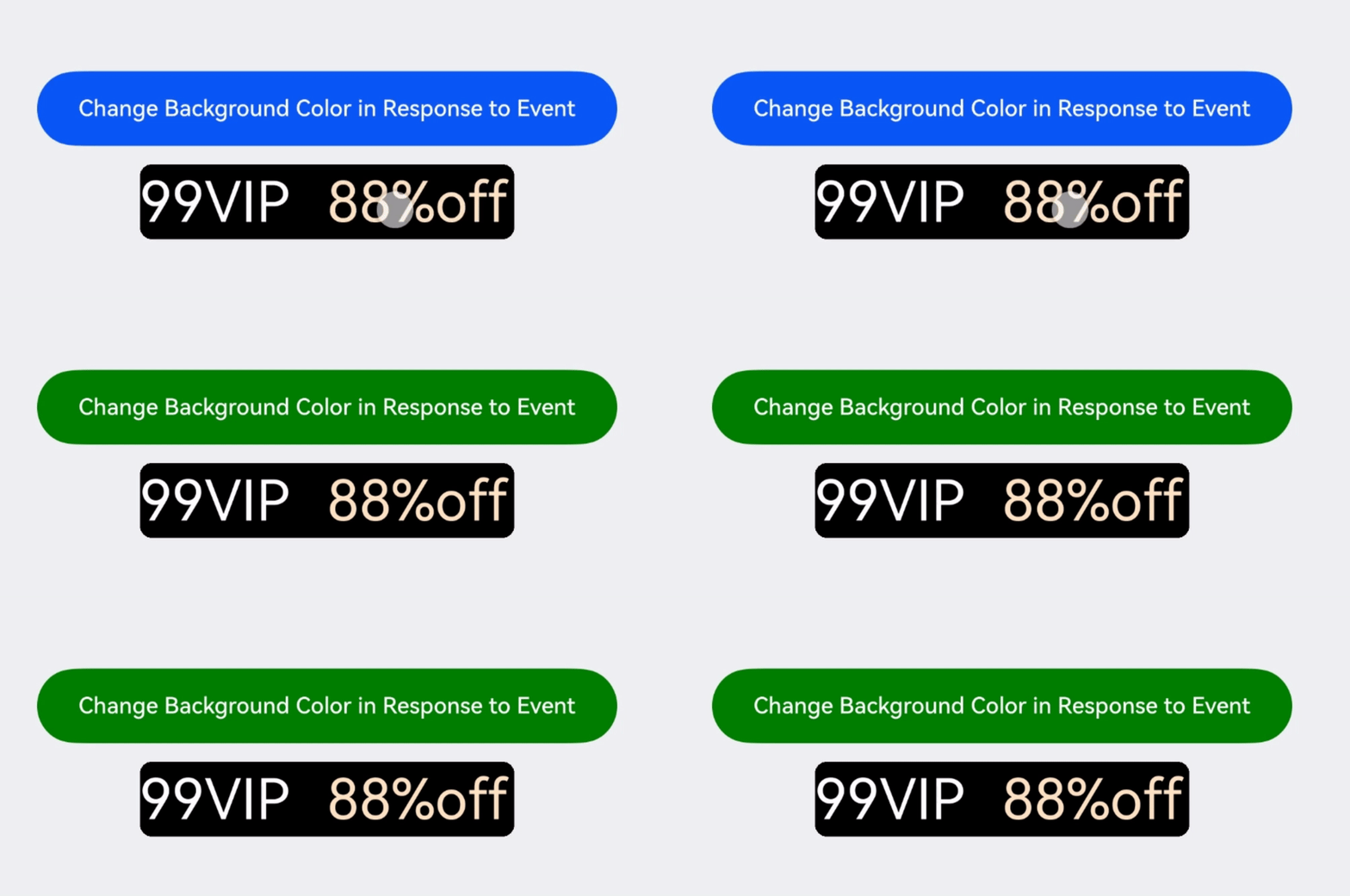
You can use GestureStyle to set up onClick and onLongPress events to enable text to respond to click and long-press actions.
In addition to initializing styled strings with initial style objects, you can also use the setStyle API to overlay new styles or update existing ones. After making changes, you need to manually trigger an update of the bound styled string on the attached text component's controller.
import { drawing } from '@kit.ArkGraphics2D';

let gUIContext: UIContext;

class MyCustomSpan extends CustomSpan {
  constructor(word: string, width: number, height: number, fontSize: number) {
    super();
    this.word = word;
    this.width = width;
    this.height = height;
    this.fontSize = fontSize;
  }

  onMeasure(measureInfo: CustomSpanMeasureInfo): CustomSpanMetrics {
    return { width: this.width, height: this.height };
  }

  onDraw(context: DrawContext, options: CustomSpanDrawInfo) {
    let canvas = context.canvas;

    const brush = new drawing.Brush();
    brush.setColor({
      alpha: 255,
      red: 0,
      green: 0,
      blue: 0
    });
    const font = new drawing.Font();
    font.setSize(gUIContext.vp2px(this.fontSize));
    const textBlob =
      drawing.TextBlob.makeFromString(this.word.substring(0, 5), font, drawing.TextEncoding.TEXT_ENCODING_UTF8);
    canvas.attachBrush(brush);

    this.onDrawRectByRadius(context, options.x, options.x + gUIContext.vp2px(this.width), options.lineTop,
      options.lineBottom, 20);
    brush.setColor({
      alpha: 255,
      red: 255,
      green: 255,
      blue: 255
    });
    canvas.attachBrush(brush);
    canvas.drawTextBlob(textBlob, options.x, options.lineBottom - 30);
    brush.setColor({
      alpha: 255,
      red: 255,
      green: 228,
      blue: 196
    });
    canvas.attachBrush(brush);
    const textBlob1 =
      drawing.TextBlob.makeFromString(this.word.substring(5), font, drawing.TextEncoding.TEXT_ENCODING_UTF8);
    canvas.drawTextBlob(textBlob1, options.x + gUIContext.vp2px(100), options.lineBottom - 30);

    canvas.detachBrush();
  }

  onDrawRectByRadius(context: DrawContext, left: number, right: number, top: number, bottom: number, radius: number) {
    let canvas = context.canvas;
    let path = new drawing.Path();

    // Draw a rounded rectangle.
    path.moveTo(left + radius, top);
    path.lineTo(right - radius, top);
    path.arcTo(right - 2 * radius, top, right, top + 2 * radius, 270, 90);
    path.lineTo(right, bottom - radius);
    path.arcTo(right - 2 * radius, bottom - 2 * radius, right, bottom, 0, 90);

    path.lineTo(left + 2 * radius, bottom);
    path.arcTo(left, bottom - 2 * radius, left + 2 * radius, bottom, 90, 90);
    path.lineTo(left, top + 2 * radius);
    path.arcTo(left, top, left + 2 * radius, top + 2 * radius, 180, 90);

    canvas.drawPath(path);
  }

  setWord(word: string) {
    this.word = word;
  }

  public width: number = 160;
  public word: string = 'drawing';
  public height: number = 10;
  public fontSize: number = 16;
}

@Entry
@Component
struct StyledStringGestureStyle {
  customSpan3: MyCustomSpan = new MyCustomSpan('99VIP88%off', 200, 40, 30);
  customSpanStyledString: MutableStyledString = new MutableStyledString(this.customSpan3);
  textController: TextController = new TextController();
  isPageShow: boolean = true;
  @State backgroundColor1: ResourceColor | undefined = undefined;
  gestureStyleAttr: GestureStyle = new GestureStyle({
    onClick: () => {
      this.backgroundColor1 = Color.Green;
    },
    onLongPress: () => {
      this.backgroundColor1 = Color.Grey;
    }
  });

  aboutToAppear() {
    gUIContext = this.getUIContext();
  }

  async onPageShow() {
    if (!this.isPageShow) {
      return;
    }
    this.isPageShow = false;
    this.customSpanStyledString.setStyle({
      start: 0,
      length: 1,
      styledKey: StyledStringKey.GESTURE,
      styledValue: this.gestureStyleAttr
    })
    this.textController.setStyledString(this.customSpanStyledString);
  }

  build() {
    NavDestination() {
      Column({ space: 12 }) {
        // ...
          Row() {
            Column() {
              // Replace $r('app.string.StyledStringGestureStyle_button_content') with the actual resource file. In this example, the value in the resource file is "Change Background Color in Response to Event."
              Button($r('app.string.StyledStringGestureStyle_button_content'))
                .backgroundColor(this.backgroundColor1)
                .width('80%')
                .margin(10)
              Text(undefined, { controller: this.textController })
                .id('text1')
                .copyOption(CopyOptions.InApp)
                .fontSize(30)
            }
            .width('100%')
          }
          .height('100%')
        }
        // ...
    }
    .backgroundColor('#f1f2f3')
    // Replace $r('app.string.StyledStringGestureStyle_title') with the actual resource file. In this example, the value of the resource file is "Set Event".
    .title($r('app.string.StyledStringGestureStyle_title'))
  }
} 
Format Conversion
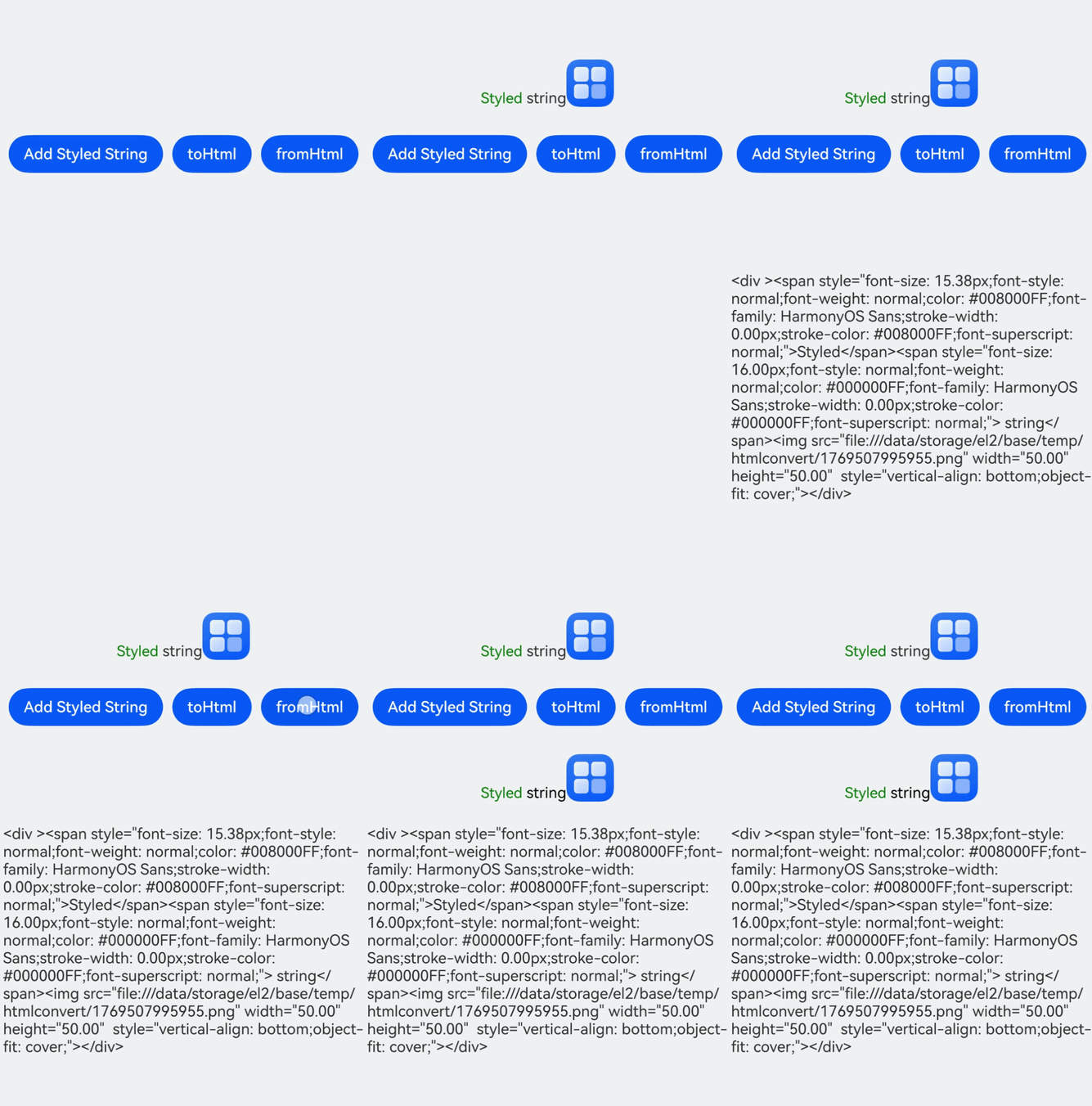
You can use the toHtml and fromHtml APIs to convert between styled strings and HTML-formatted strings. Currently supported HTML tags include: <p>, <span>, <img>, <br>, <strong>, <b>, <a>, <i>, <em>, <s>, <u>, <del>, <sup>, and <sub>.
- The following example shows how to convert between styled strings and HTML-formatted strings.
// xxx.ets
import { image } from '@kit.ImageKit';
import { LengthMetrics } from '@kit.ArkUI';
import { hilog } from '@kit.PerformanceAnalysisKit';

@Entry
@Component
struct StyledStringHtml {
  imagePixelMap: image.PixelMap | undefined = undefined;
  @State html: string | undefined = undefined;
  @State styledString: StyledString | undefined = undefined;
  controller1: TextController = new TextController;
  controller2: TextController = new TextController;
  private uiContext: UIContext = this.getUIContext();

  async aboutToAppear() {
    hilog.info(0x0000, 'testTag', 'aboutToAppear initial imagePixelMap');
    this.imagePixelMap = await this.getPixmapFromMedia($r('app.media.startIcon'));
  }

  private async getPixmapFromMedia(resource: Resource) {
    try {
      let unit8Array = await this.uiContext.getHostContext()?.resourceManager?.getMediaContent(resource.id);
      let imageSource = image.createImageSource(unit8Array?.buffer?.slice(0, unit8Array?.buffer?.byteLength));
      let createPixelMap: image.PixelMap = await imageSource.createPixelMap({
        desiredPixelFormat: image.PixelMapFormat.RGBA_8888
      });
      await imageSource.release();
      return createPixelMap;
    } catch (error) {
      hilog.error(0x0000, 'testTag', `Get Pixmap failed. error code: ${error.code}, error message: ${error.message}`);
    }
    return undefined;
  }

  build() {
    NavDestination() {
      Column({ space: 12 }) {
        // ...
          Column() {
            Text(undefined, { controller: this.controller1 }).height(100)
            Row() {
              // Replace $r('app.string.StyledStringHtml_Button_1') with the actual resource file. In this example, the value of the resource file is "Add Styled String."
              Button($r('app.string.StyledStringHtml_Button_1')).onClick(() => {
                // Replace $r('app.string.StyledStringHtml_Text_1') with the actual resource file. In this example, the value of the resource file is "Styled string."
                let mutableStyledString1: MutableStyledString =
                  new MutableStyledString(this.getUIContext()
                    .getHostContext()!.resourceManager.getStringSync($r('app.string.StyledStringHtml_Text_1').id), [{
                  start: 0,
                  length: 6,
                  styledKey: StyledStringKey.FONT,
                  styledValue: new TextStyle({ fontColor: Color.Green, fontSize: LengthMetrics.px(50) })
                }]);
                if (this.imagePixelMap !== undefined) {
                  let mutableStyledString2 = new MutableStyledString(new ImageAttachment({
                    value: this.imagePixelMap,
                    size: { width: 50, height: 50 },
                  }));
                  mutableStyledString1.appendStyledString(mutableStyledString2);
                }
                this.styledString = mutableStyledString1;
                this.controller1.setStyledString(mutableStyledString1);
              }).margin(5)
              // Replace $r('app.string.StyledStringHtml_Button_2') with the actual resource file. In this example, the value in the resource file is "toHtml."
              Button($r('app.string.StyledStringHtml_Button_2')).onClick(() => {
                this.html = StyledString.toHtml(this.styledString);
              }).margin(5)
              // Replace $r('app.string.StyledStringHtml_Button_3') with the actual resource file. In this example, the value in the resource file is "fromHtml."
              Button($r('app.string.StyledStringHtml_Button_3')).onClick(async () => {
                let styledString = await StyledString.fromHtml(this.html);
                this.controller2.setStyledString(styledString);
              }).margin(5)
            }

            Text(undefined, { controller: this.controller2 }).height(100)
            Text(this.html)
          }.width('100%')
        }
        // ...
    }
    .backgroundColor('#f1f2f3')
    // Replace $r('app.string.StyledStringHtml_title') with the actual resource file. In this example, the value in the resource file is "Convert Format."
    .title($r('app.string.StyledStringHtml_title'))
  }
} 
-
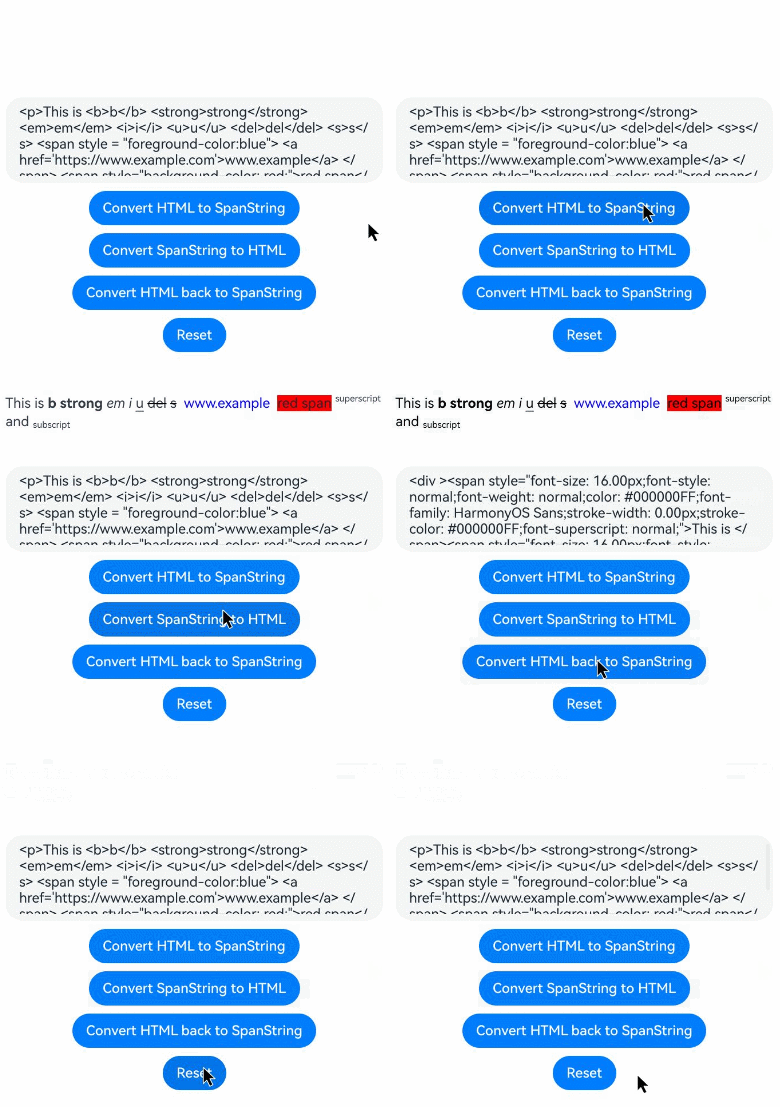
Convert HTML tags including <strong>, <b>, <a>, <i>, <em>, <s>, <u>, <del>, <sup>, and <sub>, along with the background-color attribute in HTML style attributes, to styled strings and convert them back to HTML format.
// xxx.ets
@Entry
@Component
struct HtmlSpanStringDemo {
  @State html: string =
    "<p>This is <b>b</b> <strong>strong</strong> <em>em</em> <i>i</i> <u>u</u> <del>del</del> <s>s</s> <span style =   \"foreground-color:blue\"> <a href='https://www.example.com'>www.example</a> </span> <span   style=\"background-color: red;\">red span</span> <sup>superscript</sup> and <sub>subscript</sub></p>";
  @State spanString: StyledString | undefined = undefined;
  @State resultText: string = ''; // Store conversion results.
  controller: TextController = new TextController;

  build() {
    Column() {
      // Display the spanString after conversion.
      Text(undefined, { controller: this.controller }).height(100).id('text1')

      // Display each step result in the text area.
      TextArea({ text: this.html })
        .width('100%')
        .height(100)
        .margin(5)

      // Button 1: Convert HTML to SpanString
      // Replace $r('app.string.Converted_HTML_to_SpanString') with the actual resource file. In this example, the value in the resource file is "Convert HTML to SpanString."
      Button($r('app.string.Converted_HTML_to_SpanString')).onClick(async () => {
        this.spanString = await StyledString.fromHtml(this.html);
        this.controller.setStyledString(this.spanString);
        this.resultText = 'Converted HTML to SpanString successfully.';
      }).margin(5)

      // Button 2: Convert SpanString to HTML
      // Replace $r('app.string.Converted_SpanString_to_HTML') with the actual resource file. In this example, the value in the resource file is "Convert SpanString to HTML."
      Button($r('app.string.Converted_SpanString_to_HTML')).onClick(() => {
        if (this.spanString) {
          // Convert spanString to HTML and update state if content changes.
          const newHtml = StyledString.toHtml(this.spanString);
          if (newHtml !== this.html) { // Avoid redundant updates.
            this.html = newHtml;
          }
          this.resultText = 'Converted SpanString to HTML successfully.';
        } else {
          this.resultText = 'SpanString is undefined.';
        }
      }).margin(5)

      // Button 3: Convert HTML back to SpanString.
      /* Replace $r('app.string.Converted_HTML_back_to_SpanString') with the actual resource file.
       * The value is "Converted HTML back to SpanString".
       */
      Button($r('app.string.Converted_HTML_back_to_SpanString')).onClick(async () => {
        this.spanString = await StyledString.fromHtml(this.html);
        this.controller.setStyledString(this.spanString);
        this.resultText = 'Converted HTML back to SpanString successfully.';
      }).margin(5)

      // Reset: Restore HTML and SpanString.
      // Replace $r('app.string.Reset') with the actual resource file. In this example, the value in the resource file is "Reset."
      Button($r('app.string.Reset')).onClick(() => {
        this.html =
          "<p>This is <b>b</b> <strong>strong</strong> <em>em</em> <i>i</i> <u>u</u> <del>del</del> <s>s</s> <span   style = \"foreground-color:blue\"> <a href='https://www.example.com'>www.example</a> </span> <span   style=\"background-color: red;\">red span</span> <sup>superscript</sup> and <sub>subscript</sub></p>";
        this.spanString = undefined;
        this.controller.setStyledString(new StyledString('')); // Use an empty StyledString.
        this.resultText = 'Reset HTML and SpanString successfully.';
      }).margin(5)
    }.width('100%').padding(20)
  }
}
Example
This example demonstrates the effect of a membership expiration reminder using ParagraphStyle, LineHeightStyle, and TextStyle objects.
import { LengthMetrics } from '@kit.ArkUI';

@Entry
@Component
struct StyledStringSceneExample {
  alignCenterParagraphStyleAttr: ParagraphStyle = new ParagraphStyle({ textAlign: TextAlign.Center });
  // Line height style object.
  lineHeightStyle1: LineHeightStyle = new LineHeightStyle(LengthMetrics.vp(24));
  // Bold style.
  boldTextStyle: TextStyle = new TextStyle({ fontWeight: FontWeight.Bold });
  // Create an object with paragraph style paragraphStyledString1.
  // Replace $r('app.string.StyledStringSceneExample_Text_1') with the actual resource file. In this example, the value in the resource file is "Diamond Membership expired\nRenew to keep your perks."
  paragraphStyledString1: MutableStyledString =
    new MutableStyledString(this.getUIContext()
      .getHostContext()!.resourceManager.getStringSync($r('app.string.StyledStringSceneExample_Text_1').id), [
      {
        start: 0,
        length: 4,
        styledKey: StyledStringKey.PARAGRAPH_STYLE,
        styledValue: this.alignCenterParagraphStyleAttr
      },
      {
        start: 0,
        length: 4,
        styledKey: StyledStringKey.LINE_HEIGHT,
        styledValue: new LineHeightStyle(LengthMetrics.vp(40))
      },
      {
        start: 11,
        length: 14,
        styledKey: StyledStringKey.FONT,
        styledValue: new TextStyle({ fontSize: LengthMetrics.vp(14), fontColor: Color.Grey })
      },
      {
        start: 11,
        length: 4,
        styledKey: StyledStringKey.PARAGRAPH_STYLE,
        styledValue: this.alignCenterParagraphStyleAttr
      },
      {
        start: 11,
        length: 4,
        styledKey: StyledStringKey.LINE_HEIGHT,
        styledValue: this.lineHeightStyle1
      }
    ]);
  // Replace $r('app.string.StyledStringSceneExample_Text_2') with the actual resource file. In this example, the value in the resource file is "\n¥4.88¥15."
  paragraphStyledString2: MutableStyledString =
    new MutableStyledString(this.getUIContext()
      .getHostContext()!.resourceManager.getStringSync($r('app.string.StyledStringSceneExample_Text_2').id), [
    {
      start: 0,
      length: 4,
      styledKey: StyledStringKey.PARAGRAPH_STYLE,
      styledValue: this.alignCenterParagraphStyleAttr
    },
    {
      start: 0,
      length: 4,
      styledKey: StyledStringKey.LINE_HEIGHT,
      styledValue: new LineHeightStyle(LengthMetrics.vp(60))
    },
    {
      start: 0,
      length: 6,
      styledKey: StyledStringKey.FONT,
      styledValue: this.boldTextStyle
    },
    {
      start: 1,
      length: 1,
      styledKey: StyledStringKey.FONT,
      styledValue: new TextStyle({ fontSize: LengthMetrics.vp(18) })
    },
    {
      start: 2,
      length: 4,
      styledKey: StyledStringKey.FONT,
      styledValue: new TextStyle({ fontSize: LengthMetrics.vp(40) })
    },
    {
      start: 6,
      length: 3,
      styledKey: StyledStringKey.FONT,
      styledValue: new TextStyle({ fontColor: Color.Grey, fontSize: LengthMetrics.vp(14) })
    },
    {
      start: 6,
      length: 3,
      styledKey: StyledStringKey.DECORATION,
      styledValue: new DecorationStyle({ type: TextDecorationType.LineThrough, color: Color.Grey })
    }
  ]);
  // Replace $r('app.string.StyledStringSceneExample_Text_3') with the actual resource file. In this example, the value in the resource file is "\nOffer ends in 02:06."
  paragraphStyledString3: MutableStyledString =
    new MutableStyledString(this.getUIContext()
      .getHostContext()!.resourceManager.getStringSync($r('app.string.StyledStringSceneExample_Text_3').id), [
    {
      start: 0,
      length: 4,
      styledKey: StyledStringKey.PARAGRAPH_STYLE,
      styledValue: this.alignCenterParagraphStyleAttr
    },
    {
      start: 0,
      length: 4,
      styledKey: StyledStringKey.LINE_HEIGHT,
      styledValue: new LineHeightStyle(LengthMetrics.vp(30))
    },
    {
      start: 1,
      length: 2,
      styledKey: StyledStringKey.FONT,
      styledValue: new TextStyle({ fontColor: '#FFD700', fontWeight: FontWeight.Bold })
    },
    {
      start: 4,
      length: 2,
      styledKey: StyledStringKey.FONT,
      styledValue: new TextStyle({ fontColor: '#FFD700', fontWeight: FontWeight.Bold })
    }
  ]);
  controller: TextController = new TextController();

  build() {
    NavDestination() {
      Column({ space: 12 }) {
        // ...
          Row() {
            Column({ space: 5 }) {
              Text(undefined, { controller: this.controller })
                .id('text1')
                .width(240)
                .copyOption(CopyOptions.InApp)
                .draggable(true)
                .onAppear(() => {
                  this.paragraphStyledString2.appendStyledString(this.paragraphStyledString3);
                  this.paragraphStyledString1.appendStyledString(this.paragraphStyledString2);
                  this.controller.setStyledString(this.paragraphStyledString1);
                })
              // Replace $r('app.string.StyledStringSceneExample_Button_1') with the actual resource file. In this example, the value in the resource file is "Renew."
              Button($r('app.string.StyledStringSceneExample_Button_1'))
                .width(200)
                .fontColor(Color.White)
                .fontSize(18)
                .backgroundColor('#3CB371')
                .margin({ bottom: 10 })
            }
            .borderWidth(1).borderColor('#FFDEAD')
            .margin({ left: 10 })
          }
          .height('60%')
        }
        // ...
    }
    .backgroundColor('#f1f2f3')
    // Replace $r('app.string.StyledStringSceneExample_title') with the actual resource file. In this example, the value in the resource file is "Example Scenario."
    .title($r('app.string.StyledStringSceneExample_title'))
  }
}