UIAbility is the minimum unit that can be scheduled by the system. Redirection between functional modules in a device involves starting of specific UIAbility components, which belong to the same or a different application (for example, starting the UIAbility of a third-party payment application).
This topic describes how to start the UIAbility component that belongs to the same application. For details about component redirection between applications, see Application Redirection.
- Starting UIAbility in the Same Application
- Starting UIAbility in the Same Application and Obtaining the Return Result
- Starting a Specified Page of UIAbility
Starting UIAbility in the Same Application
This scenario is possible when an application contains multiple UIAbility components. For example, in a payment application, you may need to start the payment UIAbility from the entry UIAbility.
Assume that your application has two UIAbility components: EntryAbility and FuncAbility, either in the same module or different modules. To start FuncAbility from EntryAbility, proceed as follows:
-
In EntryAbility, call startAbility() and pass the want parameter to start the UIAbility instance. In the want parameter, bundleName indicates the bundle name of the application to start; abilityName indicates the name of the UIAbility to start; moduleName is required only when the target UIAbility belongs to a different module from EntryAbility; parameters is used to carry custom information. For details about how to obtain the context in the example, see Obtaining the Context of UIAbility.
import { common, Want } from '@kit.AbilityKit'; import { hilog } from '@kit.PerformanceAnalysisKit'; import { BusinessError } from '@kit.BasicServicesKit'; const TAG: string = '[MainPage]'; const DOMAIN_NUMBER: number = 0xFF00; @Entry @Component struct MainPage { private context = this.getUIContext().getHostContext() as common.UIAbilityContext; build() { Column() { List({ initialIndex: 0, space: 8 }) { ListItem() { Row() { // ... } .onClick(() => { // Context is a member of the ability object and is required for invoking inside a non-ability object. // Pass in the Context object. let wantInfo: Want = { deviceId: '', // An empty deviceId indicates the local device. bundleName: 'com.samples.uiabilityinteraction', moduleName: 'entry', // moduleName is optional. abilityName: 'FuncAbilityA', parameters: { // Custom information. // Replace $r('app.string.main_page_return_info') with the actual resource file. In this example, the value in the resource file is "From the MainPage page of EntryAbility". info: $r('app.string.main_page_return_info') }, }; // context is the UIAbilityContext of the initiator UIAbility. this.context.startAbility(wantInfo).then(() => { hilog.info(DOMAIN_NUMBER, TAG, 'startAbility success.'); }).catch((error: BusinessError) => { hilog.error(DOMAIN_NUMBER, TAG, 'startAbility failed.'); }); }) } // ... } // ... } // ... } } -
In FuncAbility, use onCreate() or onNewWant() to receive the parameters passed in by EntryAbility.
import { AbilityConstant, UIAbility, Want } from '@kit.AbilityKit'; // ··· export default class FuncAbilityA extends UIAbility { onCreate(want: Want, launchParam: AbilityConstant.LaunchParam): void { // Receive the parameters passed by the initiator UIAbility. let funcAbilityWant = want; let info = funcAbilityWant?.parameters?.info; // ··· } // ··· } -
To stop the UIAbility instance after the FuncAbility service is not needed, call terminateSelf() in FuncAbility.
import { common } from '@kit.AbilityKit';
import { hilog } from '@kit.PerformanceAnalysisKit';

const TAG: string = '[FuncAbilityAPage]';
const DOMAIN_NUMBER: number = 0xFF00;

@Entry
@Component
struct FuncAbilityAPage {

  build() {
    Column() {
      // Replace $r('app.string.Stop_AbilityA') with the actual resource file. In this example, the value in the resource file is "StopFuncAbilityA".
      Button($r('app.string.Stop_AbilityA'))
        .onClick(() => {
          let context = this.getUIContext().getHostContext() as common.UIAbilityContext; // UIAbilityContext
          // context is the UIAbilityContext of the UIAbility instance to stop.
          context.terminateSelf((err) => {
            if (err.code) {
              hilog.error(DOMAIN_NUMBER, TAG, `Failed to terminate self. Code is ${err.code}, message is ${err.message}`);
              return;
            }
          });
        })
        // ...
    }
    // ...
  }
}
When terminateSelf() is called to stop the UIAbility instance, the snapshot of the instance is retained by default. That is, the mission corresponding to the instance is still displayed in the recent task list. If you do not want to retain the snapshot, set removeMissionAfterTerminate under the abilities tag to true in the module.json5 file of the corresponding UIAbility.
-
To stop all UIAbility instances of the application, call killAllProcesses() of ApplicationContext.

Starting UIAbility in the Same Application and Obtaining the Return Result
When starting FuncAbility from EntryAbility, you may want the result to be returned after the FuncAbility service is finished. For example, after the sign-in operation is finished in the sign-in UIAbility of your application, you want the sign-in result to be returned to the entry UIAbility.
-
In EntryAbility, call startAbilityForResult() to start FuncAbility. Use data in the asynchronous callback to receive information returned after FuncAbility stops itself. For details about how to obtain the context in the example, see Obtaining the Context of UIAbility.
import { common, Want } from '@kit.AbilityKit'; import { hilog } from '@kit.PerformanceAnalysisKit'; import { BusinessError } from '@kit.BasicServicesKit'; const TAG: string = '[MainPage]'; const DOMAIN_NUMBER: number = 0xFF00; @Entry @Component struct MainPage { private context = this.getUIContext().getHostContext() as common.UIAbilityContext; build() { Column() { List({ initialIndex: 0, space: 8 }) { // ... ListItem() { Row() { // ... } .onClick(() => { let context = this.getUIContext().getHostContext() as common.UIAbilityContext; // UIAbilityContext const RESULT_CODE: number = 1001; let want: Want = { deviceId: '', // An empty deviceId indicates the local device. bundleName: 'com.samples.uiabilityinteraction', moduleName: 'entry', // moduleName is optional. abilityName: 'FuncAbilityA', parameters: { // Custom information. // Replace $r('app.string.main_page_return_info') with the actual resource file. In this example, the value in the resource file is "From the MainPage page of EntryAbility". info: $r('app.string.main_page_return_info') } }; context.startAbilityForResult(want).then((data) => { if (data?.resultCode === RESULT_CODE) { // Parse the information returned by the target UIAbility. let info = data.want?.parameters?.info; hilog.info(DOMAIN_NUMBER, TAG, JSON.stringify(info) ?? ''); if (info !== null) { this.getUIContext().getPromptAction().showToast({ message: JSON.stringify(info) }); } } hilog.info(DOMAIN_NUMBER, TAG, JSON.stringify(data.resultCode) ?? ''); }).catch((err: BusinessError) => { hilog.error(DOMAIN_NUMBER, TAG, `Failed to start ability for result. Code is ${err.code}, message is ${err.message}`); }); }) } // ... } // ... } // ... } } -
Call terminateSelfWithResult() to stop FuncAbility. Use the input parameter abilityResult to carry the information that FuncAbility needs to return to EntryAbility.
import { common } from '@kit.AbilityKit'; import { hilog } from '@kit.PerformanceAnalysisKit'; const TAG: string = '[FuncAbilityAPage]'; const DOMAIN_NUMBER: number = 0xFF00; @Entry @Component struct FuncAbilityAPage { build() { Column() { // ... List({ initialIndex: 0 }) { ListItem() { Row() { // ... } .onClick(() => { let context = this.getUIContext().getHostContext() as common.UIAbilityContext; // UIAbilityContext const RESULT_CODE: number = 1001; // Result returned by FuncAbilityA. let abilityResult: common.AbilityResult = { resultCode: RESULT_CODE, want: { bundleName: 'com.samples.uiabilityinteraction', moduleName: 'entry', // moduleName is optional. abilityName: 'FuncAbilityA', parameters: { // Replace $r('app.string.ability_return_info') with the actual resource file. In this example, the value in the resource file is "From the Index page of FuncAbility". info: context.resourceManager.getStringSync($r('app.string.ability_return_info').id) }, }, }; context.terminateSelfWithResult(abilityResult, (err) => { if (err.code) { hilog.error(DOMAIN_NUMBER, TAG, `Failed to terminate self with result. Code is ${err.code}, message is ${err.message}`); return; } }); }) } } // ... } // ... } } -
After FuncAbility stops itself, EntryAbility uses startAbilityForResult() to receive the information returned by FuncAbility. The value of RESULT_CODE must be the same as that specified in the preceding step.
import { common, Want } from '@kit.AbilityKit';
import { hilog } from '@kit.PerformanceAnalysisKit';
import { BusinessError } from '@kit.BasicServicesKit';

const TAG: string = '[MainPage]';
const DOMAIN_NUMBER: number = 0xFF00;

@Entry
@Component
struct MainPage {
  private context = this.getUIContext().getHostContext() as common.UIAbilityContext;

  build() {
    Column() {
      List({ initialIndex: 0, space: 8 }) {

        // ...

        ListItem() {
          Row() {
            // ...
          }
          .onClick(() => {
            let context = this.getUIContext().getHostContext() as common.UIAbilityContext; // UIAbilityContext
            const RESULT_CODE: number = 1001;
            let want: Want = {
              deviceId: '', // An empty deviceId indicates the local device.
              bundleName: 'com.samples.uiabilityinteraction',
              moduleName: 'entry', // moduleName is optional.
              abilityName: 'FuncAbilityA',
              parameters: {
                // Custom information.
                // Replace $r('app.string.main_page_return_info') with the actual resource file. In this example, the value in the resource file is "From the MainPage page of EntryAbility".
                info: $r('app.string.main_page_return_info')
              }
            };
            context.startAbilityForResult(want).then((data) => {
              if (data?.resultCode === RESULT_CODE) {
                // Parse the information returned by the target UIAbility.
                let info = data.want?.parameters?.info;
                hilog.info(DOMAIN_NUMBER, TAG, JSON.stringify(info) ?? '');
                if (info !== null) {
                  this.getUIContext().getPromptAction().showToast({
                    message: JSON.stringify(info)
                  });
                }
              }
              hilog.info(DOMAIN_NUMBER, TAG, JSON.stringify(data.resultCode) ?? '');
            }).catch((err: BusinessError) => {
              hilog.error(DOMAIN_NUMBER, TAG, `Failed to start ability for result. Code is ${err.code}, message is ${err.message}`);
            });
          })
        }

        // ...
      }
      // ...
    }
    // ...
  }
}
[h2]Overview
A UIAbility component can have multiple pages that each display in specific scenarios.
A UIAbility component can be started in two modes:
- Cold start: The UIAbility instance is totally closed before being started. This requires that the code and resources of the UIAbility instance be completely loaded and initialized.
- Hot start: The UIAbility instance has been started, running in the foreground, and then switched to the background before being started again. In this case, the status of the UIAbility instance can be quickly restored.
This section describes how to start a specified page in both modes: cold start and hot start. Before starting a specified page, you will learn how to specify a startup page on the initiator UIAbility.
[h2]Specifying a Startup Page
When the caller UIAbility starts another UIAbility, it usually needs to jump to a specified page. For example, FuncAbility contains two pages (Index corresponds to the home page, and Second corresponds to the function A page). In this case, you need to configure the specified page path information in the incoming want parameter. You can add a custom parameter in the parameters of Want to pass the page jump information. For the method to obtain the context in the example, see Obtaining UIAbility Context Information.
import { common, Want } from '@kit.AbilityKit';
import { hilog } from '@kit.PerformanceAnalysisKit';
import { BusinessError } from '@kit.BasicServicesKit';

const TAG: string = '[MainPage]';
const DOMAIN_NUMBER: number = 0xFF00;

@Entry
@Component
struct MainPage {
  private context = this.getUIContext().getHostContext() as common.UIAbilityContext;

  build() {
    Column() {
      List({ initialIndex: 0, space: 8 }) {

        // ...

        ListItem() {
          Row() {
            // ...
          }
          .onClick(() => {
            let context = this.getUIContext().getHostContext() as common.UIAbilityContext; // UIAbilityContext
            let want: Want = {
              deviceId: '', // An empty deviceId indicates the local device.
              bundleName: 'com.samples.uiabilityinteraction',
              moduleName: 'entry', // moduleName is optional.
              abilityName: 'ColdStartAbility',
              parameters: { // Custom parameter used to pass the page information.
                router: 'funcA'
              }
            };
            // context is the UIAbilityContext of the initiator UIAbility.
            context.startAbility(want).then(() => {
              hilog.info(DOMAIN_NUMBER, TAG, 'Succeeded in starting ability.');
            }).catch((err: BusinessError) => {
              hilog.error(DOMAIN_NUMBER, TAG, `Failed to start ability. Code is ${err.code}, message is ${err.message}`);
            });
          })
        }

        // ...
      }
      // ...
    }
    // ...
  }
}
[h2]Cold Starting UIAbility
When the target UIAbility is cold started, the parameters passed by the caller are received in the onCreate() lifecycle callback of the target UIAbility. Then, in the onWindowStageCreate() lifecycle callback of the target UIAbility, the want parameter passed by the caller is parsed to obtain the URL of the page to be loaded, which is then passed to the windowStage.loadContent() method.
import { AbilityConstant, Want, UIAbility } from '@kit.AbilityKit';
import { hilog } from '@kit.PerformanceAnalysisKit';
import { window, UIContext } from '@kit.ArkUI';

const DOMAIN_NUMBER: number = 0xFF00;
const TAG: string = '[ColdStartAbility]';

export default class ColdStartAbility extends UIAbility {
  private funcAbilityWant: Want | undefined = undefined;
  private uiContext: UIContext | undefined = undefined;

  onCreate(want: Want, launchParam: AbilityConstant.LaunchParam): void {
    // Receive the parameters passed by the initiator UIAbility.
    this.funcAbilityWant = want;
  }

  onWindowStageCreate(windowStage: window.WindowStage): void {
    // Main window is created. Set a main page for this UIAbility.
    hilog.info(DOMAIN_NUMBER, TAG, '%{public}s', 'Ability onWindowStageCreate');
    // Main window is created. Set a main page for this UIAbility.
    let url = 'pages/Index';
    if (this.funcAbilityWant?.parameters?.router && this.funcAbilityWant.parameters.router === 'funcA') {
      url = 'pages/ColdPage';
    }
    windowStage.loadContent(url, (err, data) => {
    // ···
    });
  }
}
[h2]Hot Starting UIAbility
If the target UIAbility has been started, the initialization logic is not executed again. Instead, the onNewWant() lifecycle callback is directly triggered. To implement redirection, parse the required parameters in onNewWant().
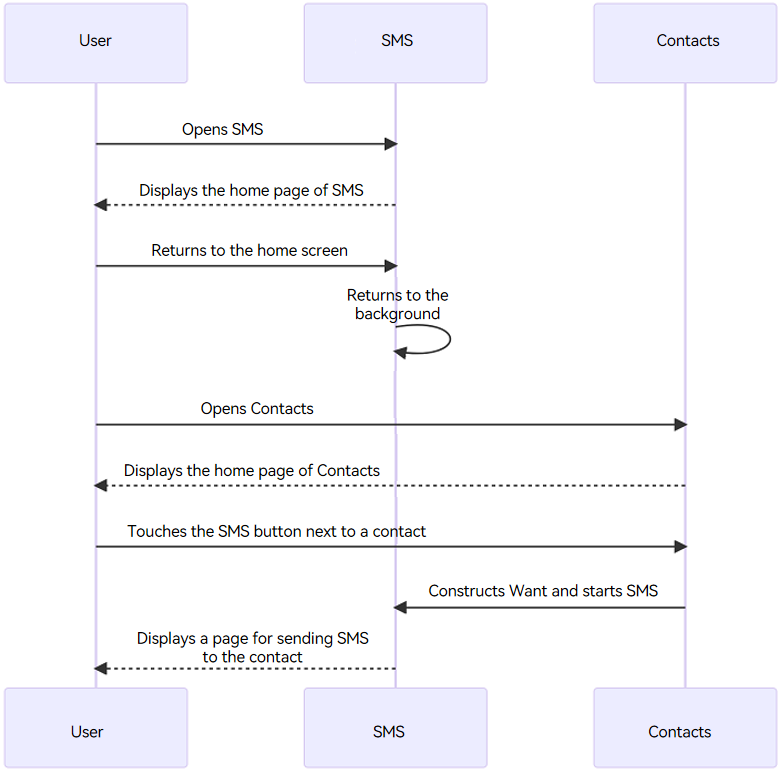
An example scenario is as follows:
- A user opens the SMS application. The UIAbility instance of the SMS application is started, and the home page of the application is displayed.
- The user returns to the home screen, and the SMS application switches to the background.
- The user opens the Contacts application and finds a contact.
- The user taps the SMS button of the contact Zhang San, which starts the UIAbility instance of the SMS application again.
- Since the UIAbility instance of the SMS application has been started, the onNewWant() callback of the UIAbility is triggered, and the initialization logic such as onCreate() and onWindowStageCreate() is skipped.
Figure 1 Hot starting the target UIAbility
The development procedure is as follows:
-
When the UIAbility instance of the SMS application is cold started, call getUIContext() in the onWindowStageCreate() lifecycle callback to obtain the UIContext.
import { hilog } from '@kit.PerformanceAnalysisKit'; import { Want, UIAbility, AbilityConstant } from '@kit.AbilityKit'; import { window, UIContext } from '@kit.ArkUI'; const DOMAIN_NUMBER: number = 0xFF00; const TAG: string = '[HotStartAbility]'; export default class HotStartAbility extends UIAbility { private funcAbilityWant: Want | undefined = undefined; private uiContext: UIContext | undefined = undefined; // ··· onWindowStageCreate(windowStage: window.WindowStage): void { // Main window is created. Set a main page for this UIAbility. hilog.info(DOMAIN_NUMBER, TAG, '%{public}s', 'Ability onWindowStageCreate'); let url = 'pages/Index'; windowStage.loadContent(url, (err, data) => { if (err.code) { return; } let windowClass: window.Window; windowStage.getMainWindow((err, data) => { if (err.code) { hilog.error(DOMAIN_NUMBER, TAG, `Failed to obtain the main window. Code is ${err.code}, message is ${err.message}`); return; } windowClass = data; this.uiContext = windowClass.getUIContext(); }); hilog.info(DOMAIN_NUMBER, TAG, 'Succeeded in loading the content. Data: %{public}s', JSON.stringify(data) ?? ''); }); } // ··· } -
In the onNewWant() callback of the UIAbility instance of the SMS application, set the value of the global variable nameForNavi through AppStorage, and perform the specified page navigation. When the UIAbility instance of the SMS application is started again, the specified page of the UIAbility instance of the SMS application is displayed.
-
Import the required modules, and set the global variable nameForNavi in the onNewWant() lifecycle callback.
import { hilog } from '@kit.PerformanceAnalysisKit'; import { Want, UIAbility, AbilityConstant } from '@kit.AbilityKit'; // ··· const DOMAIN_NUMBER: number = 0xFF00; const TAG: string = '[HotStartAbility]'; export default class HotStartAbility extends UIAbility { // ··· onNewWant(want: Want, launchParam: AbilityConstant.LaunchParam): void { hilog.info(DOMAIN_NUMBER, TAG, '%{public}s', 'onNewWant'); AppStorage.setOrCreate<string>('nameForNavi', 'pageOne'); } } -
When the Index page is displayed, trigger the onPageShow callback to obtain the value of nameForNavi, and execute the page navigation.
@Entry @Component struct Index { @State message: string = 'Index'; pathStack: NavPathStack = new NavPathStack(); onPageShow(): void { let somePage = AppStorage.get<string>('nameForNavi') if (somePage) { this.pathStack.pushPath({ name: somePage }, false); AppStorage.delete('nameForNavi'); } } build() { Navigation(this.pathStack) { Text(this.message) .id('Index') // Replace $r('app.float.page_text_font_size') with the actual resource file. In this example, the value in the resource file is "50fp". .fontSize($r('app.float.page_text_font_size')) .fontWeight(FontWeight.Bold) .alignRules({ center: { anchor: '__container__', align: VerticalAlign.Center }, middle: { anchor: '__container__', align: HorizontalAlign.Center } }) } .mode(NavigationMode.Stack) .height('100%') .width('100%') .margin({top:250}) } } -
Implement the Navigation subpage.
@Builder export function PageOneBuilder() { PageOne(); } @Component export struct PageOne { @State message: string = 'PageOne'; pathStack: NavPathStack = new NavPathStack(); build() { NavDestination() { Text(this.message) .id('PageOne') // Replace $r('app.float.page_text_font_size') with the actual resource file. In this example, the value in the resource file is "50fp". .fontSize($r('app.float.page_text_font_size')) .fontWeight(FontWeight.Bold) .alignRules({ center: { anchor: '__container__', align: VerticalAlign.Center }, middle: { anchor: '__container__', align: HorizontalAlign.Center } }) } .onReady((context: NavDestinationContext) => { this.pathStack = context.pathStack; }) .height('100%') .width('100%') .margin({top:250}) } } -
Configure subpages in the system configuration file route_map.json. For details, see System Routing Table.
// route_map.json { "routerMap": [ { "name": "pageOne", "pageSourceFile": "src/main/ets/pages/PageOne.ets", "buildFunction": "PageOneBuilder", "data": { "description": "this is pageOne" } } ] } -
Configure routerMap in the module.json5 file.
{
  "module": {
    // ···
    "routerMap": "$profile:router_map",
    // ···
  }
}
-

When the launch type of the target UIAbility is set to multiton, a new instance is created each time the target UIAbility is started. In this case, the onNewWant() callback will not be invoked.