In HTML, JavaScript can be used to create the following types of dialog boxes: window.alert(message), window.confirm(message), and window.prompt(message, defaultValue). These dialog boxes can be used to convey information, confirm operations, or request input from users.
Currently, ArkWeb does not provide default dialog boxes. To ensure that the dialog box of a web page can be used properly, the application needs to customize the dialog box through the onAlert, onConfirm, and onPrompt APIs.
Implementing the Alert Dialog Box
You can use window.alert() to display a dialog box that contains optional information. The alert dialog box is used to ensure that users can obtain certain information. When the alert dialog box is displayed, the user needs to click OK to continue the operation.
- The optional parameter message is a string to be displayed in the alert dialog box. If other types of values are passed, the values will be converted to strings.
- This method does not return any value.
An application can listen for the alert method of a web page through the onAlert event and create a dialog box.
-
Use the AlertDialog method to create a dialog box.
import { webview } from '@kit.ArkWeb';

@Entry
@Component
struct Index {
  @State message: string = 'Hello World';
  webviewController: webview.WebviewController = new webview.WebviewController();
  uiContext: UIContext = this.getUIContext();

  build() {
    Row() {
      Web({ src: $rawfile('test.html'), controller: this.webviewController })
        .onAlert((event) => {
          if (event) {
            console.info('event.url:' + event.url);
            console.info('event.message:' + event.message);
            this.uiContext.showAlertDialog({
              title: 'Warning',
              message: event.message,
              confirm: {
                value: 'confirm',
                action: () => {
                  console.info('Alert confirmed.');
                  event.result.handleConfirm();
                }
              },
              cancel: () => {
                event.result.handleCancel();
              }
            })
          }
          return true;
        })
    }
  }
}
HTML to load.
<!-- test.html --> <!DOCTYPE html> <html lang="en"> <head> <meta charset="UTF-8"> <meta name="viewport" content="width=device-width, user-scalable=no, initial-scale=1.0, maximum-scale=1.0, minimum-scale=1.0"> <meta http-equiv="X-UA-Compatible" content="ie=edge"> <title>Document</title> <style> button, label, input { margin: 5px 0; } </style> </head> <body> <input type="text" id="alert-message" placeholder="message for alert"><br/> <button onclick="handleAlert()">alert</button><br/> <script> function handleAlert() { let message = document.getElementById("alert-message").value; let result = window.alert(message ? message : 'alert'); } </script> </body> </html> -
Use the AlertDialog component to create a dialog box.
import { AlertDialog } from '@kit.ArkUI';
import { webview } from '@kit.ArkWeb';

@Entry
@Component
struct AlertDialogPage {
  @State message: string = 'Hello World';
  @State title: string = 'Hello World';
  @State subtitle: string = '';
  @State result: JsResult | null = null;
  webviewController: webview.WebviewController = new webview.WebviewController();
  dialogControllerAlert: CustomDialogController = new CustomDialogController({
    builder: AlertDialog({
      primaryTitle: this.title,
      secondaryTitle: this.subtitle,
      content: this.message,
      primaryButton: {
        value: 'confirm',
        role: ButtonRole.ERROR,
        action: () => {
          console.info('Callback when the second button is clicked');
          this.result?.handleConfirm();
        }
      },
    }),
    onWillDismiss: () => {
      this.result?.handleCancel();
      this.dialogControllerAlert.close();
    }
  })
  build() {
    Column() {
      Web({ src: $rawfile('alert.html'), controller: this.webviewController })
        .onAlert((event) => {
          if (event) {
            console.info('event.url:' + event.url);
            console.info('event.message:' + event.message);
            this.title = 'Warning';
            this.message = event.message;
            this.result = event.result;
            this.dialogControllerAlert.open();
          }
          return true;
        })
    }
  }
}
Loaded HTML:
<!-- alert.html -->
<!DOCTYPE html>
<html lang="en">
<head>
    <meta charset="UTF-8">
    <meta name="viewport"
          content="width=device-width, user-scalable=no, initial-scale=1.0, maximum-scale=1.0, minimum-scale=1.0">
    <meta http-equiv="X-UA-Compatible" content="ie=edge">
    <title>Document</title>
    <style>
        button, label, input {
        margin: 5px 0;
        }
    </style>
</head>
<body>
<input type="text" id="alert-message" placeholder="message for alert"><br/>
<button onclick="handleAlert()">alert</button><br/>
<script>
    function handleAlert() {
        let message = document.getElementById("alert-message").value;
        let result = window.alert(message ? message : 'alert');
    }
</script>
</body>
</html>
Implementing the Confirm Dialog Box
You can use window.confirm() to display a dialog box that contains optional messages and waits for the user to confirm or cancel it.
- The optional parameter message is a string to be displayed in the dialog box. If other types of values are passed, the values will be converted to strings.
- This method returns a Boolean value, indicating whether OK (true) or Cancel (false) is selected. If the application ignores the dialog box on the page, the return value is always false.
The confirm dialog box is used to check whether the user accepts an operation such as leaving a web page to prevent data loss.
An application can listen for the confirm method of a web page through the onConfirm event and create a dialog box.
-
Use the AlertDialog method to create a dialog box.
import { webview } from '@kit.ArkWeb';

@Entry
@Component
struct Index {
  @State message: string = 'Hello World';
  webviewController: webview.WebviewController = new webview.WebviewController();
  uiContext: UIContext = this.getUIContext();

  build() {
    Column() {
      Web({ src: $rawfile('test.html'), controller: this.webviewController })
        .onConfirm((event) => {
          if (event) {
            console.info('event.url:' + event.url);
            console.info('event.message:' + event.message);
            this.uiContext.showAlertDialog({
              title: 'Confirm',
              message: event.message,
              primaryButton: {
                value: 'cancel',
                action: () => {
                  event.result.handleCancel();
                }
              },
              secondaryButton: {
                value: 'ok',
                action: () => {
                  event.result.handleConfirm();
                }
              },
              cancel: () => {
                event.result.handleCancel();
              }
            })
          }
          return true;
        })
    }
  }
}
Loaded HTML:
<!-- test.html --> <!DOCTYPE html> <html lang="en"> <head> <meta charset="UTF-8"> <meta name="viewport" content="width=device-width, user-scalable=no, initial-scale=1.0, maximum-scale=1.0, minimum-scale=1.0"> <meta http-equiv="X-UA-Compatible" content="ie=edge"> <title>Document</title> <style> button, label, input { margin: 5px 0; } </style> </head> <body> result: <label id="confirmLabel" for="confirm"></label><br/> <input type="text" id="confirm-message" placeholder="message for confirm"><br/> <button id="confirm" onclick="handleConfirm()">confirm</button><br/> <script> function handleConfirm() { let message = document.getElementById("confirm-message").value; let result = window.confirm(message ? message : 'confirm'); console.info(result); document.getElementById("confirmLabel").innerHTML=String(result); } </script> </body> </html> -
Use ConfirmDialog to create a dialog.
import { webview } from '@kit.ArkWeb';
import { ConfirmDialog } from '@kit.ArkUI';

@Entry
@Component
struct DialogConfirmDialog {
  @State message: string = 'Hello World';
  @State title: string = 'Hello World';
  @State result: JsResult | null = null;
  webviewController: webview.WebviewController = new webview.WebviewController();
  isChecked = false;
  dialogControllerConfirmDialog: CustomDialogController = new CustomDialogController({
    builder: ConfirmDialog({
      title: this.title,
      content: this.message,
      // Selected state of the check box
      isChecked: this.isChecked,
      // Content of the check box
      checkTips: 'No further prompts after prohibition',
      primaryButton: {
        value: 'prohibited',
        action: () => {
          this.result?.handleCancel();
        },
      },
      secondaryButton: {
        value: 'allow',
        action: () => {
          this.isChecked = false;
          console.info('Callback when the second button is clicked');
          this.result?.handleConfirm();
        }
      },
      onCheckedChange: (checked) => {
        this.isChecked = checked;
        console.info('Callback when the checkbox is clicked');
      },
    }),
    onWillDismiss: () => {
      this.result?.handleCancel();
      this.dialogControllerConfirmDialog.close();
    },
    autoCancel: true
  })

  build() {
    Column() {
      Web({ src: $rawfile('confirm.html'), controller: this.webviewController })
        .onConfirm((event) => {
          if (event) {
            if (this.isChecked) {
              event.result.handleCancel();
            } else {
              console.info('event.url:' + event.url);
              console.info('event.message:' + event.message);
              this.title = 'Confirm';
              this.message = event.message;
              this.result = event.result;
              this.dialogControllerConfirmDialog.open();
            }
          }
          return true;
        })
    }
  }
}
Loaded HTML:
<!-- confirm.html -->
<!DOCTYPE html>
<html lang="en">
<head>
    <meta charset="UTF-8">
    <meta name="viewport"
          content="width=device-width, user-scalable=no, initial-scale=1.0, maximum-scale=1.0, minimum-scale=1.0">
    <meta http-equiv="X-UA-Compatible" content="ie=edge">
    <title>Document</title>
    <style>
        button, label, input {
        margin: 5px 0;
        }
    </style>
</head>
<body>
result: <label id="confirmLabel" for="confirm"></label><br/>
<input type="text" id="confirm-message" placeholder="message for confirm"><br/>
<button id="confirm" onclick="handleConfirm()">confirm</button><br/>
<script>
    function handleConfirm() {
        let message = document.getElementById("confirm-message").value;
        let result = window.confirm(message ? message : 'confirm');
        console.info(result);
        document.getElementById("confirmLabel").innerHTML=String(result);
    }
</script>
</body>
</html>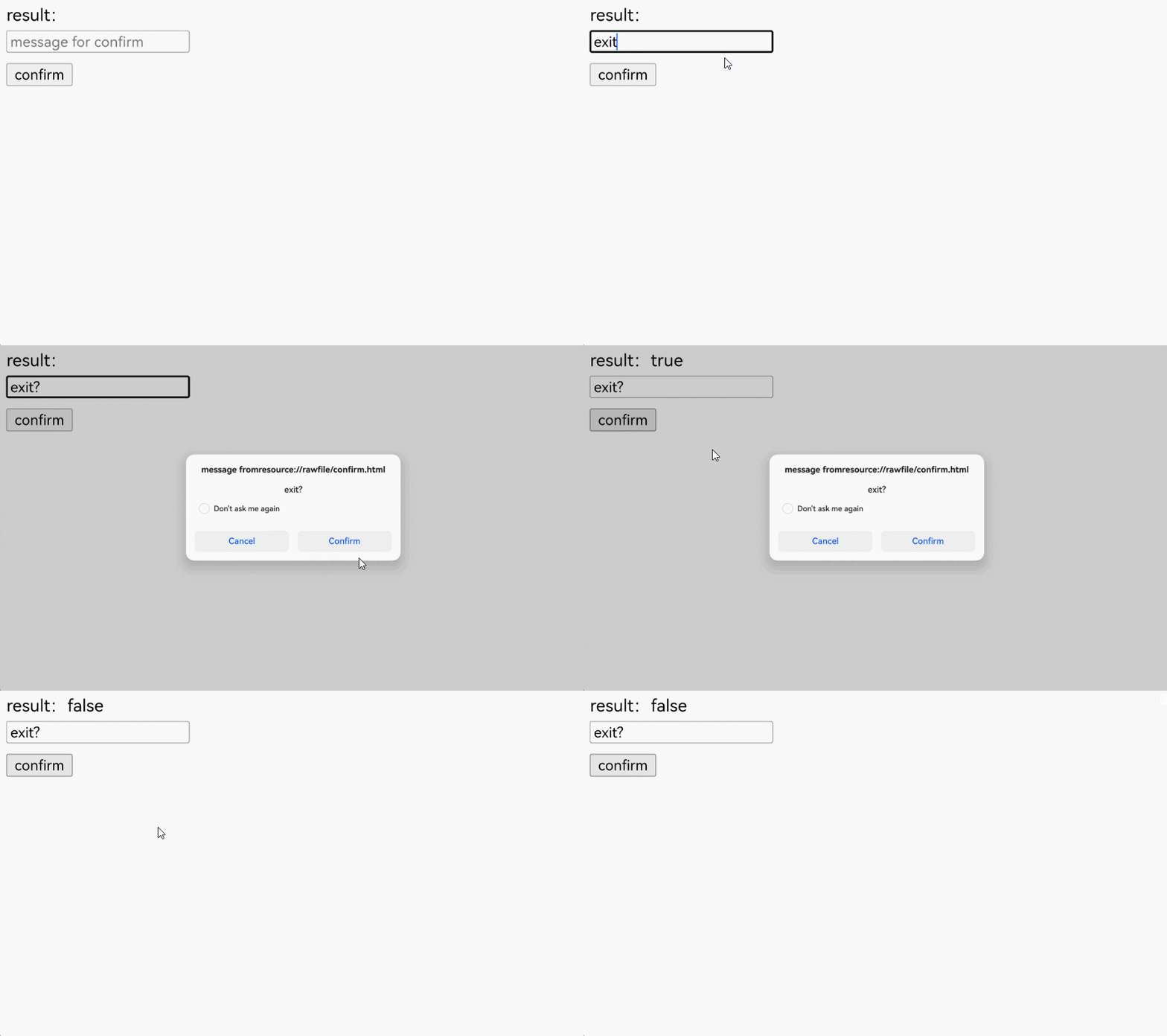
Implementing the Prompt Dialog Box
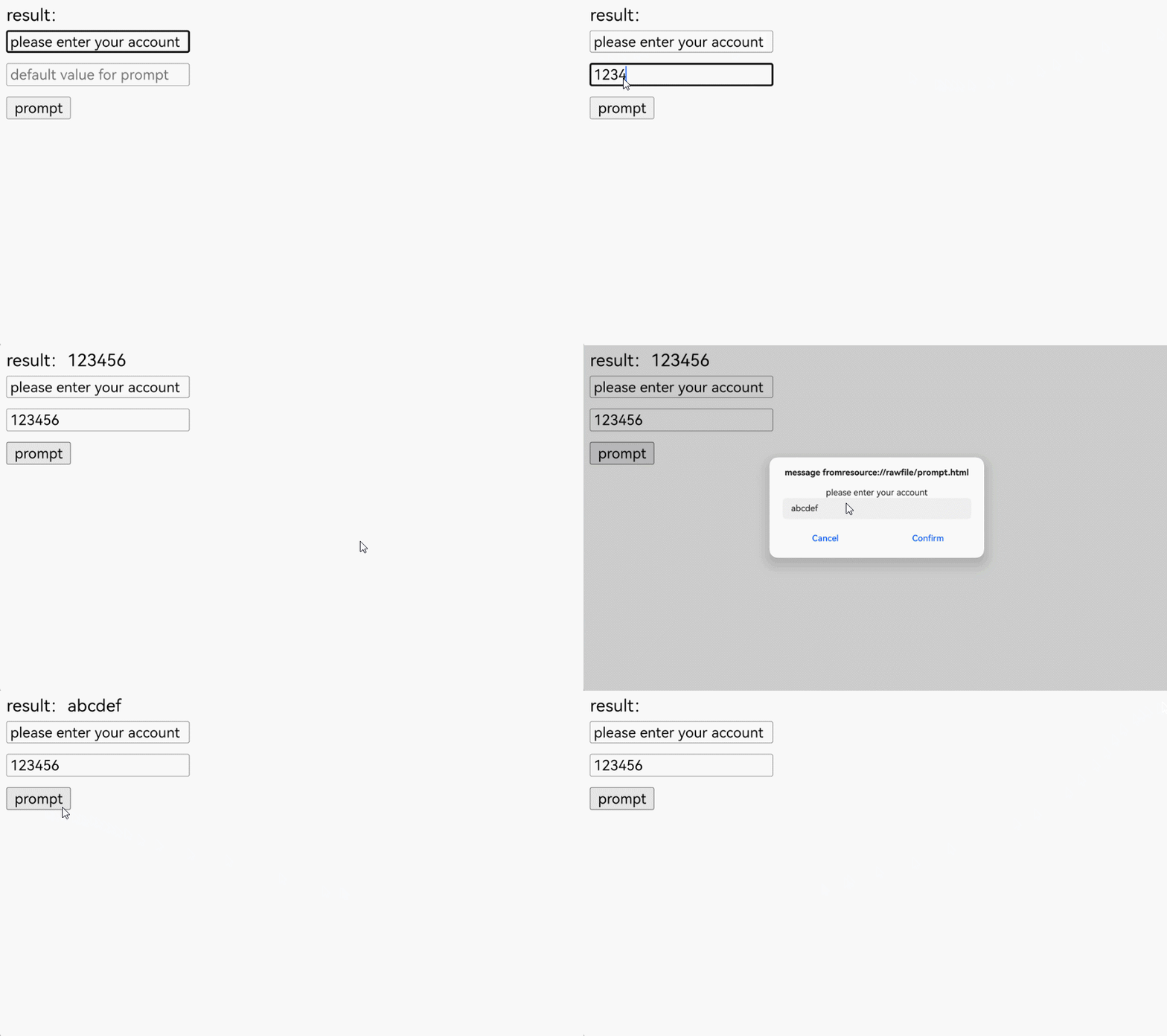
You can use window.prompt() to display a dialog box and wait for the user to submit text or cancel the dialog box. The user needs to input a value and then click **OK **or Cancel. If OK is clicked, the input value is returned. If Cancel is clicked, null is returned.
- The optional parameter message is a string of text to display to the user. It can be omitted if there is nothing to display in the prompt window.
- The optional parameter defaultValue is a string that contains the default value displayed in the text input field.
- The return value is a string of the text input by the user or null.
The prompt box is used to prompt users to input a value, which is usually used in scenarios where users need to input a temporary password or verification code.
An application can listen for the prompt method of a web page through the onPrompt event and create a dialog box.
-
Use CustomContentDialog to create a dialog.
import { CustomContentDialog } from '@kit.ArkUI';
import { webview } from '@kit.ArkWeb';

@Entry
@Component
struct PromptDialog {
  @State message: string = 'Hello World';
  @State title: string = 'Hello World';
  @State result: JsResult | null = null;
  promptResult: string = '';
  webviewController: webview.WebviewController = new webview.WebviewController();
  dialogController: CustomDialogController = new CustomDialogController({
    builder: CustomContentDialog({
      primaryTitle: this.title,
      contentBuilder: () => {
        this.buildContent();
      },
      buttons: [
        {
          value: 'cancel',
          buttonStyle: ButtonStyleMode.TEXTUAL,
          action: () => {
            console.info('Callback when the button is clicked');
            this.result?.handleCancel();
          }
        },
        {
          value: 'confirm',
          buttonStyle: ButtonStyleMode.TEXTUAL,
          action: () => {
            this.result?.handlePromptConfirm(this.promptResult);
          }
        }
      ],
    }),
    onWillDismiss: () => {
      this.result?.handleCancel();
      this.dialogController.close();
    }
  });

  // Custom content area of the dialog box
  @Builder
  buildContent(): void {
    Column() {
      Text(this.message)
      TextInput()
        .onChange((value) => {
          this.promptResult = value;
        })
        .defaultFocus(true)
    }
    .width('100%')
  }

  build() {
    Column() {
      Web({ src: $rawfile('prompt.html'), controller: this.webviewController })
        .onPrompt((event) => {
          if (event) {
            console.info('event.url:' + event.url);
            console.info('event.message:' + event.message);
            console.info('event.value:' + event.value);
            this.title = 'Prompt';
            this.message = event.message;
            this.promptResult = event.value;
            this.result = event.result;
            this.dialogController.open();
          }
          return true;
        })
    }
  }
}
Loaded HTML:
<!-- prompt.html -->
<!DOCTYPE html>
<html lang="en">
<head>
    <meta charset="UTF-8">
    <meta name="viewport"
          content="width=device-width, user-scalable=no, initial-scale=1.0, maximum-scale=1.0, minimum-scale=1.0">
    <meta http-equiv="X-UA-Compatible" content="ie=edge">
    <title>Document</title>
    <style>
        button, label, input {
        margin: 5px 0;
        }
    </style>
</head>
<body>
result: <label id="promptLabel" for="prompt"></label><br/>
<input type="text" id="prompt-message" placeholder="message for prompt"><br/>
<input type="text" id="prompt-value" placeholder="default value for prompt"><br/>
<button id="prompt" onclick="handlePrompt()">prompt</button><br/>
<script>
    function handlePrompt() {
        let message = document.getElementById("prompt-message").value;
        let defaultValue = document.getElementById("prompt-value").value;
        let result = window.prompt(message ? message : 'prompt', defaultValue);
        console.info(result);
        document.getElementById("promptLabel").innerHTML=result;
    }
</script>
</body>
</html>
Required resource file string.json:
{
  "string": [
    {
      "name": "from",
      "value": "From"
    },
    {
      "name": "warn",
      "value": "Warning"
    },
    {
      "name": "notarize",
      "value": "OK"
    },
    {
      "name": "cancel",
      "value": "Cancel"
    },
    {
      "name": "info",
      "value": "Message"
    }
  ]
}