Use Cases
Face liveness detection supports the interactive mode.
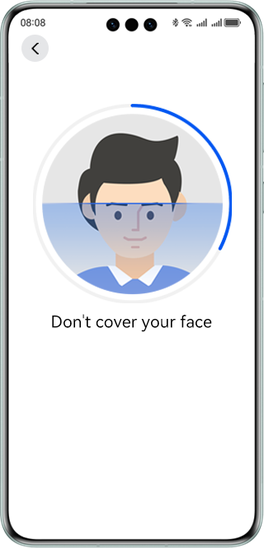
Interactive liveness detection captures faces in real time and requires users to perform specific actions to verify whether a face is of a real person or is from a face attack (such as a printed image, recaptured video, or mask).

This basic system service operates entirely on the device side and is free of charge during the trial period. It is recommended for use in low-risk scenarios such as attendance clock-in/out, auxiliary sign-in, and real-name authentication. Reducing the number of actions or specifying specific actions for liveness detection will compromise its security and increase the risk of being bypassed.
The on-device interactive liveness detection algorithm in HarmonyOS NEXT/5.0.x has been tested and certified by the China Financial Certification Authority (CFCA). Given the high-risk nature of payment and financial apps, you are advised to conduct risk assessment and evaluate risk control policies for different functional scenarios, and take necessary security measures.
Figure 2 Liveness detection
Constraints
-
For tablets, this capability is available only in portrait mode. For large foldable phones, it is available only when the phones are folded. For small foldable phones, it is available only when the phones are unfolded.
-
Languages supported for text: simplified Chinese, traditional Chinese, English, Uyghur, and Tibetan
-
Languages supported for voice broadcast: simplified Chinese and English
-
Currently, this capability does not support the landscape mode or split-screen mode.
-
The face image must be clear and complete, with sufficient ambient light, no direct strong light, no reflection, and no obstruction.
API Description
The following lists only some main APIs called in the demo. For details about all APIs, please refer to the API Reference.
| API | Description |
|---|---|
| startLivenessDetection(config: InteractiveLivenessConfig): Promise<boolean> | Entry for redirecting to the face liveness detection screen. |
| getInteractiveLivenessResult(): Promise<InteractiveLivenessResult> | Obtains the face liveness detection result. This API returns the result asynchronously through a promise. |
Development Procedure
-
Add the classes for implementing face liveness detection to a project.
import { common, abilityAccessCtrl, Permissions } from '@kit.AbilityKit'; import { interactiveLiveness } from '@kit.VisionKit'; import { BusinessError } from '@kit.BasicServicesKit'; import { hilog } from '@kit.PerformanceAnalysisKit'; -
Add the CAMERA permission to the module.json5 file, in which reason and abilities are mandatory. For details about the configuration method, please refer to Declaring Permissions.
"requestPermissions":[ { "name": "ohos.permission.CAMERA", "reason": "$string:camera_desc", "usedScene": {"abilities": []} } ] -
Configure a simple UI layout and select a redirection mode after the face liveness detection is complete. The back mode indicates returning to the previous screen after the face liveness detection is complete. The replace mode indicates displaying the success or failure screen after the face liveness detection is complete. By default, the replace mode is selected.
Flex({ direction: FlexDirection.Row, justifyContent: FlexAlign.Start, alignItems: ItemAlign.Center }) { Text('Redirection mode after detection:') .fontSize(18) .width('25%') Flex({ direction: FlexDirection.Row, justifyContent: FlexAlign.Start, alignItems: ItemAlign.Center }) { Row() { Radio({ value: 'replace', group: 'routeMode' }).checked(true) .height(24) .width(24) .onChange((isChecked: boolean) => { this.routeMode = 'replace'; }) Text('replace') .fontSize(16) } .margin({ right: 15 }) Row() { Radio({ value: 'back', group: 'routeMode' }).checked(false) .height(24) .width(24) .onChange((isChecked: boolean) => { this.routeMode = 'back'; }) Text('back') .fontSize(16) } } .width('75%') } -
If you have selected the interactive liveness detection mode, enter the number of actions to be verified.
Flex({ direction: FlexDirection.Row, justifyContent: FlexAlign.Start, alignItems: ItemAlign.Center }) { Text('Actions:') .fontSize(18) .width('25%') TextInput({ placeholder: this.actionsNum != 0 ? this.actionsNum.toString() : 'Enter 3 or 4.' }) .type(InputType.Number) .placeholderFont({ size: 18, weight: FontWeight.Normal, family: 'HarmonyHeiTi', style: FontStyle.Normal }) .fontSize(18) .fontWeight(FontWeight.Bold) .fontFamily('HarmonyHeiTi') .fontStyle(FontStyle.Normal) .width('65%') .onChange((value: string) => { this.actionsNum = Number(value) as interactiveLiveness.ActionsNumber; }) } -
Tap the Start detection button to trigger a tap event.
Button('Start detection', { type: ButtonType.Normal, stateEffect: true }) .width(192) .height(40) .fontSize(16) .backgroundColor(0x317aff) .borderRadius(20) .margin({ bottom: 56 }) .onClick(() => { this.startDetection(); }) -
Trigger CAMERA permission verification.
private context: common.UIAbilityContext = this.getUIContext()?.getHostContext() as common.UIAbilityContext; private array: Array<Permissions> = ['ohos.permission.CAMERA']; // Verify the CAMERA permission. private startDetection() { abilityAccessCtrl.createAtManager().requestPermissionsFromUser(this.context, this.array).then((res) => { for (let i = 0; i < res.permissions.length; i++) { if (res.permissions[i] === 'ohos.permission.CAMERA' && res.authResults[i] === 0) { this.routerLibrary(); } } }).catch((err: BusinessError) => { hilog.error(0x0001, 'LivenessCollectionIndex', `Failed to request permissions from user. Code is ${err.code}, message is ${err.message}`); }); } -
Set InteractiveLivenessConfig. The configuration is used to redirect to the face liveness detection control.
For details about the parameters, see API Reference.
let routerOptions: interactiveLiveness.InteractiveLivenessConfig = { isSilentMode: this.isSilentMode as interactiveLiveness.DetectionMode, routeMode: this.routeMode as interactiveLiveness.RouteRedirectionMode, actionsNum: this.actionsNum }; -
Call the startLivenessDetection API of interactiveLiveness to check whether the redirection to the face liveness detection control is successful.
private routerLibrary() { if (canIUse('SystemCapability.AI.Component.LivenessDetect')) { interactiveLiveness.startLivenessDetection(routerOptions).then((isSuccess) => { if (isSuccess) { hilog.info(0x0001, 'LivenessCollectionIndex', `Succeeded in jumping.`); } else { hilog.info(0x0001, 'LivenessCollectionIndex', `Redirection failed.`); } }).catch((err: BusinessError) => { hilog.error(0x0001, 'LivenessCollectionIndex', `Failed to jump. Code: ${err.code}, message: ${err.message}`); }); } else { hilog.error(0x0001, 'LivenessCollectionIndex', 'this api is not supported on this device'); } } -
After the detection is complete, return to the current screen. You can call the getInteractiveLivenessResult API of interactiveLiveness to verify the face liveness detection result.
// Obtain the detection result.
private getDetectionResultInfo() {
  // Resources are released after the **getInteractiveLivenessResult** API calling is complete.
  if (canIUse('SystemCapability.AI.Component.LivenessDetect')) {
    let resultInfo = interactiveLiveness.getInteractiveLivenessResult();
    resultInfo.then(data => {
      this.resultInfo = data;
    }).catch((err: BusinessError) => {
      this.failResult = {
        'code': err.code,
        'message': err.message
      };
    });
  } else {
    hilog.error(0x0001, 'LivenessCollectionIndex', 'this api is not supported on this device');
  }
}
[h2]Index.ets
import { common, abilityAccessCtrl, Permissions } from '@kit.AbilityKit';
import { interactiveLiveness } from '@kit.VisionKit';
import { BusinessError } from '@kit.BasicServicesKit';
import { hilog } from '@kit.PerformanceAnalysisKit';

@Entry
@Component
struct LivenessCollectionIndex{
  private context: common.UIAbilityContext = this.getUIContext().getHostContext() as common.UIAbilityContext;
  private array: Array<Permissions> = ['ohos.permission.CAMERA'];
  @State actionsNum: number = 0;
  @State isSilentMode: string = 'INTERACTIVE_MODE';
  @State routeMode: string = 'replace';
  @State resultInfo: interactiveLiveness.InteractiveLivenessResult = {
    livenessType: 0
  };
  @State failResult: Record<string, number | string> = {
    'code': 1008302000,
    'message': ''
  };

  build() {
    Stack({
      alignContent: Alignment.Top
    }) {
      Column() {
        Row() {
          Flex({ direction: FlexDirection.Row, justifyContent: FlexAlign.Start, alignItems: ItemAlign.Center }) {
            Text('Redirection mode after detection:')
              .fontSize(18)
              .width('25%')
            Flex({ direction: FlexDirection.Row, justifyContent: FlexAlign.Start, alignItems: ItemAlign.Center }) {
              Row() {
                Radio({ value: 'replace', group: 'routeMode' }).checked(true)
                  .height(24)
                  .width(24)
                  .onChange(() => {
                    this.routeMode = 'replace';
                  })
                Text('replace')
                  .fontSize(16)
              }
              .margin({ right: 15 })

              Row() {
                Radio({ value: 'back', group: 'routeMode' }).checked(false)
                  .height(24)
                  .width(24)
                  .onChange(() => {
                    this.routeMode = 'back';
                  })
                Text('back')
                  .fontSize(16)
              }
            }
            .width('75%')
          }
        }
        .margin({ bottom: 30 })

          Row() {
            Flex({ direction: FlexDirection.Row, justifyContent: FlexAlign.Start, alignItems: ItemAlign.Center }) {
              Text('Actions:')
                .fontSize(18)
                .width('25%')
              TextInput({
                placeholder: this.actionsNum != 0 ? this.actionsNum.toString() : 'Enter 3 or 4.'
              })
                .type(InputType.Number)
                .placeholderFont({
                  size: 18,
                  weight: FontWeight.Normal,
                  family: 'HarmonyHeiTi',
                  style: FontStyle.Normal
                })
                .fontSize(18)
                .fontWeight(FontWeight.Bold)
                .fontFamily('HarmonyHeiTi')
                .fontStyle(FontStyle.Normal)
                .width('65%')
                .onChange((value: string) => {
                  this.actionsNum = Number(value) as interactiveLiveness.ActionsNumber;
                })
            }
          }
      }
      .margin({ left: 24, top: 80 })
      .zIndex(1)

      Stack({
        alignContent: Alignment.Bottom
      }) {
        if (this.resultInfo?.mPixelMap) {
          Image(this.resultInfo?.mPixelMap)
            .width(260)
            .height(260)
            .align(Alignment.Center)
            .margin({ bottom: 260 })
          Circle()
            .width(300)
            .height(300)
            .fillOpacity(0)
            .strokeWidth(60)
            .stroke(Color.White)
            .margin({ bottom: 250, left: 0 })
        }

        Text(this.resultInfo.mPixelMap ?
          'Detection succeeded':
          this.failResult.code != 1008302000 ?
            'Detection failed':
            '')
          .width('100%')
          .height(26)
          .fontSize(20)
          .fontColor('#000000')
          .fontFamily('HarmonyHeiTi')
          .margin({ top: 50 })
          .textAlign(TextAlign.Center)
          .fontWeight('Medium')
          .margin({ bottom: 240 })

        if (this.failResult.code != 1008302000) {
          Text(this.failResult.message as string)
            .width('100%')
            .height(26)
            .fontSize(16)
            .fontColor(Color.Gray)
            .textAlign(TextAlign.Center)
            .fontFamily('HarmonyHeiTi')
            .fontWeight('Medium')
            .margin({ bottom: 200 })
        }

        Button('Start detection', { type: ButtonType.Normal, stateEffect: true })
          .width(192)
          .height(40)
          .fontSize(16)
          .backgroundColor(0x317aff)
          .borderRadius(20)
          .margin({
            bottom: 56
          })
          .onClick(() => {
            this.startDetection();
          })
      }
      .height('100%')
    }
  }

  onPageShow() {
    this.resultRelease();
    this.getDetectionResultInfo();
  }

  // Set face liveness detection parameters and call the detection API.
  private routerLibrary() {
    let routerOptions: interactiveLiveness.InteractiveLivenessConfig = {
      isSilentMode: this.isSilentMode as interactiveLiveness.DetectionMode,
      routeMode: this.routeMode as interactiveLiveness.RouteRedirectionMode,
      actionsNum: this.actionsNum
    };

    if (canIUse('SystemCapability.AI.Component.LivenessDetect')) {
      interactiveLiveness.startLivenessDetection(routerOptions).then((isSuccess) => {
        if (isSuccess) {
            hilog.info(0x0001, 'LivenessCollectionIndex', `Succeeded in jumping.`);
          } else {
            hilog.info(0x0001, 'LivenessCollectionIndex', `Redirection failed.`);
          }
      }).catch((err: BusinessError) => {
        hilog.error(0x0001, 'LivenessCollectionIndex', `Failed to jump. Code: ${err.code}, message: ${err.message}`);
      });
    } else {
      hilog.error(0x0001, 'LivenessCollectionIndex', 'this api is not supported on this device');
    }
  }

  // Verify the CAMERA permission.
  private startDetection() {
    abilityAccessCtrl.createAtManager().requestPermissionsFromUser(this.context, this.array).then((res) => {
      for (let i = 0; i < res.permissions.length; i++) {
        if (res.permissions[i] === 'ohos.permission.CAMERA' && res.authResults[i] === 0) {
        this.routerLibrary();
      }
     }
    }).catch((err: BusinessError) => {
      hilog.error(0x0001, 'LivenessCollectionIndex', `Failed to request permissions from user. Code is ${err.code}, message is ${err.message}`);
    });
  }

  // Obtain the detection result.
  private getDetectionResultInfo() {
    // Resources are released after the **getInteractiveLivenessResult** API calling is complete.
    if (canIUse('SystemCapability.AI.Component.LivenessDetect')) {
      interactiveLiveness.getInteractiveLivenessResult().then(data => {
        this.resultInfo = data;
      }).catch((err: BusinessError) => {
        this.failResult = {
          'code': err.code,
          'message': err.message
        };
      });
    } else {
      hilog.error(0x0001, 'LivenessCollectionIndex', 'this api is not supported on this device');
    }
  }

  // result release
  private resultRelease() {
    this.resultInfo = {
      livenessType: 0
    };
    this.failResult = {
      'code': 1008302000,
      'message': ''
    };
  }
}