
Currently, only apps that use HarmonyOS-adapted third-party frameworks are supported.
Follow the official HarmonyOS-adapted React Native environment setup guide to set up the environment.
Prerequisites
The SmartFill function has been enabled on the user device. To enable the function, a user needs to go to Settings > Privacy and security > SmartFill on their device.
The device has been connected to the Internet and a HUAWEI ID has signed in on the device.
The app has integrated SmartFill.

Sample Code
For the TextInput component of React Native, you need to set textContentType to support SmartFill. The sample code is as follows:
import React from 'react';
import { Text, TextInput, View, StyleSheet } from 'react-native';

const styles = StyleSheet.create({
  default: {
    borderWidth: StyleSheet.hairlineWidth,
    borderColor: '#0f0f0f',
    flex: 1,
    fontSize: 13,
    padding: 4,
    height: 80,
    width: 160,
  },
  labelContainer: {
    flexDirection: 'row',
    marginVertical: 2,
  },
  label: {
    width: 140,
    textAlign: 'right',
    marginRight: 10,
    paddingTop: 2,
    fontSize: 15,
  },
  inputContainer: {
    flex: 1,
  }
});
class WithLabel extends React.Component<$FlowFixMeProps> {
  render(): React.Node {
    return (
      <View style={styles.labelContainer}>
        <Text style={styles.label}>{this.props.label}</Text>
        <View style={styles.inputContainer}>{this.props.children}</View>
      </View>
    );
  }
}
const RNTesterApp = () : React.ReactNode=> {
  return (
    <View style={{width: '100%', height: '100%', paddingTop: 40}}>
      <WithLabel label="Nickname">
        <TextInput textContentType="nickname" style={styles.default} />
      </WithLabel>
      <WithLabel label="Name">
        <TextInput textContentType="name" style={styles.default} />
      </WithLabel>
      <WithLabel label="Phone">
        <TextInput textContentType="telephoneNumber" style={styles.default} />
      </WithLabel>
      <WithLabel label="Email">
        <TextInput textContentType="emailAddress" style={styles.default} />
      </WithLabel>
      <WithLabel label="ID number">
        <TextInput textContentType="idCardNumber" style={styles.default} />
      </WithLabel>
      <WithLabel label="Format Address">
        <TextInput textContentType="formatAddress" style={styles.default} />
      </WithLabel>
      <WithLabel label="Full Street Address">
        <TextInput textContentType="fullStreetAddress" style={styles.default}  />
      </WithLabel>
      <WithLabel label="Detail Info Without Street">
        <TextInput textContentType="detailInfoWithoutStreet" style={styles.default} />
      </WithLabel>
    </View>
  );
};
export default RNTesterApp;
HTML5 Page Input Box Display Effect of React Native
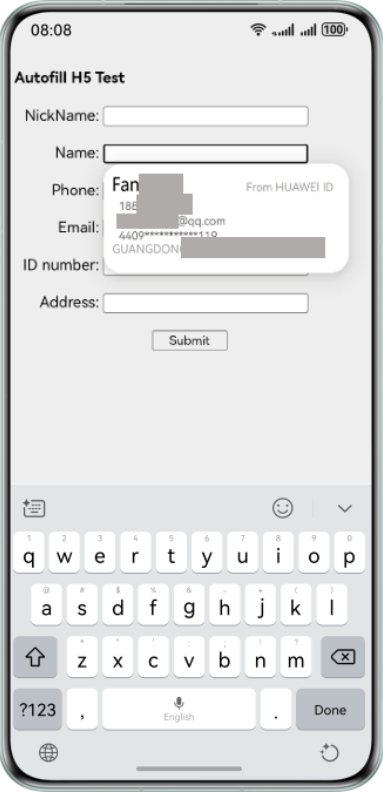
For an HTML5 page loaded in the React Native framework, you can configure the autocomplete attribute for the input box (subnode of the form) to support SmartFill. The sample code is as follows:
import React,{ useEffect } from 'react';
import { View } from 'react-native';
import { WebView } from 'react-native-webview';
// ...

const RNTesterAppH5 = () : React.ReactNode => {
// ...

  return (
// ...
      <View style={{width: '100%', height: '100%', paddingTop: 40}}>
        <WebView
          source={require('./autofill_h5.html')}
          style={{flex: 1, paddingTop: 50}}
        />
      </View>
// ...
  );
};

export default RNTesterAppH5;
For details about the implementation of autofill_h5.html, please refer to the sample code.