If the drawn content of some components does not meet the requirements, you can use the custom drawing features to draw part or all of the components to achieve the expected effect. For example, you can create buttons in special shapes or icons that mix text and imagery. The drawing modifier offers higher flexibility in your custom drawing.

The initial APIs of this module are supported since API version 12. Updates will be marked with a superscript to indicate their earliest API version.
drawModifier
drawModifier(modifier: DrawModifier | undefined): T
Creates a drawing modifier.

Atomic service API: This API can be used in atomic services since API version 12.
System capability: SystemCapability.ArkUI.ArkUI.Full
Supported components:
AlphabetIndexer, Badge, Blank, Button, CalendarPicker, Checkbox, CheckboxGroup, Circle, Column, ColumnSplit, Counter, DataPanel, DatePicker, Ellipse, Flex, FlowItem, FolderStack, FormLink, Gauge, Grid, GridCol, GridItem, GridRow, Hyperlink, Image, ImageAnimator, ImageSpan, Line, List, ListItem, ListItemGroup, LoadingProgress, Marquee, Menu, MenuItem, MenuItemGroup, NavDestination, Navigation, Navigator, NavRouter, NodeContainer, Path, PatternLock, Polygon, Polyline, Progress, QRCode, Radio, Rating, Rect, Refresh, RelativeContainer, RichEditor, Row, RowSplit, Scroll, ScrollBar, Search, Select, Shape, SideBarContainer, Slider, Stack, Stepper, StepperItem, Swiper, SymbolGlyph, TabContent, Tabs, Text, TextArea, TextClock, TextInput, TextPicker, TextTimer, TimePicker, Toggle, WaterFlow, XComponent
Parameters
| Name | Type | Mandatory | Description |
|---|---|---|---|
| modifier | DrawModifier | undefined | Yes | Custom drawing modifier, which defines the logic of custom drawing. Default value: undefined NOTE A custom modifier applies only to the FrameNode of the currently bound component, not to its subnodes. |
Return value
| Type | Description |
|---|---|
| T | Current component. |
DrawModifier
Implements a DrawModifier instance for using the drawOverlay, drawForeground, drawFront, drawContent, and drawBehind APIs for custom drawing as well as the invalidate API for redrawing. Each DrawModifier instance can be set for only one component. Repeated setting is not allowed.
The figure below shows the custom drawing layers.

Atomic service API: This API can be used in atomic services since API version 12.
System capability: SystemCapability.ArkUI.ArkUI.Full
[h2]drawFront
drawFront?(drawContext: DrawContext): void
Draws the content foreground. Override this method to implement custom content foreground drawing.
Atomic service API: This API can be used in atomic services since API version 12.
System capability: SystemCapability.ArkUI.ArkUI.Full
Parameters
| Name | Type | Mandatory | Description |
|---|---|---|---|
| drawContext | DrawContext | Yes | Graphics drawing context. |
Example
See Example 1: Implementing Custom Drawing Through DrawModifier.
[h2]drawContent
drawContent?(drawContext: DrawContext): void
Draws the content. Override this method to implement custom content drawing, which will replace the component's default content drawing function.
Note: The Canvas provided in the DrawContext parameter is a temporary command-recording canvas, not the actual rendering canvas of the node. For usage instructions, see Adjusting the Transformation Matrix of the Custom Drawing Canvas.
Atomic service API: This API can be used in atomic services since API version 12.
System capability: SystemCapability.ArkUI.ArkUI.Full
Parameters
| Name | Type | Mandatory | Description |
|---|---|---|---|
| drawContext | DrawContext | Yes | Graphics drawing context. |
Example
See Example 1: Implementing Custom Drawing Through DrawModifier.
[h2]drawBehind
drawBehind?(drawContext: DrawContext): void
Draws the background. Override this method to implement custom background drawing operations.
Atomic service API: This API can be used in atomic services since API version 12.
System capability: SystemCapability.ArkUI.ArkUI.Full
Parameters
| Name | Type | Mandatory | Description |
|---|---|---|---|
| drawContext | DrawContext | Yes | Graphics drawing context. |
Example
See Example 1: Implementing Custom Drawing Through DrawModifier.
[h2]drawForeground20+
drawForeground(drawContext: DrawContext): void
Draws the foreground. Override this method to implement custom drawing operations on the foreground layer of the component.
Atomic service API: This API can be used in atomic services since API version 20.
System capability: SystemCapability.ArkUI.ArkUI.Full
Parameters
| Name | Type | Mandatory | Description |
|---|---|---|---|
| drawContext | DrawContext | Yes | Graphics drawing context. |
Example
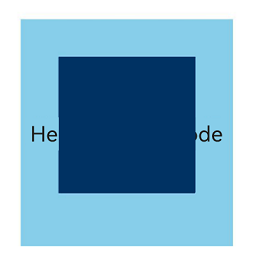
See Example 2: Implementing Custom Foreground Drawing for a Container Through DrawModifier.
[h2]drawOverlay23+
drawOverlay(drawContext: DrawContext): void
Draws the overlay. Override this method to implement custom overlay drawing operations in this component.
Atomic service API: This API can be used in atomic services since API version 23.
System capability: SystemCapability.ArkUI.ArkUI.Full
Parameters
| Name | Type | Mandatory | Description |
|---|---|---|---|
| drawContext | DrawContext | Yes | Graphics drawing context. |
Example
// test.ets
import { drawing } from '@kit.ArkGraphics2D';

class MyForegroundDrawModifier extends DrawModifier {
  public scaleX: number = 3;
  public scaleY: number = 3;
  uiContext: UIContext;

  constructor(uiContext: UIContext) {
    super();
    this.uiContext = uiContext;
  }

  // Override the drawOverlay method to customize the foreground drawing of overlay.
  drawOverlay(context: DrawContext): void {
    const brush = new drawing.Brush();
    brush.setColor({
      alpha: 255,
      red: 0,
      green: 50,
      blue: 100
    });
    context.canvas.attachBrush(brush);
    const halfWidth = context.size.width / 2;
    const halfHeight = context.size.height / 2;
    context.canvas.drawRect({
      left: this.uiContext.vp2px(halfWidth - 30 * this.scaleX),
      top: this.uiContext.vp2px(halfHeight - 30 * this.scaleY),
      right: this.uiContext.vp2px(halfWidth + 30 * this.scaleX),
      bottom: this.uiContext.vp2px(halfHeight + 60 * this.scaleY)
    });
  }
}

@Entry
@Component
struct DrawModifierExample {
  // Instantiate the foreground drawing class of the overlay, passing the UIContext instance.
  private overlayModifier: MyForegroundDrawModifier = new MyForegroundDrawModifier(this.getUIContext());

  build() {
    Column() {
      Text('Here is a child node')
        .fontSize(36)
        .width('100%')
        .height('100%')
        .textAlign(TextAlign.Center)
    }
    .margin(50)
    .width(280)
    .height(300)
    .backgroundColor(0x87CEEB)
    // Apply custom foreground drawing by passing the DrawModifier instance.
    .drawModifier(this.overlayModifier)
  }
}
[h2]invalidate
invalidate(): void
Triggers redrawing of the bound component. No overloading is allowed or needed.
Atomic service API: This API can be used in atomic services since API version 12.
System capability: SystemCapability.ArkUI.ArkUI.Full
Example
See Example 1: Implementing Custom Drawing Through DrawModifier.
[h2]DrawContext
type DrawContext = DrawContext
Atomic service API: This API can be used in atomic services since API version 12.
System capability: SystemCapability.ArkUI.ArkUI.Full
| Type | Description |
|---|---|
| DrawContext | Graphics drawing context. |
[h2]Example 1: Implementing Custom Drawing Through DrawModifier
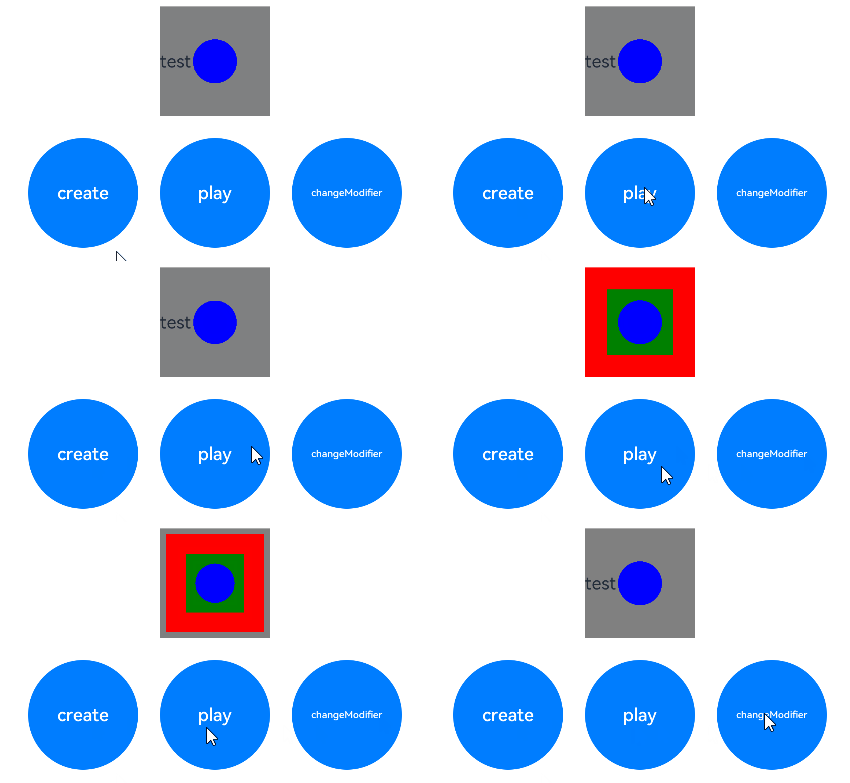
This example demonstrates how to implement custom drawing for the Text component through DrawModifier.
// xxx.ets
import { drawing } from '@kit.ArkGraphics2D';
import { AnimatorResult } from '@kit.ArkUI';

// Implement a custom drawing controller by extending DrawModifier.
class MyFullDrawModifier extends DrawModifier {
  public scaleX: number = 1;
  public scaleY: number = 1;
  uiContext: UIContext;

  constructor(uiContext: UIContext) {
    super();
    this.uiContext = uiContext;
  }

  // Override the drawBehind API for custom background drawing.
  drawBehind(context: DrawContext): void {
    const brush = new drawing.Brush();
    brush.setColor({
      alpha: 255,
      red: 255,
      green: 0,
      blue: 0
    });
    context.canvas.attachBrush(brush);
    const halfWidth = context.size.width / 2;
    const halfHeight = context.size.height / 2;
    context.canvas.drawRect({
      left: this.uiContext.vp2px(halfWidth - 50 * this.scaleX),
      top: this.uiContext.vp2px(halfHeight - 50 * this.scaleY),
      right: this.uiContext.vp2px(halfWidth + 50 * this.scaleX),
      bottom: this.uiContext.vp2px(halfHeight + 50 * this.scaleY)
    });
  }

  // Override the drawContent API for custom content drawing.
  drawContent(context: DrawContext): void {
    const brush = new drawing.Brush();
    brush.setColor({
      alpha: 255,
      red: 0,
      green: 255,
      blue: 0
    });
    context.canvas.attachBrush(brush);
    const halfWidth = context.size.width / 2;
    const halfHeight = context.size.height / 2;
    context.canvas.drawRect({
      left: this.uiContext.vp2px(halfWidth - 30 * this.scaleX),
      top: this.uiContext.vp2px(halfHeight - 30 * this.scaleY),
      right: this.uiContext.vp2px(halfWidth + 30 * this.scaleX),
      bottom: this.uiContext.vp2px(halfHeight + 30 * this.scaleY)
    });
  }

  // Override the drawFront API for custom foreground drawing.
  drawFront(context: DrawContext): void {
    const brush = new drawing.Brush();
    brush.setColor({
      alpha: 255,
      red: 0,
      green: 0,
      blue: 255
    });
    context.canvas.attachBrush(brush);
    const halfWidth = context.size.width / 2;
    const halfHeight = context.size.height / 2;
    const radiusScale = (this.scaleX + this.scaleY) / 2;
    context.canvas.drawCircle(this.uiContext.vp2px(halfWidth), this.uiContext.vp2px(halfHeight),
      this.uiContext.vp2px(20 * radiusScale));
  }
}

// Implement a custom drawing controller by extending DrawModifier, supporting only custom foreground drawing.
class MyFrontDrawModifier extends DrawModifier {
  public scaleX: number = 1;
  public scaleY: number = 1;
  uiContext: UIContext;

  constructor(uiContext: UIContext) {
    super();
    this.uiContext = uiContext;
  }

  drawFront(context: DrawContext): void {
    const brush = new drawing.Brush();
    brush.setColor({
      alpha: 255,
      red: 0,
      green: 0,
      blue: 255
    });
    context.canvas.attachBrush(brush);
    const halfWidth = context.size.width / 2;
    const halfHeight = context.size.height / 2;
    const radiusScale = (this.scaleX + this.scaleY) / 2;
    context.canvas.drawCircle(this.uiContext.vp2px(halfWidth), this.uiContext.vp2px(halfHeight),
      this.uiContext.vp2px(20 * radiusScale));
  }
}

@Entry
@Component
struct DrawModifierExample {
  private fullModifier: MyFullDrawModifier = new MyFullDrawModifier(this.getUIContext());
  private frontModifier: MyFrontDrawModifier = new MyFrontDrawModifier(this.getUIContext());
  private drawAnimator: AnimatorResult | undefined = undefined;
  @State modifier: DrawModifier = new MyFrontDrawModifier(this.getUIContext());
  private count = 0;

  // Create an Animator object and set the animation.
  create() {
    let self = this;
    this.drawAnimator = this.getUIContext().createAnimator({
      duration: 1000,
      easing: 'ease',
      delay: 0,
      fill: 'forwards',
      direction: 'normal',
      iterations: 1,
      begin: 0,
      end: 2
    });
    this.drawAnimator.onFrame = (value: number) => {
      console.info('frame value =', value);
      const tempModifier = self.modifier as MyFullDrawModifier | MyFrontDrawModifier;
      tempModifier.scaleX = Math.abs(value - 1);
      tempModifier.scaleY = Math.abs(value - 1);
      // Manually trigger redraw.
      self.modifier.invalidate();
    };
  }

  build() {
    Column() {
      Row() {
        Text('test text')
          .width(100)
          .height(100)
          .margin(10)
          .backgroundColor(Color.Gray)
          .onClick(() => {
            const tempModifier = this.modifier as MyFullDrawModifier | MyFrontDrawModifier;
            tempModifier.scaleX -= 0.1;
            tempModifier.scaleY -= 0.1;
          })
          .drawModifier(this.modifier)
      }

      Row() {
        Button('create')
          .width(100)
          .height(100)
          .borderRadius(50)
          .margin(10)
          .onClick(() => {
            this.create();
          })
        Button('play')
          .width(100)
          .height(100)
          .borderRadius(50)
          .margin(10)
          .onClick(() => {
            if (this.drawAnimator) {
              this.drawAnimator.play();
            }
          })
        Button('changeModifier')
          .width(100)
          .height(100)
          .borderRadius(50)
          .margin(10)
          .onClick(() => {
            this.count += 1;
            if (this.count % 2 === 1) {
              console.info('change to full modifier');
              this.modifier = this.fullModifier;
            } else {
              console.info('change to front modifier');
              this.modifier = this.frontModifier;
            }
          })
      }
    }
    .width('100%')
    .height('100%')
  }
} 
[h2]Example 2: Implementing Custom Foreground Drawing for a Container Through DrawModifier
This example demonstrates how to implement custom foreground drawing for a Column container using DrawModifier.
// xxx.ets
import { drawing } from '@kit.ArkGraphics2D';

class MyForegroundDrawModifier extends DrawModifier {
  public scaleX: number = 3;
  public scaleY: number = 3;
  uiContext: UIContext;

  constructor(uiContext: UIContext) {
    super();
    this.uiContext = uiContext;
  }

  // Override the drawForeground method to customize foreground drawing.
  drawForeground(context: DrawContext): void {
    const brush = new drawing.Brush();
    brush.setColor({
      alpha: 255,
      red: 0,
      green: 50,
      blue: 100
    });
    context.canvas.attachBrush(brush);
    const halfWidth = context.size.width / 2;
    const halfHeight = context.size.height / 2;
    context.canvas.drawRect({
      left: this.uiContext.vp2px(halfWidth - 30 * this.scaleX),
      top: this.uiContext.vp2px(halfHeight - 30 * this.scaleY),
      right: this.uiContext.vp2px(halfWidth + 30 * this.scaleX),
      bottom: this.uiContext.vp2px(halfHeight + 30 * this.scaleY)
    });
  }
}

@Entry
@Component
struct DrawModifierExample {
  // Instantiate the foreground drawing class, passing the UIContext instance.
  private foregroundModifier: MyForegroundDrawModifier = new MyForegroundDrawModifier(this.getUIContext());

  build() {
    Column() {
      Text('Here is a child node')
        .fontSize(36)
        .width('100%')
        .height('100%')
        .textAlign(TextAlign.Center)
    }
    .margin(50)
    .width(280)
    .height(300)
    .backgroundColor(0x87CEEB)
    // Apply custom foreground drawing by passing the DrawModifier instance.
    .drawModifier(this.foregroundModifier)
  }
}