Symptom
When the HAP is running in the device, the error message "Hdc server port XXXX has been used. Configure environment variable 'OHOS_HDC_SERVER_PORT' and restart DevEco Studio." is displayed.
Solution
This issue occurs because the default HDC port (8710) is being used by another process, preventing the service from starting. To resolve this issue:
Method 1: Stop the application that occupies the port.
- Run the command line tool and enter netstat -ano | findstr Port number to query the process ID (PID) that occupies the port number.

- Open Task Manager, click the Details tab, and locate the application based on the PID.
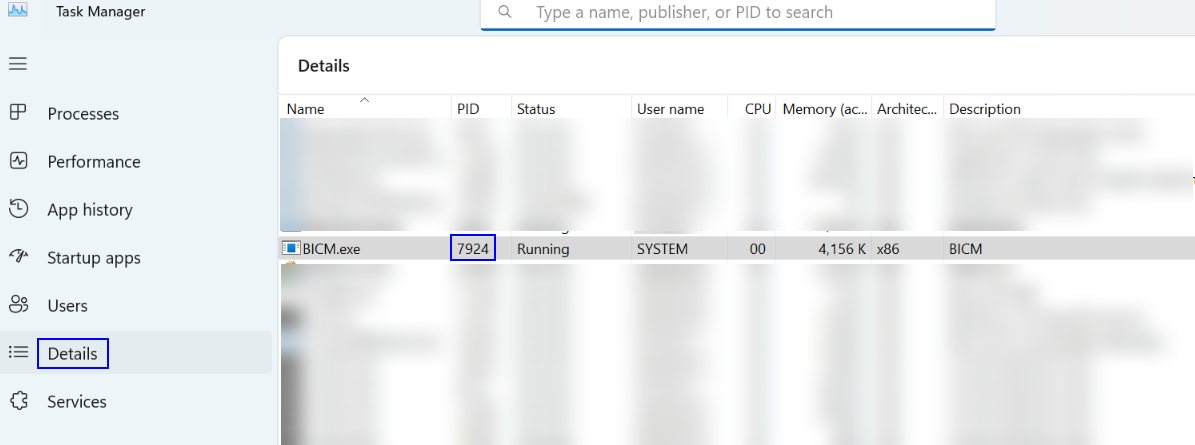
- Stop the application and restart DevEco Studio.
Method 2: Set other environment variables for the hdc port number.
- Setting environment variables in Windows:
Choose This PC > Properties > Advanced system settings > Advances > Environment Variables, add the variable OHOS_HDC_SERVER_PORT, and set its value to any port number not in use, such as 7035.
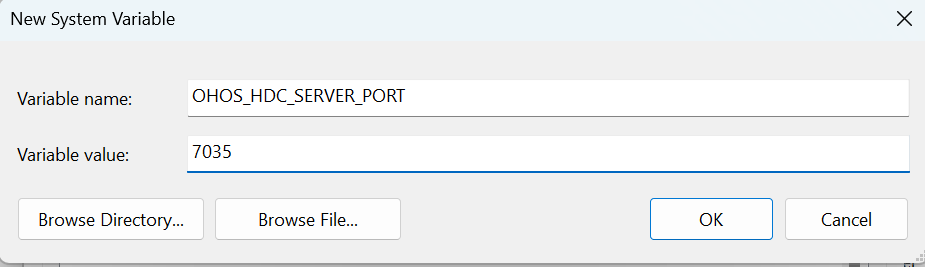
Then restart DevEco Studio.
- Setting environment variables in macOS:
Start the terminal and run the following command:
echo $SHELL
- If the command output is /bin/bash, open the .bash_profile file.
vi ~/.bash_profile
- If the command output is /bin/zsh, open the .zshrc file.
vi ~/.zshrc
- If the command output is /bin/bash, open the .bash_profile file.
- Press i to enter Insert mode.
- Enter the following content to add OHOS_HDC_SERVER_PORT information to PATH.
OHOS_HDC_SERVER_PORT=7035
launchctl setenv OHOS_HDC_SERVER_PORT $OHOS_HDC_SERVER_PORT
export OHOS_HDC_SERVER_PORT
- Press Esc to exit the edit mode, enter :wq, and press Enter to save the settings.
- Run the command for the environment variable to take effect.
- Then restart DevEco Studio.
Method 3: If the port is not occupied, check whether the port is blocked by the firewall. If it is, unblock the port and then restart DevEco Studio to try again.