When to Use
The WebSocket module can be used to establish bidirectional connections between the server and the client.
Available APIs
The following table lists the common WebSocket APIs. For details, see net_websocket.h.
| API | Description |
|---|---|
| OH_WebSocketClient_Constructor(WebSocket_OnOpenCallback onOpen, WebSocket_OnMessageCallback onMessage, WebSocket_OnErrorCallback onError, WebSocket_OnCloseCallback onclose) | Constructor used to create a WebSocket client. |
| OH_WebSocketClient_AddHeader(struct WebSocket *client, struct WebSocket_Header header) | Adds the header information to the client request. |
| OH_WebSocketClient_Connect(struct WebSocket *client, const char *url, struct WebSocket_RequestOptions options) | Connects the WebSocket client to the server. |
| OH_WebSocketClient_Send(struct WebSocket *client, char *data, size_t length) | Sends data from the WebSocket client to the server. |
| OH_WebSocketClient_Close(struct WebSocket *client, struct WebSocket_CloseOption options) | Closes the WebSocket connection proactively on the client side. |
| OH_WebSocketClient_Destroy(struct WebSocket *client) | Releases the WebSocket connection context and resources. |
[h2]How to Develop
To use related APIs to establish a connection to the WebSocket server, you need to create a Native C++ project, encapsulate the APIs in the source file, and call these APIs at the ArkTS layer. You can use hilog or console.info to print the log information on the console or generate device logs.
The following walks you through on how to establish a connection to the WebSocket server, send messages to the WebSocket server, and close the WebSocket connection.
[h2]Adding Dependencies
Adding Dynamic Link Libraries
Add the following library to CMakeLists.txt.
libace_napi.z.so
libnet_websocket.so
Including Header Files
#include "napi/native_api.h"
#include "network/netstack/net_websocket.h"
#include "network/netstack/net_websocket_type.h"
[h2]Building the Project
-
Write the API call code in the source file to allow applications to receive the URL string passed from ArkTS, create a pointer to the WebSocketClient object, and check whether the connection to the WebSocket server is successful.
#include "napi/native_api.h"
#include "network/netstack/net_websocket.h"
#include "network/netstack/net_websocket_type.h"
#include "hilog/log.h"

#include <cstring>

#undef LOG_DOMAIN
#undef LOG_TAG
#define LOG_DOMAIN 0x3200 // Global domain, which identifies the service domain.
#define LOG_TAG "WSDEMO"  // Global tag, which identifies the module log tag.


// Global variables of the WebSocket client
static struct WebSocket *g_client = nullptr;

static void onOpen(struct WebSocket *wsClient, WebSocket_OpenResult openResult)
{
    (void)wsClient;
    OH_LOG_INFO(LOG_APP, "onOpen: code: %{public}u, reason: %{public}s", openResult.code, openResult.reason);
}

static void onMessage(struct WebSocket *wsClient, char *data, uint32_t length)
{
    (void)wsClient;
    char *tmp = new char[length + 1];
    for (uint32_t i = 0; i < length; i++) {
        tmp[i] = data[i];
    }
    tmp[length] = '\0';
    OH_LOG_INFO(LOG_APP, "onMessage: len: %{public}u, data: %{public}s", length, tmp);
    delete[] tmp;
}

static void onError(struct WebSocket *wsClient, WebSocket_ErrorResult errorResult)
{
    (void)wsClient;
    OH_LOG_INFO(LOG_APP, "onError: code: %{public}u, message: %{public}s", errorResult.errorCode,
                errorResult.errorMessage);
}

static void onClose(struct WebSocket *wsClient, WebSocket_CloseResult closeResult)
{
    OH_LOG_INFO(LOG_APP, "onClose: code: %{public}u, reason: %{public}s", closeResult.code, closeResult.reason);
    // Release the corresponding client resources after receiving the connection close event.
    if (wsClient == g_client) {
        g_client = nullptr;
    }
    OH_WebSocketClient_Destroy(wsClient);
}

static napi_value ConnectWebsocket(napi_env env, napi_callback_info info)
{
    size_t argc = 2;
    napi_value args[2] = {nullptr};
    napi_value result;

    napi_get_cb_info(env, info, &argc, args, nullptr, nullptr);

    size_t length = 0;
    napi_status status = napi_get_value_string_utf8(env, args[0], nullptr, 0, &length);
    if (status != napi_ok) {
        napi_get_boolean(env, false, &result);
        return result;
    }

    if (g_client != nullptr) {
        OH_LOG_INFO(LOG_APP, "there is already one websocket client running.");
        napi_get_boolean(env, false, &result);
        return result;
    }
    char *buf = new char[length + 1];
    std::memset(buf, 0, length + 1);
    napi_get_value_string_utf8(env, args[0], buf, length + 1, &length);
    // Create a pointer to the WebSocketClient object.
    g_client = OH_WebSocketClient_Constructor(onOpen, onMessage, onError, onClose);
    if (g_client == nullptr) {
        delete[] buf;
        napi_get_boolean(env, false, &result);
        return result;
    }
    // Connect to the WebSocket server identified by the URL stored in the buffer.
    int connectRet = OH_WebSocketClient_Connect(g_client, buf, {});

    delete[] buf;
    napi_get_boolean(env, connectRet == 0, &result);
    return result;
}


static napi_value SendMessage(napi_env env, napi_callback_info info)
{
    size_t argc = 1;
    napi_value args[1] = {nullptr};
    napi_value result;

    napi_get_cb_info(env, info, &argc, args, nullptr, nullptr);

    size_t length = 0;
    napi_status status = napi_get_value_string_utf8(env, args[0], nullptr, 0, &length);
    if (status != napi_ok) {
        napi_create_int32(env, -1, &result);
        return result;
    }

    if (g_client == nullptr) {
        OH_LOG_INFO(LOG_APP, "websocket client not connected.");
        napi_create_int32(env, WebSocket_ErrCode::WEBSOCKET_CLIENT_NULL, &result);
        return result;
    }
    char *buf = new char[length + 1];
    std::memset(buf, 0, length + 1);
    napi_get_value_string_utf8(env, args[0], buf, length + 1, &length);
    // Send the messages in the buffer to the server.
    int ret = OH_WebSocketClient_Send(g_client, buf, length);

    delete[] buf;
    napi_create_int32(env, ret, &result);
    return result;
}

static napi_value CloseWebsocket(napi_env env, napi_callback_info info)
{
    napi_value result;
    if (g_client == nullptr) {
        OH_LOG_INFO(LOG_APP, "websocket client not connected.");
        napi_create_int32(env, -1, &result);
        return result;
    }
    // Initiate a close request. Resources are released in the onClose callback.
    int ret = OH_WebSocketClient_Close(g_client, {
                                                   .code = 0,
                                                   .reason = "Actively Close",
                                               });
    napi_create_int32(env, ret, &result);
    return result;
}
The ConnectWebsocket function receives a WebSocket URL and attempts to establish a connection. It returns true if the connection is successful and false otherwise. Before creating the WebSocket struct pointer that represents the WebSocket client, define the following callbacks: the onOpen callback for when the connection is opened, the onMessage callback for receiving normal messages, the onError callback for receiving error messages, and the onClose callback for receiving close messages. In the sample code, functions such as OH_WebSocketClient_Send and OH_WebSocketClient_Close are also called to send messages to the server and proactively close the WebSocket connection.
-
Initialize and export the napi_value objects encapsulated through NAPI, and expose the preceding functions to JavaScript through external function APIs. In the sample code, the ConnectWebsocket function is exposed as the external function Connect, the SendMessage function is exposed as the external function Send, and the CloseWebsocket function is exposed as the external function Close.
EXTERN_C_START static napi_value Init(napi_env env, napi_value exports) { napi_property_descriptor desc[] = { {"Connect", nullptr, ConnectWebsocket, nullptr, nullptr, nullptr, napi_default, nullptr}, {"Send", nullptr, SendMessage, nullptr, nullptr, nullptr, napi_default, nullptr}, {"Close", nullptr, CloseWebsocket, nullptr, nullptr, nullptr, napi_default, nullptr}, }; napi_define_properties(env, exports, sizeof(desc) / sizeof(desc[0]), desc); return exports; } EXTERN_C_END -
Register the objects successfully initialized in the previous step into Node.js by using the napi_module_register function of RegisterEntryModule.
static napi_module demoModule = { .nm_version = 1, .nm_flags = 0, .nm_filename = nullptr, .nm_register_func = Init, .nm_modname = "entry", .nm_priv = ((void *)0), .reserved = {0}, }; extern "C" __attribute__((constructor)) void RegisterEntryModule(void) { napi_module_register(&demoModule); } -
Define the types of the functions in the index.d.ts file of the project. For example, the Connect function takes a string parameter as the input parameter and returns a Boolean value indicating whether the WebSocket connection is successfully established.
export const Connect: (url: string) => boolean;
export const Send: (data: string) => number;
export const Close: () => number;
-
Call the encapsulated APIs in the index.ets file.
import testWebsocket from 'libentry.so'; @Entry @Component struct Index { @State wsUrl: string = ''; @State content: string = ''; @State connecting: boolean = false; build() { Navigation() { Column() { Column() { Text($r('app.string.WebSocket_address')) .fontColor(Color.Gray) .textAlign(TextAlign.Start) .width('100%') TextInput() .width('100%') .id('textInput_address') .onChange((value) => { this.wsUrl = value; }) } .margin({ bottom: 16 // Spacing from the bottom }) .padding({ left: 16, // Spacing from the left right: 16 // Spacing from the right }) Column() { Text($r('app.string.Content')) .fontColor(Color.Gray) .textAlign(TextAlign.Start) .width('100%') TextInput() .width('100%') .id('textInput_content') .enabled(this.connecting) .onChange((value) => { this.content = value; }) } .margin({ bottom: 16 // Spacing from the bottom }) .padding({ left: 16, // Spacing from the left right: 16 // Spacing from the right }) Blank() Column({ space: 12 // Spacing }) { Button($r('app.string.Connect')) .id('Connect') .enabled(!this.connecting) .onClick(() => { let connRet = testWebsocket.Connect(this.wsUrl); if (connRet) { this.connecting = true; // ··· } // ··· }) Button($r('app.string.Send')) .id('Send') .enabled(this.connecting) .onClick(() => { testWebsocket.Send(this.content); // ··· }) Button($r('app.string.Close')) .id('Close') .enabled(this.connecting) .onClick(() => { let closeResult = testWebsocket.Close(); if (closeResult != -1) { this.connecting = false; // ··· } // ··· }) } } } } } -
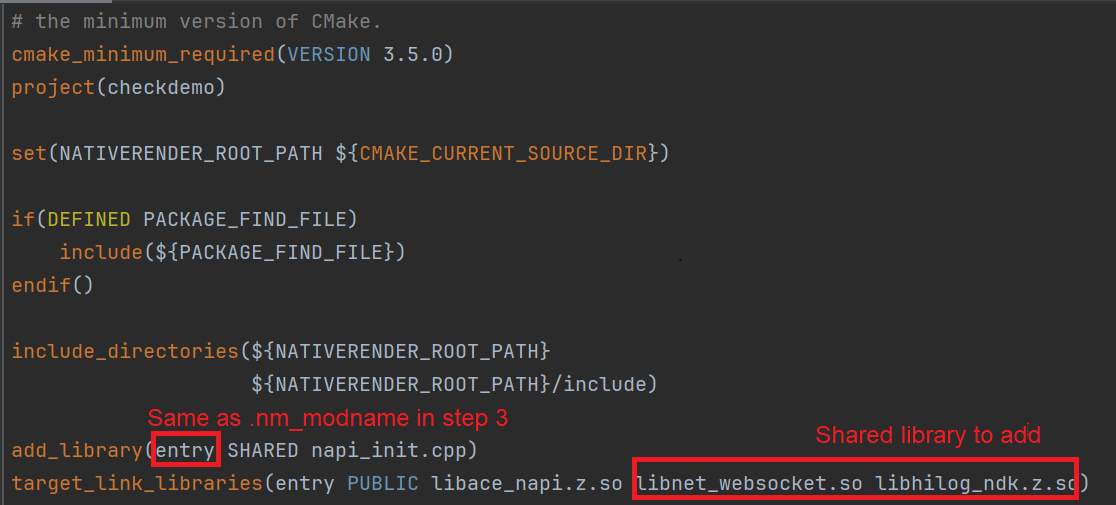
Configure the CMakeLists.txt file. Add the required shared library, that is, libnet_websocket.so, to target_link_libraries in the CMakeLists.txt file automatically generated by the project.
As shown in the following figure, entry in add_library is the modename automatically generated by the project. If you want to change its value, ensure that it is the same as the .nm_modname in step 3.
-
To call WebSocket C APIs, make sure that you have the ohos.permission.INTERNET permission. Add this permission to the requestPermissions item in the module.json5 file.
After the preceding steps, the entire project is set up. Then, you can connect to the device to run the project to view logs.
Test Procedure
-
Connect the device and use DevEco Studio to open the project.
-
Run the project. The following page is displayed.
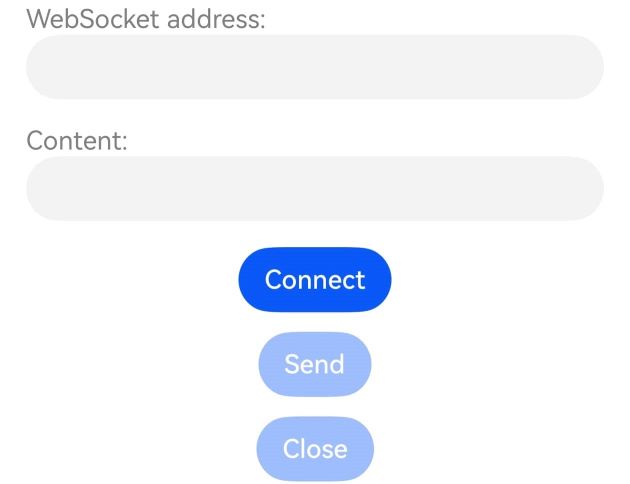
Description of settings:
-
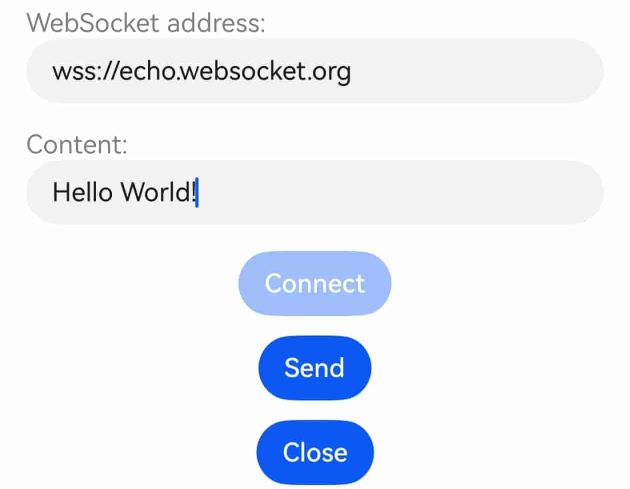
In the text box in the first line, enter a WebSocket URL starting with ws:// or wss://.
-
Tap Connect. If the connection is successful, the onOpen callback is triggered and logs are printed.
-
Enter the content to be sent to the server in the Content text box and tap Send. If the server returns a message, the onMessage callback is triggered and logs are printed.
-
Tap Close. The WebSocket connection is released. You can enter a new WebSocket URL to establish a new connection.

-