Before starting debugging on the Emulator, register a debug credential with AppGallery Connect to secure the access of your app or atomic service to Cloud Foundation Kit. When you start your app or atomic service on the Emulator and trigger an API of Cloud Functions, Cloud DB, or Cloud Storage, the Emulator will generate a debug credential and output it to the log. Register the debug credential with AppGallery Connect, and you can debug your app or atomic service on the Emulator.
The procedure is as follows:
Obtain the debug credential.
Create and start an Emulator. For details, please refer to Managing the Emulator.
Start your app or atomic service on the Emulator and trigger an API of Cloud Functions, Cloud DB, or Cloud Storage (an API of Cloud Functions is recommended). The API call will fail because the debug credential has not been registered. Ignore the failure and go to the next step.
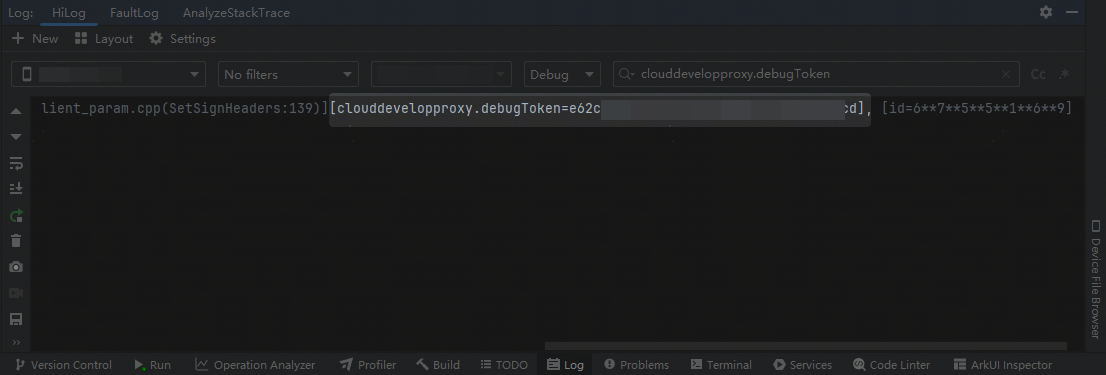
Select No filters, use the keyword clouddevelopproxy.debugToken to find the debug credential in the log, and copy the debug credential.
Format: [clouddevelopproxy.debugToken=xxx], where xxx indicates the debug credential.

If the debug credential cannot be found in the log, troubleshoot as follows:
Verify that the Emulator's network connection is functioning properly.
Check whether the app uses an incorrect signing mode. Currently, Cloud Foundation Kit supports two signing modes: automatically signing an app associated with a registered app or manual signing. Change the signing mode and try again.
Register the obtained debug credential with AppGallery Connect. For details, please refer to Registering an Emulator Debug Credential.
After the debug credential is registered, you can use the Emulator to debug your app or atomic service. For details about how to use the Emulator, please refer to the instructions.
If the error message returned when an API is called indicates a signature verification failure (error code 401) or an authentication failure (error code 403), or the message "create http task error" is displayed, the possible causes are as follows:
The debug credential is not registered. In this case, register an Emulator debug credential.
The registered debug credential is bound to an incorrect app or atomic service. In this case, delete the debug credential, bind the correct app or atomic service, and wait for 30 minutes before debugging.