Solution
To reference a third-party library in ArkTS, you must have xxx.so, index.d.ts, and oh-package.json5. You can find index.d.ts and oh-package.json5 in the C++ template or create them manually. In the oh-package.json5 file in the root directory of the module to be called, declare the root directory of the third-party library. Then, use the import statement to reference the third-party library declared in oh-package.json5. Note that only the .so library that is adapted for the native environment can be referenced in this way. When building the .so library, you need to implement the service functions, register the native functions, and provide the native interface file index.d.ts and configuration file oh-package.json5.
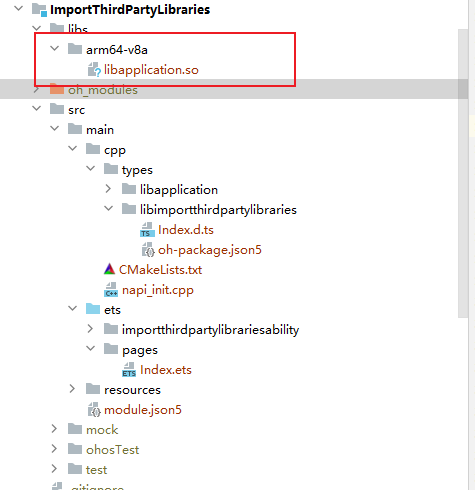
- Move the .so file to the directory of the corresponding architecture in the libs folder. In a pure ArkTS project, move the libc++\_xxx.so file generated during third-party library compilation to this directory.
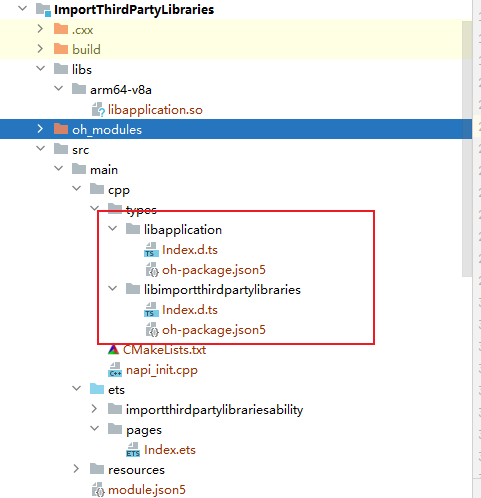
- Create a directory in src/main/cpp/types and place index.d.ts and oh-package.json5 to the directory.
- In the oh-package.json5 file of the module, declare the root directory of the third-party library.
"dependencies": { "libimportthirdpartylibraries.so": "file:./src/main/cpp/types/libimportthirdpartylibraries", "libapplication.so": "file:./src/main/cpp/types/libapplication" }, - Reference and call the dependencies declared in oh-package.json5 in the code.
import testNapi from 'libimportthirdpartylibraries.so';
import myNapi from 'libapplication.so';

@Entry
@Component
struct Index {
  @State message: string = 'Hello World';

  build() {
    Row() {
      Column() {
        Text(this.message)
          .fontSize(50)
          .fontWeight(FontWeight.Bold)
          .onClick(() => {
            console.info(`MyTest NAPI 2 + 3 = ${myNapi.add(2, 3)}`);
            console.info(`MyTest NAPI 2 - 3 = ${testNapi.sub(2, 3)}`);
          })
      }
      .width('100%')
    }
    .height('100%')
  }
}
Check the execution result.

Reference