Since API version 20, you can clear repeated notifications across devices to prevent users from being disturbed by notifications published through different ways (for example, notifications sent from a mobile phone to the current device are the same as those published by Push Kit).
Implementation Principles
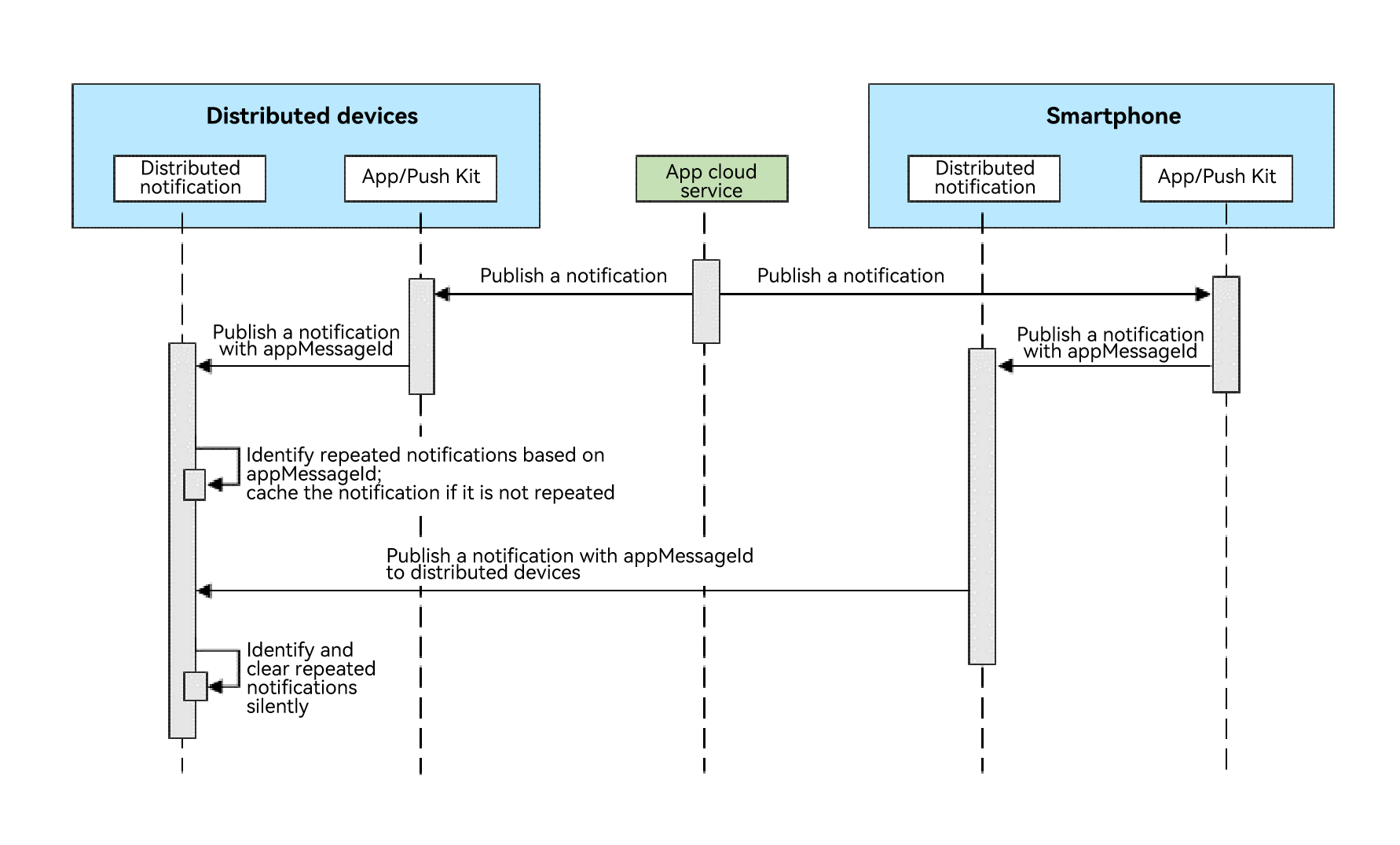
When sending a notification, an application carries the unique identifier field appMessageId. After receiving notifications published through multiple channels, distributed notification determines based on this field, thereby implementing notification deduplication.
Only the first notification is displayed on the device. Duplicate notifications received later will be silently cleared and will not be displayed or notified.
Figure 1 Process of notification deduplication in all scenarios
Constraints
- You must ensure the uniqueness of appMessageId. The same notification must retain the same value for this field across all device form factors.
- This field is only valid within 24 hours after the notification is published. It becomes invalid after 24 hours or when the device is restarted.
Available APIs
| API | Description | Description |
|---|---|---|
| publish(request: NotificationRequest): Promise<void> | Publishes a notification. | For details, see the description of the appMessageId field in the NotificationRequest object. |
How to Develop
-
Import the related modules.
import { notificationManager } from '@kit.NotificationKit'; import { BusinessError } from '@kit.BasicServicesKit'; -
Publish a notification that contains the appMessageId field.
// publish callback
let publishCallback = (err: BusinessError): void => {
  if (err) {
    console.error(`Failed to publish notification. Code is ${err.code}, message is ${err.message}`);
  } else {
    console.info(`Succeeded in publishing notification.`);
  }
};
// NotificationRequest object
let notificationRequest: notificationManager.NotificationRequest = {
  id: 1,
  content: {
    notificationContentType: notificationManager.ContentType.NOTIFICATION_CONTENT_BASIC_TEXT,
    normal: {
      title: 'test_title',
      text: 'test_text',
      additionalText: 'test_additionalText'
    }
  },
  appMessageId: 'test_appMessageId_1'
};
notificationManager.publish(notificationRequest, publishCallback);