Use Cases
Since version 4.1.0(11), the basic payment scenario is supported for merchants.
For example, if a user needs to book a hotel room in advance for a trip, the user can open the app or atomic service of a merchant, select a room, and initiate a payment. The merchant can integrate Huawei Pay to display the Huawei Pay checkout screen for the user to complete the payment for a single order.
Supported merchant models: direct merchant, platform merchant, and service provider
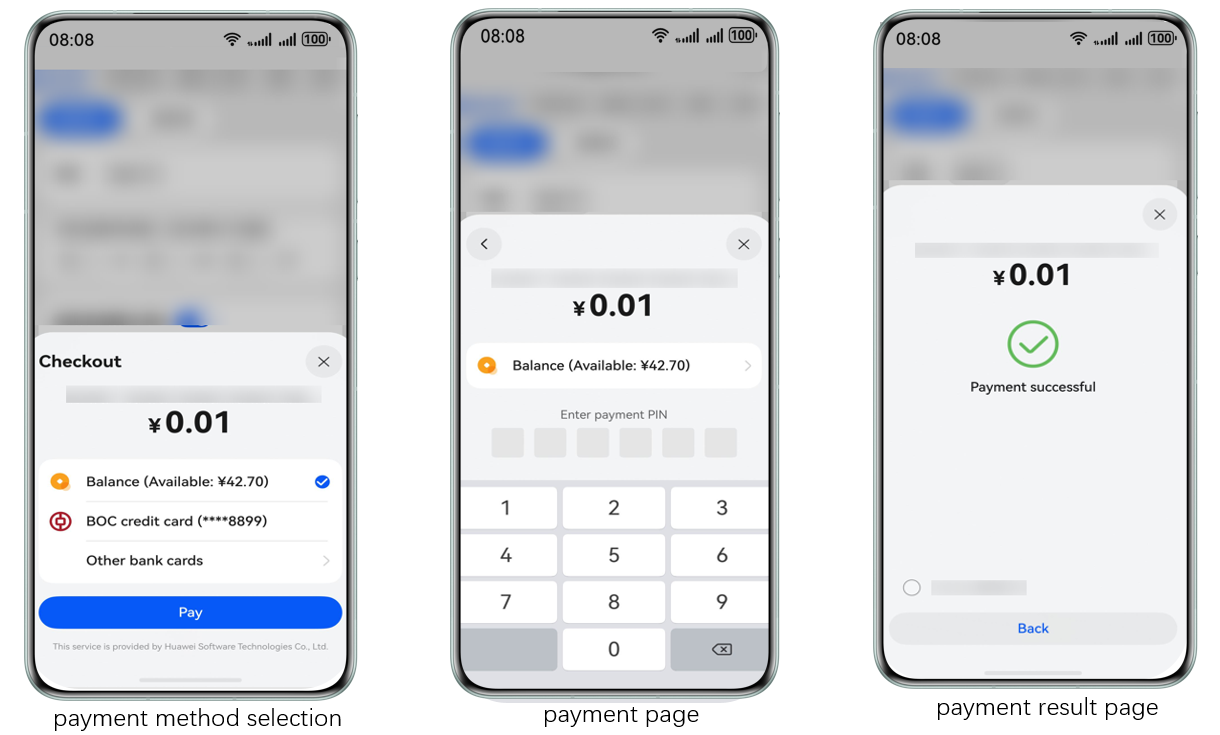
The following figure shows the Huawei Pay checkout screen.
Service Process
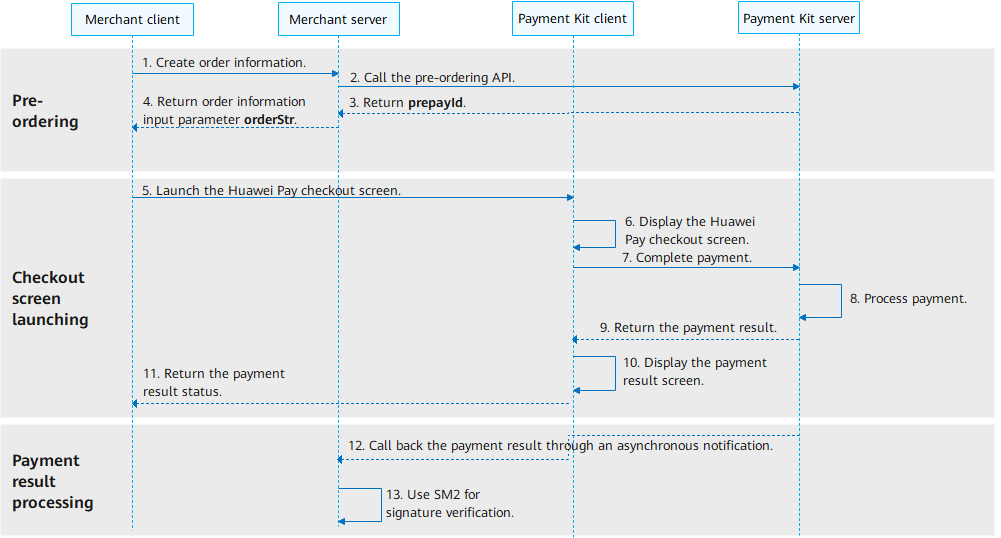
By integrating basic payment of Payment Kit, you can easily implement the payment capability in your app. The integration process is as follows.
-
The merchant client requests the merchant server to create a product order.
-
The merchant server calls the pre-ordering API for direct merchants or pre-ordering API for platform merchants/service providers of the Payment Kit server based on the merchant model.
-
The Payment Kit server returns the prepayment ID (prepayId).
-
The merchant server constructs the order information parameter orderStr and returns it to the merchant client.
-
The merchant client calls the requestPayment API to launch the checkout screen of Payment Kit.
-
The Payment Kit client displays the checkout screen.
-
The user completes the payment on the checkout screen. The Payment Kit client receives the payment result and requests the Payment Kit server to process the payment.
-
The Payment Kit server successfully processes the payment order and asynchronously processes the payment.
-
The Payment Kit server returns the payment result to the Payment Kit client.
-
The Payment Kit client displays the payment result screen.
-
After the user closes the payment result screen, the Payment Kit client returns the payment status to the merchant client.
-
After the payment is processed, the Payment Kit server calls the callback API to return the payment result to the merchant server.
-
After receiving the payment result callback response, the merchant server performs SM2-based signature verification on the payment result.
API Description
APIs use either a promise or AsyncCallback to return the result. The APIs that use a promise provide the same functions as their counterparts that use an AsyncCallback. For details about the API, please refer to API Reference.
| API Name | Description |
|---|---|
| requestPayment(context:common.UIAbilityContext, orderStr: string): Promise<void>; | Launches the checkout screen of Payment Kit. |
| requestPayment(context:common.UIAbilityContext, orderStr: string, callback: AsyncCallback<void>): void; | Launches the checkout screen of Payment Kit. |
[h2]Pre-ordering (Server Development)
-
Call the pre-ordering API for direct merchants or pre-ordering API for platform merchants/service providers based on the merchant model to obtain the prepayment ID (prepayId).
To ensure the security and reliability of payment orders, the input parameters in the request body and the PayMercAuth object in the request header need to be sorted and concatenated for signing. For details, please refer to Signing Rules.
-
Construct the order information parameter orderStr.
The merchant server needs to sign the input parameter orderStr of the client payment API and return the signed parameter to the client.

The signing rule of the sign field in orderStr is to sort and concatenate all parameters except the sign field and then sign the concatenated string (for details, please refer to Signing Rules). The signing value is assigned to the sign field.
The following is a snippet of the sample code for sending an open API request and constructing the orderStr parameter:
import com.huawei.petalpay.paymentservice.apiservice.client.model.BaseGwRspWithSign;
import com.huawei.petalpay.paymentservice.apiservice.client.model.PreOrderCreateRequestV2;
import com.huawei.petalpay.paymentservice.apiservice.client.model.PreOrderCreateResponse;
import com.huawei.petalpay.paymentservice.core.client.DefaultPetalPayClient;
import com.huawei.petalpay.paymentservice.core.client.PetalPayClient;
import com.huawei.petalpay.paymentservice.example.common.CommonResponse;
import com.huawei.petalpay.paymentservice.example.common.MercConfigUtil;
import lombok.extern.slf4j.Slf4j;

@Slf4j
public class MercApiController {
    private static PetalPayClient payClient = new DefaultPetalPayClient(MercConfigUtil.getMercConfig());
    /**
     * Call the pre-ordering API.
     */
    public CommonResponse aggrPreOrderForAppV2() {
        // Assemble the object.
        PreOrderCreateRequestV2 preOrderReq = getPreOrderCreateRequestV2();
        PreOrderCreateResponse response = null;
        try {
            response = payClient.execute("POST", "/api/v2/aggr/preorder/create/app", PreOrderCreateResponse.class,
                preOrderReq);
        } catch (Exception e) {
            // Handle exceptions.
            log.error("request error ", e);
            return CommonResponse.buildErrorRsp(e.getMessage());
        }
        if (!validResponse(response)) {
            log.error("response is invalid ", response);
            return CommonResponse.buildFailRsp(response);
        }
        return CommonResponse.buildSuccessRsp(payClient.buildOrderStr(response.getPrepayId()));
    }
    public static boolean validResponse(BaseGwRspWithSign rsp) {
        return rsp != null && "000000".equals(rsp.getResultCode());
    }
    /**
     * Assemble the pre-ordering API request parameters. The merchant needs to implement the function as needed.
     */
    public static PreOrderCreateRequestV2 getPreOrderCreateRequestV2() {
        return PreOrderCreateRequestV2.builder()
            .mercOrderNo("pay-example-" + System.currentTimeMillis()) // The order ID changes every time. Replace pay-example- with the order prefix of the merchant.
            .appId(MercConfigUtil.APP_ID)  // Set the app ID to the one bound to the merchant.
            .mercNo(MercConfigUtil.MERC_NO) // Merchant ID.
            .tradeSummary("Product brief name") // Change this to the product brief name.
            .totalAmount(2L)
            .callbackUrl("https://www.xxxxxx.com/hw/pay/callback") // Callback notification URL, which must be an HTTPS URL that can be directly accessed. The value can contain a maximum of 512 characters. Replace it with the correct result notification callback URL.
            .build();
    }
}
[h2]Launching the Huawei Pay Checkout Screen (On-Device Development)
The merchant client uses orderStr as a parameter to call the requestPayment API to launch the checkout screen of Payment Kit.
If the API returns a result using the .then() method, the order payment is successful. If the API returns a result using the .catch() method, the order payment fails. If the request is abnormal, you can obtain the error code through error.code. For details about the error code, please refer to Error Codes. The sample code is as follows:
import { BusinessError } from '@kit.BasicServicesKit';
import { paymentService } from '@kit.PaymentKit';
import { common } from '@kit.AbilityKit';

@Entry
@Component
struct Index {
  context: common.UIAbilityContext = this.getUIContext().getHostContext() as common.UIAbilityContext;
  requestPaymentPromise() {
    // Use your own orderStr.
    const orderStr = '{"app_id":"***","merc_no":"***","prepay_id":"xxx","timestamp":"1680259863114","noncestr":"1487b8a60ed9f9ecc0ba759fbec23f4f","sign":"****","auth_id":"***"}';
    paymentService.requestPayment(this.context, orderStr)
      .then(() => {
        // The payment is successful.
        console.info('succeeded in paying');
      })
      .catch((error: BusinessError) => {
        // The payment fails.
        console.error(`failed to pay, error.code: ${error.code}, error.message: ${error.message}`);
      });
  }

  build() {
    Column() {
      Button('requestPaymentPromise')
        .type(ButtonType.Capsule)
        .width('50%')
        .margin(20)
        .onClick(() => {
          this.requestPaymentPromise();
        })
    }
    .width('100%')
    .height('100%')
  }
} 
-
If a user has not signed in, the system will automatically launch the HUAWEI ID sign-in screen, asking the user to sign in first.
-
The payment is successful. It is not recommended to use the result returned by the client as the user's payment result. Instead, use the result notification received by the server or the result returned by the query API.
[h2]Payment Result Callback Notification (Server Development)
After the payment is successful, the Huawei Pay server calls your callback API to send the payment information to your server. For details about the callback information, please refer to the callback notification for the direct merchant payment result or callback notification for the platform merchant/service provider.

The callback API is the input parameter callbackUrl used when you call the pre-ordering API.
To ensure the validity of the information, the merchant server needs to perform SM2-based signature verification on the returned payment information. Pay attention to the following during signature verification:
-
Use the complete content of the notification for signature verification.
-
Before signature verification, sort and combine the returned data. The sign field indicates the signature value. The content to be verified must exclude the sign field.
-
Use the Huawei Pay certificate as the public key for signature verification.
Extension
After implementing the preceding capabilities, you can also call the following APIs to perform order-related operations.
[h2]Direct Merchant
Query a payment order, apply for a refund, query a refund order, query a reconciliation statement, and query a settlement bill.
[h2]Platform Merchant/Service Provider
Query a payment order, apply for a refund, query a refund order, query a reconciliation statement, and query a settlement bill.