Since API version 26.0.0, Online Authentication Kit has added the digital identity feature, which provides mobile devices with digital identity capabilities based on the Decentralized Identifier (DID) protocol. After deploying a server that complies with the DID protocol, your app can implement cross-platform digital identity services based on the digital identity capabilities of mobile devices. The digital identity service provides the following capabilities:
- DID key generation and use: After generating a DID key for a user, an app can use the key associated with the user's DID.
- DID import, query, and deletion: When creating a DID for a user, your app can import information such as the DID identifier and DID document to a device.
- Verifiable credential (VC) import, query, and deletion: When issuing a digital identity credential (that is, a VC) to a user, your app can import the VC to the TEE of the device for secure storage, ensuring user privacy. Your app can also query and delete the VC.
- Verifiable presentation (VP) display: When your app needs to request a user's digital identity credential VP, the Digital Identity service assembles the attributes to be disclosed in the VC into a VP in the TEE after obtaining the user's consent, and returns the VP to your app. Credential presentation and partial disclosure through biometric authentication authorization are supported, ensuring the security and privacy of users' identity credentials.
Use Cases
To address issues such as complex user operations and privacy leakage risks associated with traditional identity verification methods (such as uploading ID photos), Online Authentication Kit provides digital identity capabilities and supports the DID protocol. This allows services to securely store digital identity credentials (such as digital ID credentials) in the TEE of a device. Users can then securely and conveniently use these credentials through biometric authentication authorization. This effectively enhances the privacy and security of user identity information while optimizing user experience.
Constraints
This function can be used only when the following conditions are met:
-
A server that complies with DID standards has been deployed for your app.
-
Mobile devices must support biometric features (fingerprints or 3D faces). Check whether a mobile device supports the ATL4 authentication trust level.
import { BusinessError } from '@kit.BasicServicesKit'; import { userAuth } from '@kit.UserAuthenticationKit'; try { // Example: Check whether the device supports the ATL4 authentication trust level for facial recognition. userAuth.getAvailableStatus(userAuth.UserAuthType.FACE, userAuth.AuthTrustLevel.ATL4); console.info('current auth trust level is supported'); } catch (error) { const err: BusinessError = error as BusinessError; console.error(`current auth trust level is not supported. Code is ${err?.code}, message is ${err?.message}`); } -
The DID service returns the credential information and anonymized personal information such as fingerprint ID and facial ID to the app to provide passwordless authentication capabilities based on specific biometric features. Before uploading personal information to the cloud, an app must explicitly inform the user and obtain their consent. For details, see Personal Data Processing Description.
[h2]Enabling Digital Identity
When an app needs to create a digital identity for a user, it can use the digital identity service to create and use keys associated with the user's DID, and import the user's DID document to a device. After a digital identity is created, the app can issue credentials to the user based on the user's DID and use the user's DID key to sign data and grant authorization.
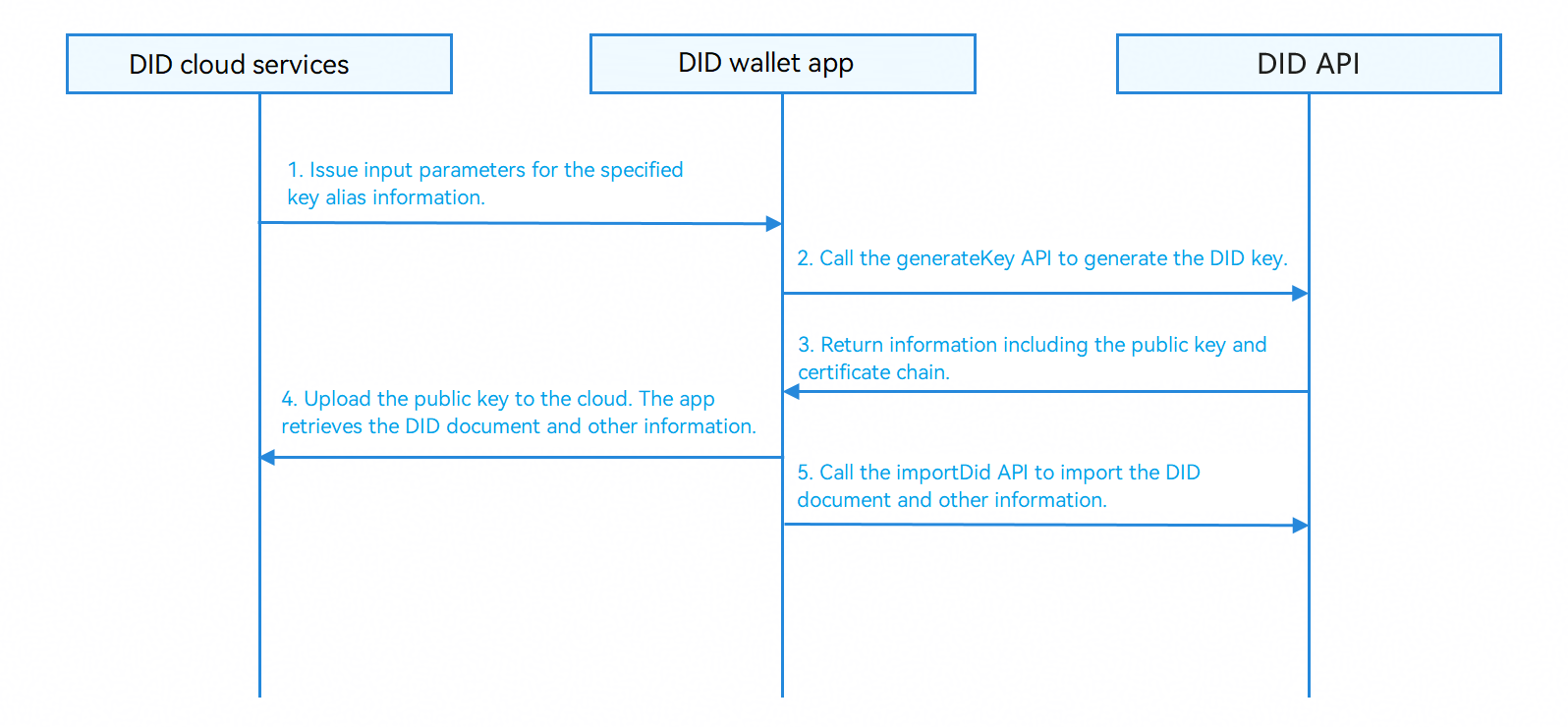
Process description:
- The app cloud delivers parameters such as the specified key alias.
- An app constructs a GenerateKeyRequest object, specifies parameters such as the key alias, algorithm type, and usage, and calls the generateKey API to generate a DID key.
- The DID API returns information such as the public key and certificate chain.
- The application uploads information such as the public key to the application cloud, where the cloud completes tasks like publishing the public key to the blockchain and retrieves the DID document.
- The app calls the importDid API to import information such as the DID document.
[h2]Issuing a Digital Credential
The app issues a digital identity credential (such as a teacher credential) to the user. The app can use the digital identity service to import the digital identity credential to a device for secure storage, so that the user can present the credential on the device.

Process description:
- The app obtains an encrypted (or unencrypted) VC from the issuer.
- The app constructs an ImportDigitalCredentialRequest object, configures decryption parameters and display settings, and calls the importDigitalCredential API to import the credential.
- The DID API verifies the credential format, securely stores the credential, and returns the API call result and credential summary.
[h2]Presenting a Digital Credential
When an app functions as the verifier and needs to request a user's digital identity credential for identity verification or granting corresponding benefits, the app can use the digital identity service to request the user's credential. After the user confirms the credential to be presented and the attribute fields to be disclosed, the digital identity service presents the credential to the verifier app.
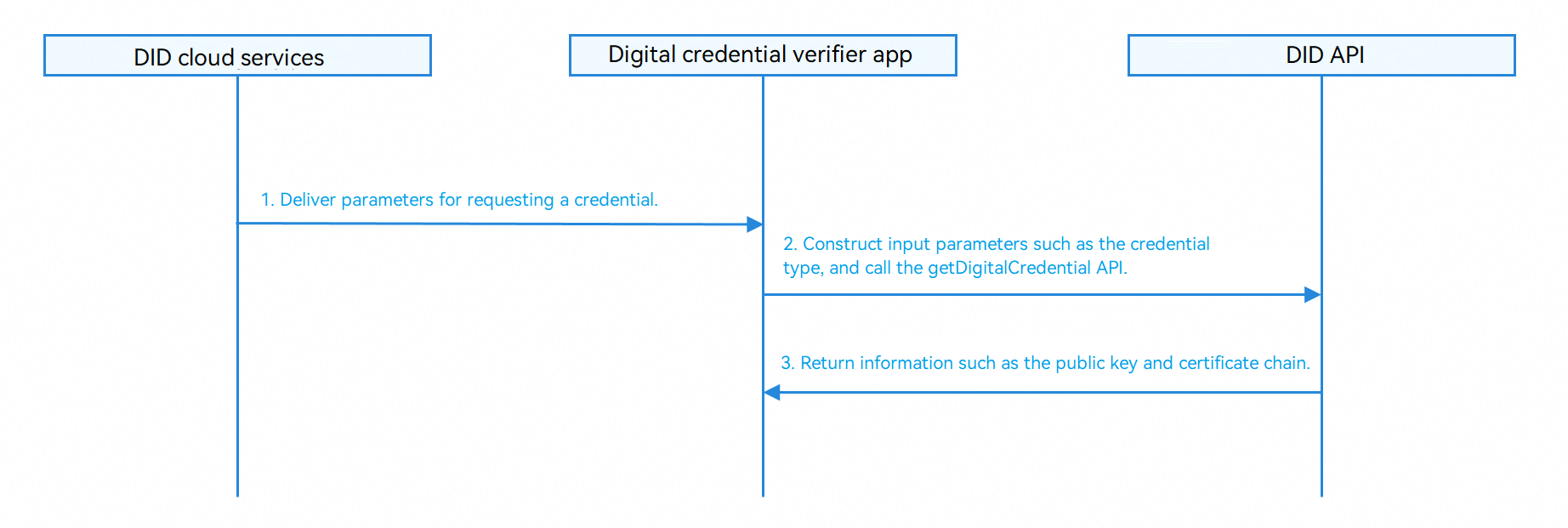
Process description:
- The app cloud delivers the parameters for requesting a credential.
- The app constructs a GetDigitalCredentialRequest object, specifies the credential type and authenticator information, and calls the getDigitalCredential API to obtain the credential.
- The DID API returns the VP to the app.
API Description
Services use the DID capability to enable digital identities, import digital credentials, and present digital credentials. For details about the APIs, please refer to the API Reference.
| API | Description |
|---|---|
| generateKey(context: common.Context, generateKeyRequest: GenerateKeyRequest): Promise<GenerateKeyResponse> | Generates a DID key. This API returns the result asynchronously through a promise. |
| importDid(context: common.Context, importDidRequest: ImportDidRequest): Promise<void> | Imports DID information. This API returns the result asynchronously through a promise. |
| queryDid(context: common.Context, queryDidRequest: QueryDidRequest): Promise<QueryDidResponse> | Queries DID information. This API returns the result asynchronously through a promise. |
| deleteDid(context: common.Context, did: string): Promise<void> | Deletes a DID. This API returns the result asynchronously through a promise. |
| sign(context: common.Context, signRequest: SignRequest): Promise<SignResponse> | Signs data. This API returns the result asynchronously through a promise. |
| importDigitalCredential(context: common.Context, importDigitalCredentialRequest: ImportDigitalCredentialRequest): Promise<ImportDigitalCredentialResponse> | Imports a digital credential. This API returns the result asynchronously through a promise. |
| queryDigitalCredential(context: common.Context, did?: string, credentialId?: string): Promise<QueryDigitalCredentialResponse> | Queries a digital credential. This API returns the result asynchronously through a promise. |
| deleteDigitalCredential(context: common.Context, did?: string, credentialId?: string): Promise<void> | Deletes a digital credential. This API returns the result asynchronously through a promise. |
| getDigitalCredential(context: common.Context, getDigitalCredentialRequest: GetDigitalCredentialRequest): Promise<GetDigitalCredentialResponse> | Obtains a digital credential. This API returns the result asynchronously through a promise. |
[h2]Enabling Digital Identity
-
Import the DID module and construct a key generation request.
import { did } from '@kit.OnlineAuthenticationKit'; import { buffer } from '@kit.ArkTS'; import { common } from '@kit.AbilityKit'; import { BusinessError } from '@kit.BasicServicesKit'; // These functions for importing DID-related modules are placed at the beginning of the file and will not be displayed in subsequent sample code. // The following code for obtaining the context must be placed in the UI component class for calling. This is a common method for obtaining the context and will not be displayed in subsequent sample code. let context: common.UIAbilityContext = this.getUIContext().getHostContext() as common.UIAbilityContext; async function generateKey() { // Construct a key generation request. let generateKeyRequest: did.GenerateKeyRequest = { keyAlias: 'myDidKey', keyConfig: { algorithm: did.KeyAlgo.SM2, purposeList: [did.KeyPurpose.SIGN, did.KeyPurpose.VERIFY] }, authenticatorConfig: { authTypeList: [did.AuthType.UVM_FINGERPRINT], requireBioId: true } }; try { let response: did.GenerateKeyResponse = await did.generateKey(context, generateKeyRequest); console.info('Succeeded in generating did key, Public Key:', response.publicKey, 'Certificate Chain:', response.certChain); // Process the returned information such as the public key and certificate chain. } catch (error) { const err: BusinessError = error as BusinessError; console.error(`Failed to generate did key. Code: ${err.code}, message: ${err.message}`); } } -
Construct a DID import request and call the importDid API to import information such as the DID document to the device.
async function importDid() { let importDidRequest: did.ImportDidRequest = { isUpdate: false, did: 'did:example:123456', didKeyList: [{ keyAlias: 'myDidKey', keyId: 'keyId123' }], didDoc: JSON.stringify({ '@context': 'https://www.w3.org/ns/did/v1', id: 'did:example:123456', //... Other DID document content }) }; try { await did.importDid(context, importDidRequest); console.info('Succeeded in importing did'); } catch (error) { const err: BusinessError = error as BusinessError; console.error(`Failed to import did. Code: ${err.code}, message: ${err.message}`); } } -
Construct a query request and call the queryDid API to check whether the DID is successfully imported.
async function queryDid() { let queryDidRequest: did.QueryDidRequest = { did: 'did:example:123456', queryDidConfig: { requireDidKey: true, requireDidDoc: true, requireAdditionalData: true } }; try { let response: did.QueryDidResponse = await did.queryDid(context, queryDidRequest); console.info('Succeeded in querying did, Did Key List:', response.didKeyList, 'Did Doc:', response.didDoc); // Process the returned DID key and DID document. } catch (error) { const err: BusinessError = error as BusinessError; console.error(`Failed to query did. Code: ${err.code}, message: ${err.message}`); } } -
Call the sign API to sign the digital signature to be signed if the DID and DID keys exist.
async function sign() { let data: string = 'data to sign'; let signRequest: did.SignRequest = { inData: new Uint8Array(buffer.from(data).buffer), keyId: 'keyId123' }; try { let response: did.SignResponse = await did.sign(context, signRequest); console.info('Succeeded in signing data, Signed Data:', response.outData); // Process the signature result. } catch (error) { const err: BusinessError = error as BusinessError; console.error(`Failed to sign data. Code: ${err.code}, message: ${err.message}`); } } -
Call the deleteDid API to delete the DID information.
async function deleteDid() {
   try {
      await did.deleteDid(context, 'did:example:123456');
      console.info('Succeeded in deleting did');
   } catch (error) {
      const err: BusinessError = error as BusinessError;
      console.error(`Failed to delete did. Code: ${err.code}, message: ${err.message}`);
   }
}
[h2]Issuing a Digital Credential
-
Construct a credential import request and configure security and display parameters.
async function importDigitalCredential() {
   let importCredentialRequest: did.ImportDigitalCredentialRequest = {
      did: 'did:example:123456',
      credentialType: did.CredentialType.VC,
      isUpdate: false,
      credentialData: JSON.stringify({
         '@context': ['https://www.w3.org/2018/credentials/v1'],
         type: ['VerifiableCredential'],
         issuer: 'did:example:issuer',
         issuanceDate: '2024-01-01T00:00:00Z',
         credentialSubject: Object, // Credential subject content
         proof: Object, // Signature information
      }),
      displayConfig: {
         credentialDisplayName: 'ID card',
         issuerDisplayName: 'Public security department',
         propertyDisplayName: 'Name'
      },
      securityConfig: {
         authConfig: {
            requireAuth: true
         }
      }
   };

   try {
      let response: did.ImportDigitalCredentialResponse =
         await did.importDigitalCredential(context, importCredentialRequest);
      console.info('Succeeded in importing digital credential, Credential Summary:',
         response.credentialSummary);
   } catch (error) {
      const err: BusinessError = error as BusinessError;
      console.error(`Failed to import digital credential. Code: ${err.code}, message: ${err.message}`);
   }
}
Note that the digital identity service can parse VCs assembled in either of the following formats:
// VC format 1 // Note: Only the fields listed below can be parsed. If additional unrecognizable fields are included, they will not be parsed by default but will be stored and included as part of the VC in subsequent VPs. Different VC formats will lead to different methods of calculating the Merkle root. Select the format based on your actual needs. { "@context": [ "https://www.w3.org/2018/credentials/v1" ], "id": "vc.XXXXXXXX", // Indicates the VC identifier. "types": [ "XXXXXXXX" ], // Credential type, for example, teacher credential type. "type": [ "VerifiableCredential", "SelectiveDisclosureVC" ], // VC type "credentialSubject": { "property1": "XXXXXXXX", "property2": "XXXXXXXX", ... }, // Credential attribute field "issuer": "did:XXXXXXXX", //: DID of the issuer "issuanceDate": "2025-02-25T12:23:43Z", // Issuance time "expirationDate": "2031-02-08T13:06:40Z",// Expiration time "auxVerificationInfo": { // Information used to calculate the Merkle root "type": "MerkleTree", "salt": { "seed": "XXXXXXXX" } }, "proof": { // VC signature "type": "SM3WithSM2", "created": "2025-02-25T12:23:43Z", "verificationMethod": "did:XXXXXXXX#key-X", "proofPurpose": "assertionMethod", "proofValue": "XXXXXXXX" } } // VC format 2 // Note: Only the fields listed below can be parsed. If additional unrecognizable fields are included, they will not be parsed by default but will be stored and included as part of the VC in subsequent VPs. Different VC formats will lead to different methods of calculating the Merkle root. Select the format based on your actual needs. { "@context": [ "https://www.w3.org/2018/credentials/v1", "https://www.w3.org/2018/credentials/examples/v1" ], "type": [ "CredentialType", // Credential type "SelectiveDisclosureCredentialType" // VC type ], "id": "did:credential:XXXXXXXX", // VC identifier "issuer": "did:XXXXXXXX", //: DID of the issuer "issuanceDate": "2024-07-11T13:50:18+08:00", // Issuance time "expirationDate": "2024-07-11T13:50:18+08:00", // Expiration time "credentialSubject": { "did": "did:XXXXXXXX", // User DID "claims": { "subject": { // Credential attribute field "property1": "XXXXXXXX", "property2": "XXXXXXXX", ... }, "seed": "XXXXXXXX" // Used to calculate the Merkle root } }, "proof": { // VC signature "type": "SM2Signature2024", "created": "2024-07-11T13:50:18+08:00", "creator": "did:XXXXXXXX", "verificationMethod": "did:XXXXXXXX#key-X", "proofPurpose": "assertionMethod", "proofValue": "XXXXXXXX" } } -
Call the queryDigitalCredential API to check whether the credential is successfully imported.
async function queryDigitalCredential() { try { let response: did.QueryDigitalCredentialResponse = await did.queryDigitalCredential(context, 'did:example:123456'); console.info('Succeeded in querying digital credential, Credential Summary List:', response.credentialSummaryList); // Process the credential digest list. } catch (error) { const err: BusinessError = error as BusinessError; console.error(`Failed to query digital credential. Code: ${err.code}, message: ${err.message}`); } } -
Call the deleteDigitalCredential API to delete the digital credential.
async function deleteDigitalCredential() {
   try {
      await did.deleteDigitalCredential(context, 'did:example:123456', 'credential123');
      console.info('Succeeded in deleting digital credential');
   } catch (error) {
      const err: BusinessError = error as BusinessError;
      console.error(`Failed to delete digital credential. Code: ${err.code}, message: ${err.message}`);
   }
}
[h2]Presenting a Digital Credential
Construct a credential obtaining request and call the getDigitalCredential API.
async function getDigitalCredential() {
  let getCredentialRequest: did.GetDigitalCredentialRequest = {
      credentialType: did.CredentialType.VP,
      displayConfig: {
        verifierDisplayName: 'An app',
        purpose: 'Identity verification'
      },
      holderConfigList: [{
        holderDid: 'did:example:123456',
        holderDidKeyId: 'keyId123'
      }],
      credentialFilterList: [{
        credentialId: 'credential123',
        issuerDid: 'did:example:issuer'
      }]
  };

  try {
      let response: did.GetDigitalCredentialResponse =
        await did.getDigitalCredential(context, getCredentialRequest);
      console.info('Succeeded in getting digital credential');
      // Process the returned credential data.
  } catch (error) {
      const err: BusinessError = error as BusinessError;
      console.error(`Failed to get digital credential. Code: ${err.code}, message: ${err.message}`);
  }
}
Note that the digital identity service can assemble VPs in either of the following formats. Parse and verify a VP based on the following formats.
// VP format 1
{
    "id": "vp.XXXXXXXX", // VP identifier
    "type": [ // VP type
    "VerifiablePresentation",
    "SelectiveDisclosureVP"
    ],
    "holder": "did:XXXXXXXX", // User DID
    "verifiableCrendential": [
    {
        // Attributes to be disclosed in the VC and all other fields (including the proof of the VC)
        "@context": [
        "https://www.w3.org/2018/credentials/v1"
        ],
        "id": "vc.XXXXXXXX",
        "types": [
        "XXXXXXXX"
        ],
        //... Other fields

        // Information used to calculate the Merkle root
        "auxVerificationInfo": {
        "type": "MerkleTree",
        "salt": {
            "seed": "XXXXXXXX"
        },
        "dataSalt": {
            "property1": "XXXXXXXX",
            "property2": "XXXXXXXX"
        },
        "dataIndex": {
            "property1": [1, 1, 1, 1],
            "property2": [0, 1, 1, 1]
        },
        "merkleSibling": {
            "property1": [
            "XXXXXXXX",
            "XXXXXXXX",
            "XXXXXXXX",
            "XXXXXXXX"
            ],
            "property2": [
            "XXXXXXXX",
            "XXXXXXXX",
            "XXXXXXXX",
            "XXXXXXXX"
            ]
        }
        }
    }
    ],
    "proof": { // VP signature
    "type": "SM3WithSM2",
    "created": "2026-07-21T09:35:34+08:00",
    "verificationMethod": "did:XXXXXXXX", // User DID
    "proofPurpose": "assertionMethod",
    "proofValue": "XXXXXXXX"
    }
}

// VP format 2
{
    "@context": [
    "https://www.w3.org/2018/credentials/v1",
    "https://www.w3.org/2018/credentials/examples/v1"
    ],
    "created": "2026-07-21T09:37:20+08:00", // Creation time
    "domain": "did:testVerifierDid", // DID of the verifier
    "type": [ // DID of the VP
    "VerifiablePresentation"
    ],
    "proof": {
    // VP signature
    "created": "2026-07-21T09:37:20+08:00",
    "creator": "testDid",
    "proofPurpose": "assertionMethod",
    "type": "SM2Signature2024",
    "verificationMethod": "did:testDidKeyId",
    "proofValue": "XXXXXXXX"
    },
    "verifiableCredential": [
    {
        // Attributes to be disclosed in the VC and all other fields
        "@context": [
        "https://www.w3.org/2018/credentials/v1",
        "https://www.w3.org/2018/credentials/examples/v1"
        ],
        "type": [
        "DisableCredentialType",
        "SelectiveDisclosureCredentialType"
        ],

        ...

        "credentialSubject": {
        "did": "did:XXXXXXXX",
        "claims": {
            "disclosedSalt": {
            // Used to calculate the Merkle root
            "property1": "XXXXXXXX",
            "property2": "XXXXXXXX"
            // ...
            },
            "subject": {
            "property1": "XXXXXXXX",
            "property2": "XXXXXXXX"
            // ...
            }
        }
        }
    }
    ]
}