Overview
To enhance program efficiency, computing-intensive tasks are often executed in C++. As a result, data must be passed between ArkTS and C++. This topic uses five common data types, Array (Uint8Array), Object, HashMap, PixelMap, and Class, as examples to describe how to pass complex parameters across programming languages.
Before you start to learn the development process in different scenarios, note that Node-API is required for cross-language data transfer. After creating a project, you need to create a native module, as shown in the following figure.
Figure 1 Creating a Napi module

[h2]Passing ArrayBuffer Data
The following walks you through on how to pass a Uint8Array array. Specifically, pass a Uint8Array array from ArkTS to C++, and return an array in C++ to ArkTS.
The following demonstrates how to pass the ArrayBuffer array between ArkTS and C++. You can also pass continuous data types such as string in the same way.
How to implement
ArrayBuffer is an object used to represent a generic, fixed-length raw binary data buffer. When receiving this type of parameter on the C++ side, the data pointer and length of the ArrayBuffer are generally obtained through the function (such as napi_get_arraybuffer_info()) provided by Node-API. In this way, the data can be accessed and operated.
To pass ArrayBuffer data from C++ to ArkTS, you need to create a data buffer (for example, std::vector<uint8_t>) at the C++ layer and fill it with required data; Then, use the functions provided by the Node-API (such as napi_create_arraybuffer() and napi_create_typedarray()) to create a new ArrayBuffer object on the ArkTS side and associate it with the data buffer in the C++ layer. Finally, pass the object to ArkTS.
How to develop
Declare a function for passing data in the index.d.ts file.
export const uint8ArrayPassing: (input: Uint8Array) => Uint8Array;
Import it to ArkTS, for example:
import ParamPassing from 'libentry.so';
Pass data of the Uint8Array type to the uint8ArrayPassing() function as a parameter.
// entry/src/main/ets/pages/Uint8ArrayPage.ets
paramPassing() {
  let sendArray: number[] = [];
  try {
    this.inputArray.forEach((inputField) => {
      if (inputField.inputStr.length > 0) {
        if (Number(inputField.inputStr) <= 0xff) {
          sendArray.push(Number(inputField.inputStr));
        } else {
          throw new Error('Invalid data type.');
        }
      }
    })
    this.printStr = `Array: [${ParamPassing.uint8ArrayPassing(new Uint8Array(sendArray))}]`;
  } catch (e) {
    this.printStr = e?.message;
  }
}
In a C++ project, define a function for passing data.
// entry\src\main\cpp\napi_init.cpp
static napi_value Uint8ArrayPassing(napi_env env, napi_callback_info info) {
    vector<uint8_t> num_array = {};
    Uint8ArrayPassingTs2Napi(env, info, num_array);
    return Uint8ArrayPassingNapi2Ts(env, num_array);
}
In the function, uint8ArrayPassingTs2Napi() is used to pass data from ArkTS to C++, and uint8ArrayPassingNapi2Ts() is used to pass data from C++ to ArkTS.
// entry\src\main\cpp\napi_init.cpp
void Uint8ArrayPassingTs2Napi(napi_env env, napi_callback_info info, vector<uint8_t> &input_array) {
    // Obtain parameters transmitted from the TS layer
    size_t argc = 1;
    napi_value args;
    // Gets detailed information about the function call, such as input parameters.
    napi_get_cb_info(env, info, &argc, &args, NULL, NULL);
    napi_value input_array_napi = args;

    // Retrieve the input array typedarray and generate input_buffer
    napi_typedarray_type type;
    napi_value input_buffer;
    size_t byte_offset;
    size_t length;
    napi_get_typedarray_info(env, input_array_napi, &type, &length, NULL, &input_buffer, &byte_offset);

    // Retrieve array data
    void *data;
    size_t byte_length;
    napi_get_arraybuffer_info(env, input_buffer, &data, &byte_length);

    if (type == napi_uint8_array) {
        uint8_t *data_bytes = (uint8_t *)(data);
        int num = length / sizeof(uint8_t);

        for (int i = 0; i < num; i++) {
            input_array.push_back(*((uint8_t *)(data_bytes) + i));
        }
    }

    return;
}
In this code, the following functions are used to obtain key information:
napi_get_cb_info(): Obtains input parameters from the ArkTS side.
napi_get_typedarray_info(): obtains the properties of a TypedArray in the Node-API module.
napi_get_arraybuffer_info(): Obtains the underlying data buffer and length of an ArrayBuffer.
Then, the data is read in a loop based on the pointer and offset, and is stored in inputArray.
// entry\src\main\cpp\napi_init.cpp
napi_value Uint8ArrayPassingNapi2Ts(napi_env env, vector<uint8_t> &output_array) {
    // Number of data
    int num = output_array.size();

    // create output_buffer
    napi_value output_buffer;
    void *output_ptr = NULL;
    napi_create_arraybuffer(env, num * sizeof(uint8_t), &output_ptr, &output_buffer);

    // output_array
    napi_value output_array_napi;
    napi_create_typedarray(env, napi_uint8_array, num, output_buffer, 0, &output_array_napi);

    // Assign values to output_ptr and output_buffer
    uint8_t *output_bytes = (uint8_t *)output_ptr;
    for (int i = 0; i < num; i++) {
        output_bytes[i] = output_array[i];
    }

    return output_array_napi;
}
In this code, two functions are used to construct a buffer and an array:
- napi_create_arraybuffer(): constructs a buffer.
- napi_create_typedarray(): constructs an array.
Then, the data is pushed into output_buffer through a loop and returned to output_array. In this way, the uint8Array data is transferred to ArkTS.
Bind and map the ArkTS and C++ APIs in Init().
static napi_value Init(napi_env env, napi_value exports) {
    napi_property_descriptor desc[] = {
        {"uint8ArrayPassing", nullptr, Uint8ArrayPassing, nullptr, nullptr, nullptr, napi_default, nullptr},
        // ...
    };
    // ...
}
Implementation effect

[h2]Passing Object Data
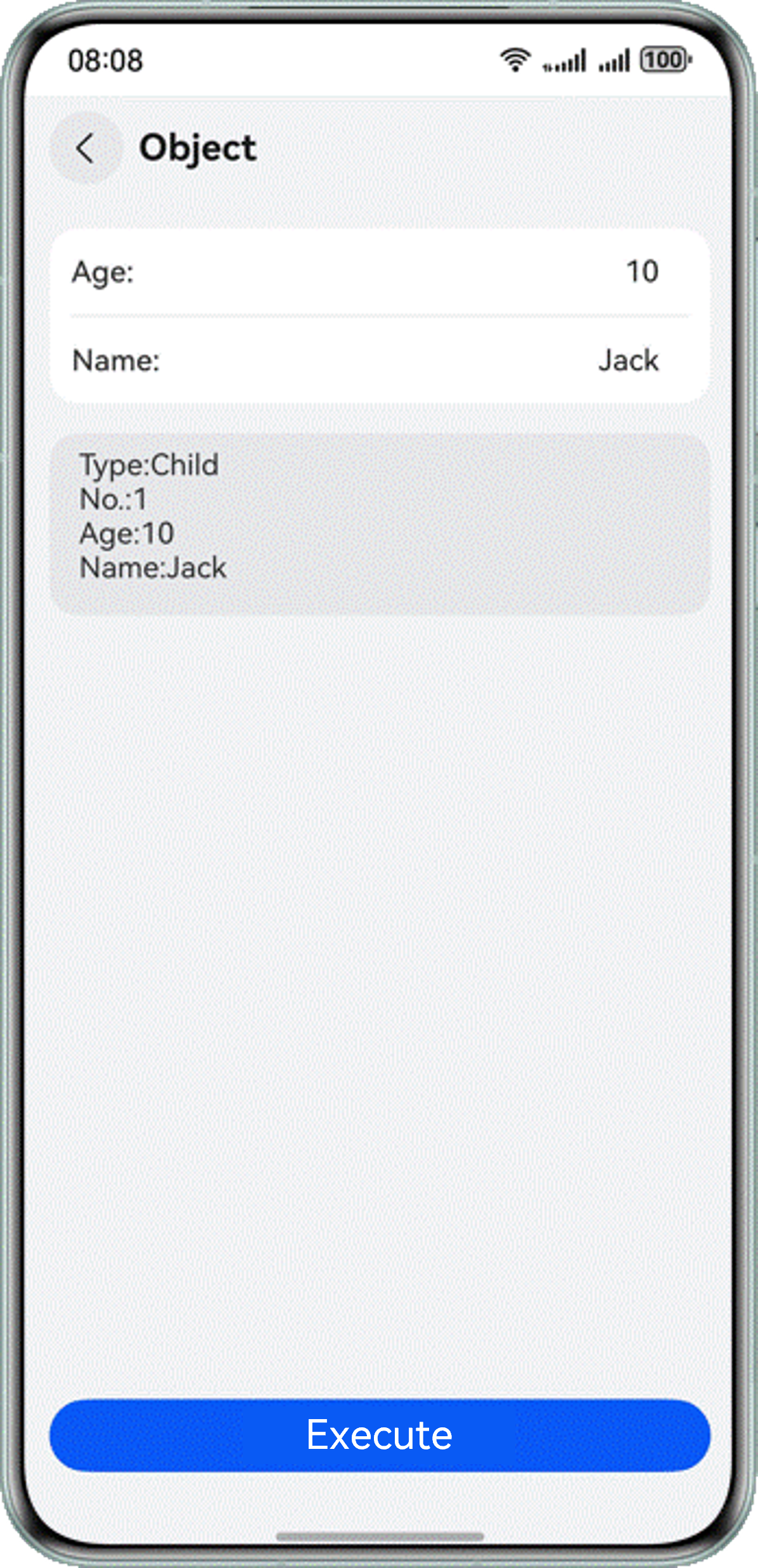
The following uses a queue machine app as an example to describe how to pass data of the object type between ArkTS and C++, and parse and modify the data.
How to implement
The Object class is the base class of all other types. When receiving parameters of this type in C++, the function provided by Node-API (for example, napi_get_named_property()) is generally used to obtain an attribute of the object and then operate the attribute value.
When passing an object from C++ to ArkTS, you can use the Node-API-encapsulated API (napi_create_object_with_named_properties()) to directly construct an object with specified property values by passing a parameter array.
How to develop
The function declaration and calling are similar to those in the section about ArrayBuffer data exchange. Details are not described here.
In addition, you need to define the object data type to be used.
In this example, age and name are required as input, and a Boolean value indicating whether the person is an adult and a sequence number are returned for a simple ticket dispenser used in a hospital. For this purpose, construct two types of object data for input and output, respectively.
// entry/src/main/ets/model/SampleObject.ts
export type SampleInputObject = {
  age: number;
  name: string;
}

export type SampleOutputObject = {
  isAdult: boolean;
  code: number;
  age: number;
  name: string;
}
In a C++ project, define a function for passing data.
// entry\src\main\cpp\napi_init.cpp
static napi_value ObjectPassing(napi_env env, napi_callback_info info) {
    return ObjectPassingNapi2Ts(env, ObjectPassingTs2Napi(env, info));
}
In the function, objectPassingTs2Napi() is used to pass data from ArkTS to C++, and objectPassingNapi2Ts() is used to pass data from C++ to ArkTS.
// entry\src\main\cpp\napi_init.cpp napi_value ObjectPassingTs2Napi(napi_env env, napi_callback_info info) { // Obtain parameters transmitted from the TS layer size_t argc = 1; napi_value args; // Gets detailed information about the function call, such as input parameters. napi_get_cb_info(env, info, &argc, &args, NULL, NULL); return args; }napi_get_cb_info(): Obtains input parameters from the ArkTS side.
// entry\src\main\cpp\napi_init.cpp napi_value ObjectPassingNapi2Ts(napi_env env, napi_value inputObj) { static int32_t codeChild = 1; static int32_t codeAdult = 1; napi_value input_age; napi_value input_name; napi_get_named_property(env, inputObj, "age", &input_age); napi_get_named_property(env, inputObj, "name", &input_name); napi_value output_obj; napi_value output_is_adult; napi_value output_code; napi_value output_age = input_age; napi_value output_name = input_name; int32_t age; napi_get_value_int32(env, input_age, &age); napi_get_boolean(env, age >= 18, &output_is_adult); if (age < 18) { napi_create_int32(env, codeChild++, &output_code); } else { napi_create_int32(env, codeAdult++, &output_code); } const char *keysArray[] = {"isAdult", "code", "age", "name"}; const napi_value outputArray[] = {output_is_adult, output_code, output_age, output_name}; napi_create_object_with_named_properties(env, &output_obj, 4, keysArray, outputArray); return output_obj; }napi_get_named_property(): Obtains and stores the properties in inputObj.
napi_get_value_int32(): Parses the obtained inputAge property into int32 data and stores the data in age.
napi_get_boolean(): writes the boolean attribute to be returned to the corresponding napi_value.
napi_create_int32(): writes the int32 attribute to be returned to the corresponding napi_value.
napi_create_object_with_named_properties(): constructs the object to be returned.
Set the data passing function in the Init() function pre-generated in DevEco Studio. The implementation is similar to that of ArrayBuffer data interaction.
Implementation effect
[h2]Passing HashMap Data
The following uses a points accumulation app as an example to describe how to pass data of the HashMap type between ArkTS and C++, and how to parse and modify the data. The points accumulation app allows each entry to log an object's current points and returns the total accumulated points for all objects.
How to implement
HashMap is a data struct implemented based on the Map interface of the hash table. C++ does not have the data type that can directly hold the parameters of this type. Therefore, data of this type is passed in any of the following ways:
Pass the data in an array. Specifically, obtain the key and value from the HashMap data in two arrays, pass the arrays to C++, and assemble them into a Map for data processing.
Pass the data in JSON format. Specifically, convert the HashMap data into a JSON string and pass it to C++. Then, deserialize the JSON string into a Map for processing.
Similarly, to pass a Map from C++ to ArkTS, serialize the Map into a JSON string and pass the string to ArkTS. Then, deserialize the JSON string to obtain the data in ArkTS.
How to develop
The function declaration and calling are similar to those in the section Passing ArrayBuffer Data. Details are not described here.
Pass HashMap data via other data types.
Two solutions are available:
- Serialize and deserialize the data of the string type in JSON format.
- Splits the key and value of the data into two arrays to carry data.
This document uses the first solution as an example. For details about the second solution, see How do I implement HashMap conversion between ArkTS and C/C++?
In addition, JSON.stringify in ArkTS does not support direct serialization of HashMap data. Therefore, you must convert HashMap data into data of the Record type and then serialize it. The following is an example:
// entry/src/main/ets/pages/HashMapPage.ets
hashMap2Rec(map: HashMap<string, Object>): Record<string, Object> {
  let Rec: Record<string, Object> = {}

  try {
    map.forEach((value: Object, key: string) => {
      // value may also be HashMap
      if (value instanceof HashMap) {
        let vRec: Record<string, Object> = this.hashMap2Rec(value);
        value = vRec;
      }
      Rec[key] = value;
    })
  } catch (error) {
    let err = error as BusinessError;
    hilog.error(0x0000, 'testTag', `forEach fail. code = ${err.code}, message = ${err.message}`);
  }

  return Rec;
}
Then, serialize the data of the Record type using JSON.stringify and pass the obtained data to C++.
In a C++ project, define a function for passing data.
static napi_value HashMapPassing(napi_env env, napi_callback_info info) {
    return HashMapPassingNapi2Ts(env, HashMapPassingTs2Napi(env, info));
}
In the function, hashMapPassingNapi2Ts() is used to pass data from ArkTS to C++, and hashMapPassingTs2Napi() is used to pass data from C++ to ArkTS. Data serialization and deserialization must be performed in C++ as well. In this topic, the third-party library nlohmann is used to handle serialization and deserialization.
Obtain the third-party library: HarmonyOS / third_party_json · GitCode
// entry\src\main\cpp\napi_init.cpp map<string, int> HashMapPassingTs2Napi(napi_env env, napi_callback_info info) { size_t argc = 1; napi_value args; // Gets detailed information about the function call, such as input parameters. napi_get_cb_info(env, info, &argc, &args, nullptr, nullptr); return nlohmann::json::parse(Value2String(env, args).c_str()); }napi_get_cb_info(): Obtains input parameters from the ArkTS side.
value2String(): encapsulates the process of parsing napi_value data into a string into a function for multiple calls.
nlohmann::json::parse(): Deserializes a string into data of the map<string, int> type.
You need to implement the value2String function.
// entry\src\main\cpp\napi_init.cpp static std::string Value2String(napi_env env, napi_value value) { size_t string_size = 0; // Get string length napi_get_value_string_utf8(env, value, nullptr, 0, &string_size); std::string result_string; result_string.resize(string_size + 1); // Convert to string based on length napi_get_value_string_utf8(env, value, &result_string[0], string_size + 1, &string_size); return result_string; }napi_get_value_string_utf8(): parses napi_value data into a string.

stringSize needs to be incremented by 1 because napi_value is pointer to a C struct and C strings are one-dimensional character arrays terminated by a null character \0. The length of stringSize returned by napi_get_value_string_utf8 does not include the ending \0. To ensure that the data written to valueString includes the terminating \0, we need to add 1.
// entry\src\main\cpp\napi_init.cpp napi_value HashMapPassingNapi2Ts(napi_env env, map<string, int> inputMap) { static map<string, int> points_table; std::map<string, int>::iterator iter; for (iter = inputMap.begin(); iter != inputMap.end(); ++iter) { points_table[iter->first] += iter->second; } string dump_string = nlohmann::ordered_json(points_table).dump(); return String2value(env, dump_string); }nlohmann::ordered_json(): serializes the map.
dump() converts the serialized data into a string.
string2value() encapsulates the conversion of a string to a napi_value within a function for convenient reuse.
You need to implement string2value().
// entry\src\main\cpp\napi_init.cpp static napi_value String2value(napi_env env, string str) { int length = str.length(); napi_value output_string; napi_create_string_utf8(env, str.c_str(), length, &output_string); return output_string; }napi_create_string_utf8(): converts the string data into the napi_value type.
Set the data passing function in the Init() function pre-generated in DevEco Studio. This is similar to the interaction with the data of the arrayBuffer type. For details, see Passing ArrayBuffer Data.
Deserialize the string returned by C++ into a HashMap object.
// entry/src/main/ets/pages/HashMapPage.ets
let receiveObj: object = JSON.parse(receiveStr);
let receiveMap: HashMap<string, number> = new HashMap();
Object.entries(receiveObj).forEach((value: [string, number]) => {
  receiveMap.set(value[0], value[1]);
})
JSON.parse() only deserializes a string to an object. You need to convert the object to the HashMap format.
Implementation effect

[h2]Passing PixelMap Data
The following uses an image processing app as an example to describe how to pass PixelMap data between C++ and ArkTS.
In addition to the methods described in this document, you can also use readPixelsToBuffer to convert the data type to Uint8Array for processing. For details about this solution, see Data Interaction of the ArrayBuffer Type.

Before developing an application, you need to open the src/main/cpp/CMakeLists.txt file of the native project and add libpixelmap_ndk.z.so of the image to the target_link_libraries dependency.
# entry/src/main/cpp/CMakeLists.txt
target_link_libraries(entry PUBLIC libace_napi.z.so libhilog_ndk.z.so libpixelmap_ndk.z.so)
How to implement
PixelMap is a data struct used to represent image data. When handling this type of data in C++, you can call the function in the libpixelmap.so library to construct a NativePixelMap object from the PixelMap object in ArkTS, and then process the data.
PixelMap is similar to a pointer in C++. The constructed NativePixelMap object changes the content to which the PixelMap data points. Therefore, you can trigger the image self-rendering by setting a delay in ArkTS. After the ArkTS page is refreshed, the modified image is displayed.
How to develop
Declare and import the function, which is the same as that in data interaction of the ArrayBuffer type.
On the ArkTS side, load the image and convert it to PixelMap format.
// entry/src/main/ets/pages/PixelMapPage.ets
async loadPixelMap() {
  let resourceManager = this.getUIContext().getHostContext()!.resourceManager;
  try {
    let imageArray = await resourceManager.getMediaContent($r('app.media.SampleImage').id);
    let imageResource = image.createImageSource(imageArray.buffer);
    let opts: image.DecodingOptions = { editable: true, desiredPixelFormat: image.PixelMapFormat.BGRA_8888 };
    imageResource.createPixelMap(opts).then((pixelMap) => {
      this.pixelMap = pixelMap;
      this.loadComplete = true;
    })
  } catch (error) {
    let err = error as BusinessError;
    hilog.error(0x0000, 'testTag', `getMediaContent fail. code = ${err.code}, message = ${err.message}`);
  }
}

aboutToAppear(): void {
  this.loadPixelMap();
}
createPixelMap() decodes the image loaded from imageResource to PixelMap format.
In a C++ project, define a function for passing data.
// entry\src\main\cpp\napi_init.cpp
static napi_value PixelMapPassing(napi_env env, napi_callback_info info) {
    size_t argc = 1;
    napi_value ts_pixel_map;
    // Gets detailed information about the function call, such as input parameters.
    napi_get_cb_info(env, info, &argc, &ts_pixel_map, nullptr, nullptr);

    // Initialize the NativePixelMap object.
    // NativePixelMap and ArkTSPixelMap share memory space.
    // That is, modifications to NativePixelMap also affect ArkTSPixelMap.
    NativePixelMap *native_pixel_map = OH_PixelMap_InitNativePixelMap(env, ts_pixel_map);

    float opacity = 0.5;
    OH_PixelMap_SetOpacity(native_pixel_map, opacity);

    return nullptr;
}
napi_get_cb_info(): obtains input parameters from ArkTS.
OH_PixelMap_InitNativePixelMap(): initializes the NativePixelMap object.
OH_PixelMap_SetOpacity(): modifies the opacity of the NativePixelMap object.
For details about other operations such as rotation and scaling, see PixelMap Operation.

The input PixelMap and the created NativePixelMap share the same memory space. Consequently, any modifications made to the NativePixelMap object will also be reflected in the PixelMap object. Therefore, there is no need to pass the data back.
The setting process in the Init() function is the same as that in ArrayBuffer data interaction.
Re-render the Image component in ArkTS.
// entry/src/main/ets/pages/PixelMapPage.ets
if (this.loadComplete) {
  Image(this.pixelMap)
    .height(400)
} else {
  Image($r('app.media.loading'))
    .height(400)
}
You can modify this.loadComplete() to re-render the image.
// entry/src/main/ets/pages/PixelMapPage.ets
if (this.pixelMap) {
  this.loadComplete = false;
  ParamPassing.pixelMapPassing(this.pixelMap);
  // Only modifying PixelMap cannot cause the system to re render,
  // so this method is required to manually refresh the image component.
  setTimeout(() => this.loadComplete = true, 500);
}
PixelMap functions similarly to a C pointer, which only changes the content it points to without changing its own value, hence not triggering automatic re-rendering. The delay set here ensures that re-rendering can be triggered.
Implementation effect

[h2]Passing Class Data from ArkTS to C++
The uses a simple calculator as an example to describe how to pass Class data. Due to significant difference in data passing on both sides, this section
describes only how to pass Class data from ArkTS to C++.
How to implement
In ArkTS, a class is a template used to define objects. It consists of properties and methods used to define an object. When handling this type of data in C++, you can call Node-API (such as napi_get_named_property()) to obtain a property of the Class object, and then operate it.
How to develop
Declare the class to be passed in index.d.ts.
// entry/src/main/cpp/types/libentry/Index.d.ts
export interface SampleClassTs2Napi {
  result: string;

  add(a: number, b: number): string;
}
Declare the function used for passing data.
// entry/src/main/cpp/types/libentry/Index.d.ts
export const classPassingTs2Napi: (input: SampleClassTs2Napi) => string;
Import the function in the ArkTS file and implement the class.
// entry/src/main/ets/pages/ClassPage.ets
import ParamPassing from 'libentry.so';
import { OutputArea } from '../model/IOModel';

const HINT_STRING: string = 'Calculation completed:\n';

class SampleClassTs2Napi implements ParamPassing.SampleClassTs2Napi {
  public result: string = '';

  add(a: number, b: number) {
    this.result = `${a} + ${b} = ${a + b}`;
    return HINT_STRING;
  }
}
In a C++ project, define a function for passing data.
// entry\src\main\cpp\napi_init.cpp napi_value ClassPassingTs2Napi(napi_env env, napi_callback_info info) { size_t argc = 1; napi_value args; // Gets detailed information about the function call, such as input parameters. napi_get_cb_info(env, info, &argc, &args, nullptr, nullptr); // Retrieve the method named "add" from the parameter object and store it in the "add" variable. napi_value add; napi_get_named_property(env, args, "add", &add); // Create parameter array napi_value arr[2]; napi_create_int32(env, 114, &arr[0]); napi_create_int32(env, 514, &arr[1]); // Call the "add" method of the parameter object, pass this array as a parameter, // and store the result in the funcResult variable. napi_value func_result; napi_call_function(env, args, add, 2, arr, &func_result); // Retrieve the property values named "result" from the parameter object // using the napi_get_named_property function, and store them in the param_result variables. napi_value param_result; napi_get_named_property(env, args, "result", ¶m_result); string resultStr = Value2String(env, func_result) + Value2String(env, param_result); return String2value(env, resultStr); }classPassingTs2Napi() passes the class from ArkTS to Node-API, which returns a string.
napi_get_cb_info(): obtains the input parameters from ArkTS.
napi_get_named_property(): is called for the first time to store the add() method into the variable add.
napi_create_int32(): parses the input parameters into int32 and stores them into the array arr.
napi_call_function() calls the class method passed from ArkTS in C++. The input parameters arr and the add method obtained in the preceding two steps are required.
napi_get_named_property(): is called for the second time to store the property named "result" into param_result.
value2String and string2value(): are used to convert between napi_value and string. For details, see Passing HashMap Data.
Set the data passing function in the Init() function pre-generated in DevEco Studio. This is similar to ArrayBuffer Data Interaction and will not be described here.
Implementation effect

[h2]Passing Class Data from C++ to ArkTS
The following uses a simple calculator as an example to describe how to pass class data from C++ to ArkTS.
How to implement
When passing data from C++ to ArkTS, you need to adapt the C++ methods to Node-API in C++, create the mapping between the ArkTS class method and the C++ method using napi_define_class in init(), and add the class object to export for export. Note that the class to be passed must be declared in the index.d.ts file.
How to develop
Declare the class to be passed in index.d.ts.
// entry/src/main/cpp/types/libentry/Index.d.ts
export class SampleClassNapi2Ts {
  private _hintStr: string;

  constructor(hintStr: string);

  times(a: number, b: number): string;
  public get hintStr();
  public set hintStr(value:string);
}
Use the get and set keywords to define the accessor. The properties cannot be directly referenced or modified.
Call the class and its properties and methods on the ArkTS side.
// entry/src/main/ets/pages/ClassPage.ets
let napiClass: ParamPassing.SampleClassNapi2Ts = new ParamPassing.SampleClassNapi2Ts(HINT_STRING);
napiClass.hintStr += 'modify by ArkTS: \n';
this.printStr = napiClass.hintStr + napiClass.times(6, 9);
The usage is the same as that of other common ArkTS classes. No special attention is required.
Define the corresponding class in the C++ project.
// entry\src\main\cpp\napi_init.cpp
class SampleClassNapi2Ts {
public:
    std::string hint_str;
    SampleClassNapi2Ts(string str) { this->hint_str = str; };
    std::string times(int a, int b) {
        std::ostringstream ost;
        ost << a << " × " << b << " = " << a * b;
        return ost.str();
    };
};
Here, ostringstream is used to construct strings. Therefore, you need to import stream in advance.
In addition, you need to complete the accessor, constructor, and method for ArkTS to call in sequence.
Call getHintStr() to obtain the hintStr property.
// entry\src\main\cpp\napi_init.cpp
static napi_value GetHintStr(napi_env env, napi_callback_info info) {
    napi_value ts_class_obj;
    // Gets detailed information about the function call, such as input parameters.
    napi_get_cb_info(env, info, nullptr, nullptr, &ts_class_obj, nullptr);

    SampleClassNapi2Ts *c_class_obj;
    // Retrieve and manipulate the C++object previously bound to jsThis using napi_unwrap
    napi_unwrap(env, ts_class_obj, reinterpret_cast<void **>(&c_class_obj));
    if (c_class_obj) {
        return String2value(env, c_class_obj->hint_str);
    } else {
        return nullptr;
    }
}
napi_get_cb_info(): obtains input parameters from ArkTS.
napi_unwrap(): parses the C++ class wrapped in the ArkTS class and stores the class using the pointer c_class_obj.
string2value(): converts obj->hintStr to napi_value, which is used as the output. For details about the implementation of this function, see Passing HashMap Data.
When value of hintStr is called from ArkTS, this function is called to obtain the value from C++.

The accessor in the initialization phase. The c_class_obj obtained after napi_unwrap may be a null pointer. Therefore, you must check whether the pointer is null. The same below
Call setHintStr() to set the hintStr property. The principle is similar to that of getHintStr.
// entry\src\main\cpp\napi_init.cpp
static napi_value SetHintStr(napi_env env, napi_callback_info info) {
    // Obtain parameters transmitted from the TS layer
    size_t argc = 1;
    napi_value value;
    napi_value ts_class_obj;
    // Gets detailed information about the function call, such as input parameters.
    napi_get_cb_info(env, info, &argc, &value, &ts_class_obj, nullptr);

    SampleClassNapi2Ts *c_class_obj;
    // Retrieve and manipulate the C++object previously bound to jsThis using napi_unwrap
    napi_unwrap(env, ts_class_obj, reinterpret_cast<void **>(&c_class_obj));

    if (c_class_obj) {
        c_class_obj->hint_str = Value2String(env, value);
    }

    return nullptr;
}
Implement the times method, which is named TSTimes.
napi_get_cb_info(): obtains input parameters from ArkTS.
napi_unwrap(): unpacks the passed ArkTS class, obtains the C++ class bound to the ArkTS class, and stores the class using the pointer c_class_obj.
napi_get_value_int32(): parses the input parameter into an int32 value and stores the value in value0 or value1.
string2Value(): converts a string to napi_value. For details about the implementation of this function, see Passing HashMap Data.
// entry\src\main\cpp\napi_init.cpp
static napi_value TSTimes(napi_env env, napi_callback_info info) {
    size_t argc = 2;
    napi_value args[2] = {nullptr};
    napi_value ts_class_obj = nullptr;
    // Gets detailed information about the function call, such as input parameters.
    napi_get_cb_info(env, info, &argc, args, &ts_class_obj, nullptr);
    SampleClassNapi2Ts *c_class_obj = nullptr;
    // Convert ArkTS object to C++ object
    napi_unwrap(env, ts_class_obj, (void **)&c_class_obj);
    // Get parameters passed by ArkTS
    int value0;
    napi_get_value_int32(env, args[0], &value0);
    int value1;
    napi_get_value_int32(env, args[1], &value1);
    string c_result = c_class_obj->times(value0, value1);
    return String2value(env, c_result);
}
Use TsConstructor() to construct the ArkTS class.
napi_get_cb_info(): Obtains input parameters from ArkTS.
Call value2String() to convert the input parameters into strings. For details about the implementation of this function, see Passing HashMap Data.
napi_set_named_property(): Adds a new property to a specified object and specifies the property name. The name specified here is used when the API is called from ArkTS.
napi_wrap(): Wraps a C++ class into an ArkTS class.
// entry\src\main\cpp\napi_init.cpp
static napi_value TsConstructor(napi_env env, napi_callback_info info) {
    // Create Napi object
    napi_value ts_class_obj;
    size_t argc = 1;
    napi_value args[1] = {nullptr};
    // Gets detailed information about the function call, such as input parameters.
    napi_get_cb_info(env, info, &argc, args, &ts_class_obj, nullptr);
    string hint_str = Value2String(env, args[0]);
    // Create C++ object
    SampleClassNapi2Ts *c_class_obj = new SampleClassNapi2Ts(hint_str);
    // Set the JS object hintStr attribute
    napi_set_named_property(env, ts_class_obj, "hintStr", args[0]);
    // Binding JS objects with C++objects
    napi_wrap(
        env, ts_class_obj, c_class_obj,
        // Define callback function for recycling JS objects, used to destroy C++objects and prevent memory leaks
        [](napi_env env, void *finalize_data, void *finalize_hint) {
            SampleClassNapi2Ts *c_class_obj = (SampleClassNapi2Ts *)finalize_data;
            delete c_class_obj;
            c_class_obj = nullptr;
        },
        nullptr, nullptr);
    return ts_class_obj;
}
Set the class in Init().
// entry\src\main\cpp\napi_init.cpp
EXTERN_C_START
static napi_value Init(napi_env env, napi_value exports) {
    // ...
    napi_property_descriptor class_prop[] = {
        {"hintStr", 0, 0, GetHintStr, SetHintStr, 0, napi_default, 0},
        {"times", nullptr, TSTimes, nullptr, nullptr, nullptr, napi_default, nullptr}};
    napi_value sample_class = nullptr;
    const char *class_name = "SampleClassNapi2Ts";
    // Establish the association between ArkTS constructor and C++ methods
    napi_define_class(env, class_name, sizeof(class_name), TsConstructor, nullptr,
                      sizeof(class_prop) / sizeof(class_prop[0]), class_prop, &sample_class);
    napi_set_named_property(env, exports, class_name, sample_class);

    return exports;
}
EXTERN_C_END
Define a classProp in the Init() function pre-generated in DevEco Studio and write the accessor and method corresponding to the class.
Then, call napi_define_class() and napi_set_named_property() to associate and set the ArkTS class with the C++ class. In this way, ArkTS can call the class in C++.
Implementation effect
