Use Cases
Multi-object detection detects various objects in a given image (including landscapes, animals, plants, buildings, faces, tables, and texts) and highlights the positions of these objects using boxes.
Example:
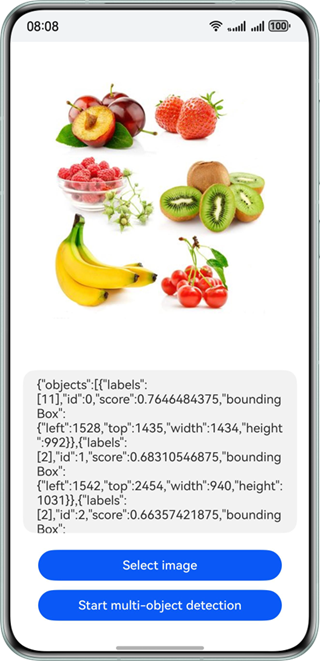
Development Procedure
-
Add the classes for implementing multi-object detection to a project.
import { image } from '@kit.ImageKit'; import { hilog } from '@kit.PerformanceAnalysisKit'; import { BusinessError } from '@kit.BasicServicesKit'; import { fileIo } from '@kit.CoreFileKit'; import { objectDetection, visionBase } from '@kit.CoreVisionKit'; import { photoAccessHelper } from '@kit.MediaLibraryKit'; -
Call photoAccessHelper.PhotoViewPicker to start the gallery to select an image, and use the fileIo and image modules to convert the URI to a PixelMap to prepare input data for the detection API.
Button('Select image')
  .type(ButtonType.Capsule)
  .fontColor(Color.White)
  .alignSelf(ItemAlign.Center)
  .width('80%')
  .margin(10)
  .onClick(() => {
    // Bring up the gallery to obtain images.
    void this.selectImage();
  })
The method for selecting and decoding images is implemented as follows:
private async selectImage() { let uri = await this.openPhoto(); if (!uri) { hilog.error(0x0000, 'objectDetectSample', 'Failed to define uri.'); return; } this.loadImage(uri); } private async openPhoto(): Promise<string> { return new Promise<string>((resolve, reject) => { let photoPicker: photoAccessHelper.PhotoViewPicker = new photoAccessHelper.PhotoViewPicker(); photoPicker.select({ MIMEType: photoAccessHelper.PhotoViewMIMETypes.IMAGE_TYPE, maxSelectNumber: 1 }).then(res => { resolve(res.photoUris[0]); }).catch((err: BusinessError) => { hilog.error(0x0000, 'objectDetectSample', `Failed to get photo image uri. code: ${err.code}, message: ${err.message}`); reject(err); }); }); } private loadImage(name: string) { setTimeout(async () => { let fileSource = await fileIo.open(name, fileIo.OpenMode.READ_ONLY); this.imageSource = image.createImageSource(fileSource.fd); this.chooseImage = await this.imageSource.createPixelMap(); await fileIo.close(fileSource); }, 100); } -
Instantiate the visionBase.Request object and encapsulate PixelMap as an input parameter. Call ObjectDetector.create() to create a detector instance, call its process method to obtain the location and class information of objects in the images, and display the result on the GUI.
Button('Start multi-object detection')
  .type(ButtonType.Capsule)
  .fontColor(Color.White)
  .alignSelf(ItemAlign.Center)
  .width('80%')
  .margin(10)
  .onClick(() => {
    // Call the encapsulated asynchronous detection function.
    void this.handleMultiObjectDetection();
  })
The multi-object detection method is implemented as follows:
private async handleMultiObjectDetection() {
  try {
    if (!this.chooseImage) {
      hilog.error(0x0000, 'objectDetectSample', 'Failed to choose image.');
      return;
    }
    // Call the multi-object detection API.
    let request: visionBase.Request = {
      inputData: { pixelMap: this.chooseImage }
    };
    let detector = await objectDetection.ObjectDetector.create();
    let data: objectDetection.ObjectDetectionResponse = await detector.process(request);
    await detector.destroy();
    if (!data) {
      hilog.error(0x0000, 'objectDetectSample', 'Invalid object detection result');
      return;
    }
    let objectJson = JSON.stringify(data);
    hilog.info(0x0000, 'objectDetectSample', `Succeeded in object detection: ${objectJson}`);
    this.dataValues = objectJson;
  } catch (err) {
    const error = err as BusinessError;
    hilog.error(0x0000, 'objectDetectSample', `Object detection error. Code: ${error.code}, message: ${error.message}`);
  }
}
[h2]Index.ets
import { image } from '@kit.ImageKit';
import { hilog } from '@kit.PerformanceAnalysisKit';
import { BusinessError } from '@kit.BasicServicesKit';
import { fileIo } from '@kit.CoreFileKit';
import { objectDetection, visionBase } from '@kit.CoreVisionKit';
import { photoAccessHelper } from '@kit.MediaLibraryKit';

@Entry
@Component
struct Index {
  private imageSource: image.ImageSource | undefined = undefined;
  @State chooseImage: PixelMap | undefined = undefined;
  @State dataValues: string = '';

  build() {
    Column() {
      Image(this.chooseImage)
        .objectFit(ImageFit.Fill)
        .height('60%')

      Text(this.dataValues)
        .copyOption(CopyOptions.LocalDevice)
        .height('15%')
        .margin(10)
        .width('60%')

      Button('Select image')
        .type(ButtonType.Capsule)
        .fontColor(Color.White)
        .alignSelf(ItemAlign.Center)
        .width('80%')
        .margin(10)
        .onClick(() => {
          // Start Gallery.
          void this.selectImage();
        })

      Button('Start multi-object detection')
        .type(ButtonType.Capsule)
        .fontColor(Color.White)
        .alignSelf(ItemAlign.Center)
        .width('80%')
        .margin(10)
        .onClick(() => {
          // Call the encapsulated asynchronous detection function.
          void this.handleMultiObjectDetection();
        })
    }
    .width('100%')
    .height('100%')
    .justifyContent(FlexAlign.Center)
  }

  // Encapsulate the asynchronous logic for multi-object detection.
  private async handleMultiObjectDetection() {
    try {
      if (!this.chooseImage) {
        hilog.error(0x0000, 'objectDetectSample', 'Failed to choose image.');
        return;
      }
      // Call the multi-object detection API.
      let request: visionBase.Request = {
        inputData: { pixelMap: this.chooseImage }
      };
      let detector = await objectDetection.ObjectDetector.create();
      let data: objectDetection.ObjectDetectionResponse = await detector.process(request);
      await detector.destroy();
      if (!data) {
        hilog.error(0x0000, 'objectDetectSample', 'Invalid object detection result');
        return;
      }
      let objectJson = JSON.stringify(data);
      hilog.info(0x0000, 'objectDetectSample', `Succeeded in object detection: ${objectJson}`);
      this.dataValues = objectJson;
    } catch (err) {
      hilog.error(0x0000, 'objectDetectSample', `Object detection error: ${err}`);
    }
  }

  private async selectImage() {
    let uri = await this.openPhoto();
    if (!uri) {
      hilog.error(0x0000, 'objectDetectSample', 'Failed to define uri.');
      return;
    }
    this.loadImage(uri);
  }

  private async openPhoto(): Promise<string> {
    return new Promise<string>((resolve, reject) => {
      let photoPicker: photoAccessHelper.PhotoViewPicker = new photoAccessHelper.PhotoViewPicker();
      photoPicker.select({
        MIMEType: photoAccessHelper.PhotoViewMIMETypes.IMAGE_TYPE,
        maxSelectNumber: 1
      }).then(res => {
        resolve(res.photoUris[0]);
      }).catch((err: BusinessError) => {
        hilog.error(0x0000, 'objectDetectSample', `Failed to get photo image uri. code: ${err.code}, message: ${err.message}`);
        reject(err);
      });
    });
  }

  private loadImage(name: string) {
    setTimeout(async () => {
      let fileSource = await fileIo.open(name, fileIo.OpenMode.READ_ONLY);
      this.imageSource = image.createImageSource(fileSource.fd);
      this.chooseImage = await this.imageSource.createPixelMap();
      await fileIo.close(fileSource);
    }, 100);
  }
}