Cascading Style Sheets (CSS) is a style language that describes the structure of HML pages. While all components come with default styles, CSS allows you to customize the look and feel of the components and pages to fit your design requirements. For details about the component styles supported by the web development paradigm that is compatible with JavaScript, see Common Styles.
Size Unit
-
Logical px set by <length>:
-
The default logical screen width is 720 px (for details, see the window section in "js" Tag). Your page will be scaled to fit the actual width of the screen. For example, on a screen with the actual width of 1440 physical px, 100 px is displayed on 200 physical px, with all sizes doubled from 720 px to 1440 px.
-
If autoDesignWidth is set to true (for details, see the window section in "js" Tag), the logical px is scaled based on the screen density. For example, on a screen with the screen density of 3, 100 px is displayed on 300 physical px. This approach is recommended when your application needs to adapt to multiple devices.
-
-
Percentage set by <percentage>: The component size is represented by its percentage of the parent component size. For example, if the width <percentage> of a component is set to 50%, the width of the component is half of its parent component's width.
Style Import
To implement modular management and code reuse, CSS style files support the @import statement to import CSS files.
Style Declaration
The .css file with the same name as the .hml file in each page directory describes the styles of components on the HML page, determining how the components will be displayed.
-
Internal style: The style and class attributes can be used to specify the component style. Example:
<!-- index.hml -->
<div class="container">
  <text style="color: red">Hello World</text>
</div>
/* index.css */ .container { justify-content: center; } -
External style files: You need to import the files. For example, create a style.css file in the common directory and import the file at the beginning of index.css.
/* style.css */
.title {
  font-size: 50px;
}
/* index.css */ @import '../../common/style.css'; .container { justify-content: center; }
Selectors
A CSS selector is used to select elements for which styles need to be added. The following table lists the supported selectors.
| Selector | Example | Description |
|---|---|---|
| .class | .container | Selects all components whose class is container. |
| #id | #titleId | Selects all components whose id is titleId. |
| tag | text | Selects the text component. |
| , | .title, .content | Selects all components whose class is title or content. |
| #id .class tag | #containerId .content text | Selects all grandchild <text> components whose grandparent components are identified as containerId and whose parent components are of the content class. To use the strict parent-child relationship, replace the space with >, for example, #containerId>.content. |
Example:
<!-- Pagelayoutexample.hml -->
<div id="containerId" class="container">
  <text id="titleId" class="title">Title</text>
  <div class="content">
    <text id="contentId">Content</text>
  </div>
</div>
/* Pagestyleexample.css */
.container {
width: 100%;
height: 100%;
justify-content: center;
align-items: center;
}
/* Set the style for all <div> components. */
div {
flex-direction: column;
}
/* Set the style for the components whose class is title. */
.title {
font-size: 30px;
}
/* Set the style for the components whose id is contentId. */
#contentId {
font-size: 20px;
}
/* Set padding for all components of the title or content class to 5 px. */
.title, .content {
padding: 5px;
}
/* Set the style for all texts of components whose class is container. */
.container text {
color: #007dff;
}
/* Set the style for direct descendant texts of components whose class is container. */
.container > text {
color: #fa2a2d;
} The above style works as follows:
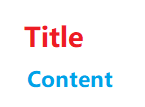
In this example, .container text sets "Title" and "Content" to blue, while .container > text, a direct descendant selector, sets "Title" to red. Both have the same specificity, but the direct descendant selector is declared later, overriding the former style. (For specificity calculation, see Selector Priority.)
Selector Priority
The priority rule of the selectors complies with the W3C rule, which is only available for inline styles, id, class, tag, grandchild components, and child components. (Inline styles are those declared in the style attribute.)
When multiple selector declarations match the same element, the priorities of various selectors are as follows: inline style > id > class > tag.
Pseudo-classes
A CSS pseudo-class is a keyword added to a selector that specifies a special state of the selected element(s). For example, :disabled can be used to select the element whose disabled attribute is true.
In addition to a single pseudo-class, a combination of pseudo-classes is supported. For example, :focus:checked selects the element whose focus and checked attributes are both set to true. The following table lists the supported single pseudo-class in descending order of priority.
| Name | Supported Component | Description |
|---|---|---|
| :disabled | Components that support the disabled attribute | Indicates the element whose disabled attribute is true. (The animation style cannot be set.) |
| :active | Components that support the click event | Indicates the element activated by the user, for example, a button pressed by the user or an activated tab-bar tab. (The animation style cannot be set.) |
| :waiting | button | Indicates the element whose waiting attribute is true. (The animation style cannot be set.) |
| :checked | input[type="checkbox", type="radio"], switch | Indicates the element whose checked attribute is true. (The animation style cannot be set.) |
The following is an example for you to use the :active pseudo-class to control the style when a user presses the button.
<!-- index.hml -->
<div class="container">
  <input type="button" class="button" value="Button"></input>
</div>
/* index.css */
.container {
  width: 100%;
  height: 100%;
  justify-content: center;
  align-items: center;
}

.button:active {
  background-color: #888888;/* After the button is activated, the background color is changed to #888888. */
} 
Pseudo-class effects are not supported for the <popup> component and its child components, including, <popup>, <dialog>, <menu>, <option>, and <picker>.
Precompiled Styles
Precompilation is a program that uses specific syntax to generate CSS files. It provides variables and calculation, helping you define component styles more conveniently. Currently, Less, Sass, and Scss are supported. To use precompiled styles, change the suffix of the original .css file. For example, change index.css to index.less, index.sass, or index.scss.
-
The following index.less file is changed from index.css.
/* index.less */ /* Define a variable. */ @colorBackground: #000000; .container { background-color: @colorBackground; /* Use the variables defined in the current less file. */ } -
Reference a precompiled style file. For example, if the style.scss file is located in the common directory, change the original index.css file to index.scss and import style.scss.
/* style.scss */
/* Define a variable. */
$colorBackground: #000000;
Reference the precompiled style file in index.scss:
/* index.scss */
/* Import style.scss. */
@import '../../common/style.scss';
.container {
  background-color: $colorBackground; /* Use the variable defined in style.scss. */
}
Place precompiled style files in the common directory.
CSS Style Inheritance6+
CSS style inheritance enables a child node to inherit the style of its parent node. The inherited style has the lowest priority when multiple style selectors are involved. Currently, the following styles can be inherited:
-
font-family
-
font-weight
-
font-size
-
font-style
-
text-align
-
line-height
-
letter-spacing
-
color
-
visibility