Function Description
After iteration is performed, a C matrix slice is obtained and can be directly output to the GM tensor.
This API is used together with the Iterate API to obtain a matrix slice with the size of baseM x baseN after iterative computation executed by the Iterate call is complete.
There are synchronous and asynchronous modes to iteratively obtaining the slices of matrix C.
Synchronous mode: After Iterate, execute GetTensorC and wait until matrix C slices are obtained.
Asynchronous mode: After Iterate, GetTensorC does not need to be called immediately for synchronous waiting. Other logic can be executed first, and GetTensorC can be called when the result needs to be obtained. The asynchronous mode can reduce the synchronization time and improve the parallelism degree. This mode is ideal for scenarios with high requirements on computing performance.
Function Prototype
Obtain matrix C and output it to GM.
template <bool sync = true>
__aicore__ inline void GetTensorC(const GlobalTensor<DstT>& gm, uint8_t enAtomic = 0, bool enSequentialWrite = false)
- Supported mode: synchronous
- Supported mode: asynchronous
Obtain the matrix C on GM returned by the API. Developers can control its subsequent use.
This API is provided to return the matrix C on GM applied for by the API framework. You can control its subsequent use.
Supported mode: asynchronous
The doPad, height, width, srcGap, and dstGap parameters in the following APIs will be deprecated. You do not need to pass them. Retain the default values.
template <bool sync = true, bool doPad = false>
__aicore__ inline void GetTensorC(const LocalTensor<DstT>& c, uint8_t enAtomic = 0, bool enSequentialWrite = false, uint32_t height = 0, uint32_t width = 0, uint32_t srcGap = 0, uint32_t dstGap = 0)
Parameters
Table 1 Template parameters
| Parameter | Description |
|---|---|
| sync | Sets the synchronous or asynchronous mode. Setting it to true enables the synchronous mode; while setting it to false enables the asynchronous mode. |
Table 2 API parameters
| Parameter | Input/Output | Description |
|---|---|---|
| gm | Output | Extracts matrix C to GM. The data format can be ND or NZ. For Kirin 9020 and Kirin 9030 series processors, the supported data type is half. |
| enAtomic | Input | Whether to enable the atomic operation. The default value is 0. Values: 0: disables the Atomic operation. 1: enables the AtomicAdd (accumulation) operation. 2: enables the AtomicMax (maximum value calculation) operation. 3: enables the AtomicMin (minimum value calculation) operation. |
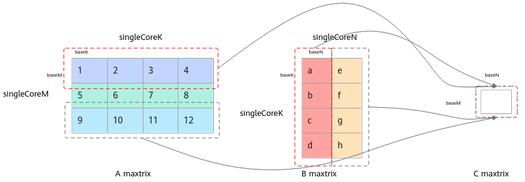
| enSequentialWrite | Input | Whether to enable the continuous write mode (continuous write: write to [baseM, baseN]; non-continuous write: write to the corresponding position in [singleCoreM, singleCoreN]). The default value is false (non-continuous write mode). Note: In non-continuous write mode, the offset is calculated internally based on the iteration sequence, and you do not need to pay attention to it. If you need to decide the layout sequence, you can select the continuous write mode and perform the movement operation based on the offset you set. |
Figure 1 Non-continuous write mode
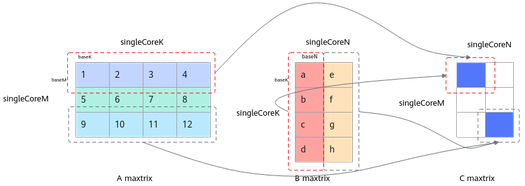
Figure 2 Continuous write mode
Precautions
Ensure that the size of the input matrix C address space is greater than or equal to baseM x baseN.
Calling Example
Obtain matrix C and output it to GM in synchronization mode.
while (mm.Iterate()) {
mm.GetTensorC(gm);
}
Obtain matrix C on GM returned by the API and manually copy it to UB in asynchronous mode.
// BaseM * BaseN = 128 *256
mm.SetTensorA(gmA);
mm.SetTensorB(gmB);
mm.SetTail(singleM, singleN, singleK);
mm.template Iterate<false>();
// ...
for (int i = 0; i < singleM / baseM * singleN / baseN; ++i) {
// Obtain the BaseM x BaseN data calculated each time and allocate UB space of 64 × 128.
DataCopy(local, global[64 * 128 * i], 64 * 128); // Copy the GM data to UB for subsequent vector operations.
// ... Vector operations
}