In mobile app or web development, ad redirection is a common way to turn traffic into money or promote products. It works by guiding users to tap ads and then taking them to target pages, like app download pages, product details, or event pages.
For example, there is a video app that shows ads. When users tap a product ad in the splash screen, the system automatically takes them to the product details page in an e-commerce app. This not only boosts the ad's effectiveness but also makes user experience smoother.
This topic mainly talks about developing the ad target side, like an e-commerce app. It explains how to use App Linking to efficiently bring users from external ad carriers (like video apps) to the product pages of the e-commerce app. It also covers various scenarios, such as when the app is not installed or when there is a delay in redirection, to create a complete loop for ad monetization.
How to Implement
Ad redirection involves two apps:
- Ad carrier (for example, video app): It shows ads and handles the redirection to landing pages.
- Ad target (for example, e-commerce app): It gets started by external apps and redirects users to the product details page.
The following figure shows the ad redirection process.
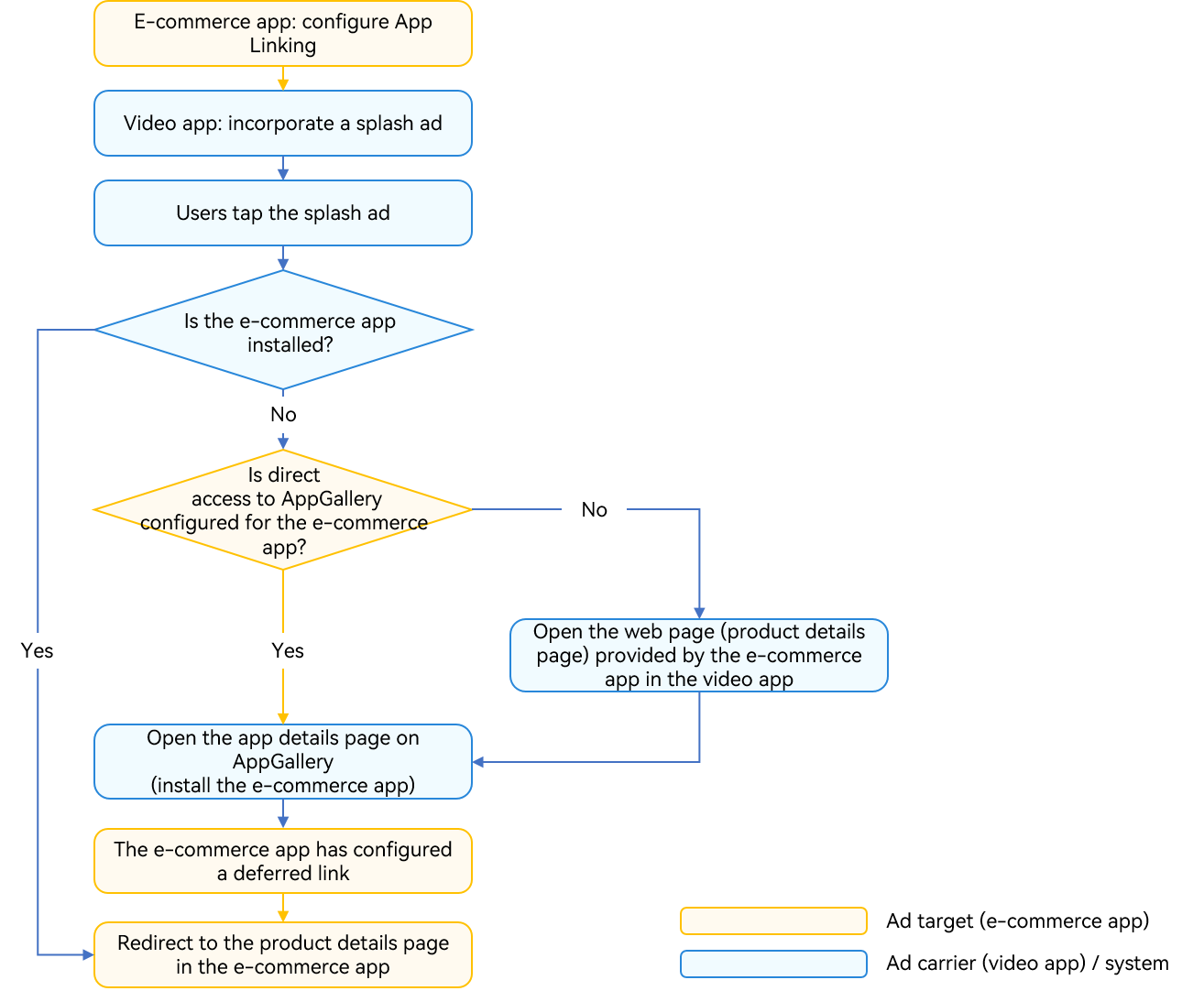
The redirection process is based on the App Linking feature and is classified into the following scenarios:
- E-commerce app installed
When a user taps a product ad in the video app and the e-commerce app is already installed, the system uses App Linking to directly open the e-commerce app and jump to the specific product details page.
- E-commerce app not installed, but direct access to AppGallery configured
When a user taps a product ad in the video app and the e-commerce app is not installed, the system automatically takes the user to the app details page on AppGallery. Once the user downloads and installs the app, they can directly access the product page through the deferred link upon the first launch of the app.
- E-commerce app not installed, and direct access to AppGallery not configured
When a user taps a product ad in the video app and the e-commerce app is not installed, the system opens the app's web page (product details page) where users can browse or be guided to download and install the app. Even if the user installs the app later, the user can still go directly to the product details page.
How to Develop
- Configure App Linking.
- Enable the App Linking feature for your e-commerce app in AppGallery Connect (AGC), and correctly configure the deep links and parameters for the product details page.
- Ensure that all pages that need to be redirected from the ad carrier (for example, video app) can be uniquely identified through App Linking links.
- Create the product details page.
- Develop the product details page so that when the e-commerce app is not installed, tapping the link shows the same product information.
- Include buttons like Open E-commerce App or Download E-commerce App on the web page to improve the user conversion rate.
- Complete the deployment and configuration by referring to Developing and Deploying a Web Page.

If the ad carrier (for example, video app) wants to directly open the e-commerce app's product details page within its own app, set the appLinkingOnly parameter to true when calling the openLink() API. This way, if the e-commerce app cannot be launched, the system does not automatically open the web page in the browser but returns the result through a failure callback.
The ad carrier (for example, video app) can handle exceptions in the callback, such as manually redirecting to the e-commerce app's product details page, for more flexible redirection control.
- (Optional) Configure direct access to AppGallery.
- If you want users to prioritize installing the e-commerce app for a complete experience, enable the direct access to AppGallery feature in the App Linking configuration.
- When users tap an ad, if the e-commerce app is not installed, they are taken directly to the e-commerce app details page on AppGallery without going through the web page.
- Implement deferred links.
- Configure and implement the Deferred Link feature.
- After users download and install the e-commerce app through the ad link, they are automatically redirected to the product details page when they first open the app. This ensures that ad traffic is fully converted.
- Provide App linking links to the ad carrier (for example, video app).
Provide the App Linking link for each product to the ad carrier (for example, video app). When an ad is tapped, the openLink() API is called to perform the redirection.