This topic describes how to implement basic video capture in a camera app. It covers camera device acquisition and configuration, recording control (start/stop), and data output processing. This guide is designed to help you integrate high-quality video recording into your apps across diverse hardware platforms.
[h2]When to Use
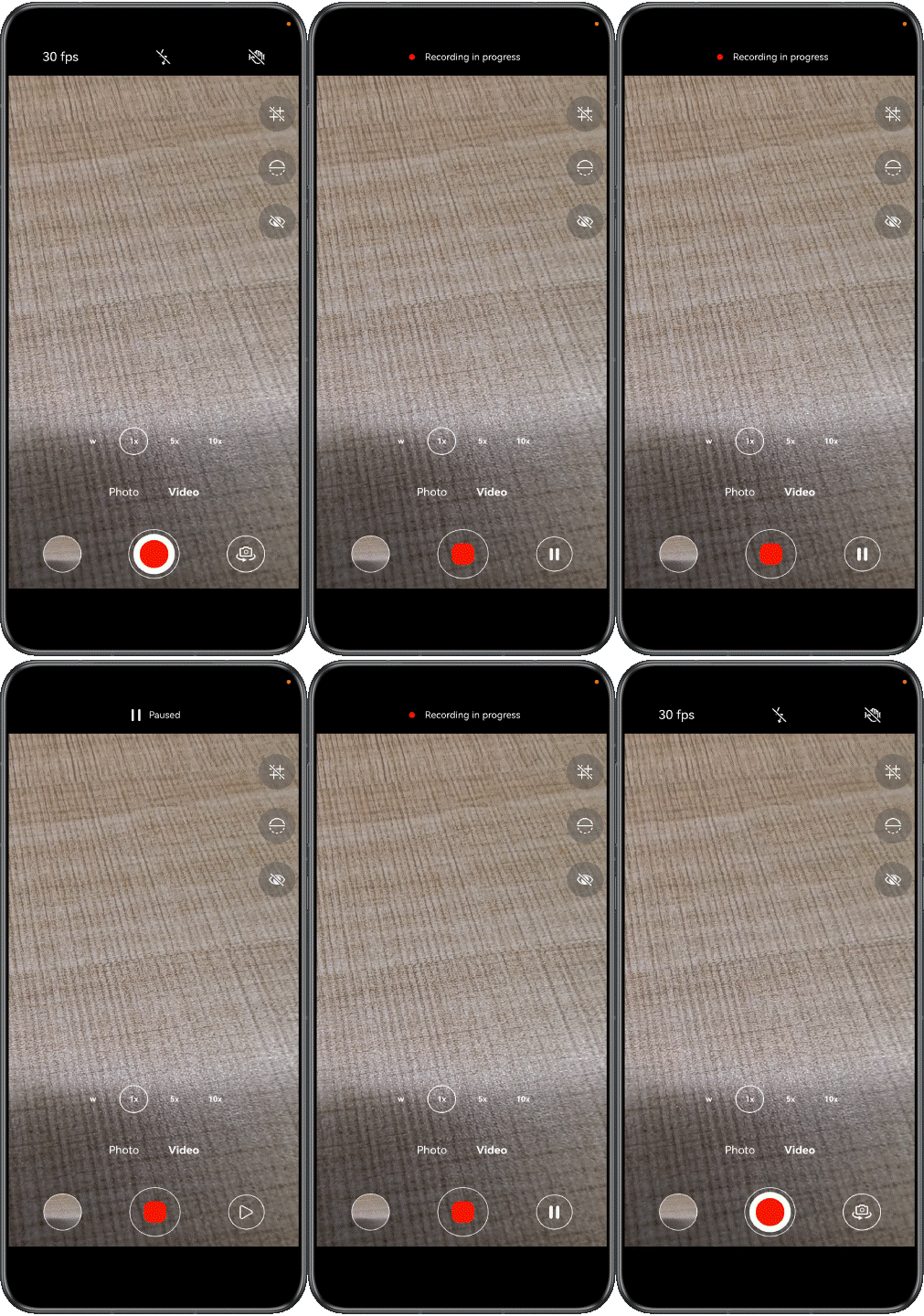
Video recording is the core feature of a custom camera app, providing capabilities for real-time preview and composition adjustment. Users can start video recording with just a tap of the recording button. During recording, the camera app continuously collects image data and saves it as a video file and allows users to freely pause or stop the recording.


- Apply for required permissions.
Before developing a camera app, you need to request related permissions by referring to Requesting Camera Development Permissions.
- Set video recording parameters.
- Create a video resource using the album management module PhotoAccessHelper for writing recording files.
let options: photoAccessHelper.CreateOptions = { title: Date.now().toString() }; let videoAccessHelper: photoAccessHelper.PhotoAccessHelper = photoAccessHelper.getPhotoAccessHelper(this.context); try { this.videoUri = await videoAccessHelper.createAsset(photoAccessHelper.PhotoType.VIDEO, 'mp4', options); this.file = fileIo.openSync(this.videoUri, fileIo.OpenMode.READ_WRITE | fileIo.OpenMode.CREATE); } catch (exception) { Logger.error(TAG_LOG, `createAsset failed, code is ${exception.code}, message is ${exception.message}`); } - Dynamically generate a profile for video recording.
this.avProfile = { audioBitrate: 48000, // Audio bitrate (unit: bps), which affects audio quality audioChannels: 2, // Stereo two-channel recording audioCodec: media.CodecMimeType.AUDIO_AAC, // The audio encoding format is AAC audioSampleRate: 48000, // Audio sampling rate (unit: Hz), CD-quality sound fileFormat: media.ContainerFormatType.CFT_MPEG_4, // Container Format Configuration videoBitrate: 32000000, // Video bitrate (unit: bps) determines video clarity // Dynamic Selection of Video Encoding Format videoCodec: (this.qualityLevel === QualityLevel.HIGHER && this.cameraPosition === camera.CameraPosition.CAMERA_POSITION_BACK) ? media.CodecMimeType.VIDEO_HEVC : media.CodecMimeType.VIDEO_AVC, videoFrameWidth: this.videoProfile?.size.width, // Obtain width from video configuration videoFrameHeight: this.videoProfile?.size.height, // Obtain height from video configuration videoFrameRate: this.cameraPosition === camera.CameraPosition.CAMERA_POSITION_BACK ? 60 : 30, // Obtain rate from video configuration }; - Set parameters for audio and video recording, including the source type, encoding mode, image quality configuration, and save path.
this.avConfig = {
  audioSourceType: media.AudioSourceType.AUDIO_SOURCE_TYPE_CAMCORDER,
  videoSourceType: media.VideoSourceType.VIDEO_SOURCE_TYPE_SURFACE_YUV,
  profile: this.avProfile,
  url: `fd://${this.file.fd}`,
  metadata: {
    videoOrientation: this.getCameraImageRotation().toString()
  }
};
- Create a video resource using the album management module PhotoAccessHelper for writing recording files.
- Obtain a surface.
Call createAVRecorder() of the media module to create an AVRecorder instance, and call getInputSurface() of the instance to obtain the surface ID, which is associated with the video output stream to process the stream data.
let videoSurfaceId = await this.avRecorder.getInputSurface();
- Create a video output stream.
Obtain the recording output stream configurations supported by the device based on the videoProfiles property of the CameraOutputCapability module and select a proper configuration based on the service scenario. In this example, the resolution and frame rate are set based on the camera position and image quality, and the recording output stream is created using createVideoOutput().
async createVideoOutput(cameraManager: camera.CameraManager | undefined): Promise<void> {
  if (!this.avRecorder || this.avRecorder.state !== AVRecorderState.PREPARED) {
    return;
  }
  try {
    let videoSurfaceId = await this.avRecorder.getInputSurface();
    this.output = cameraManager?.createVideoOutput(this.videoProfile, videoSurfaceId);
  } catch (error) {
    Logger.error(TAG_LOG,
      `Failed to create the output instance. error code: ${error.code}`);
  }
}

setVideoProfile(cameraManager: camera.CameraManager | undefined, targetProfile: camera.Profile,
  device: camera.CameraDevice): void {
  this.cameraPosition = device.cameraPosition;
  let cameraOutputCap: camera.CameraOutputCapability | undefined =
    cameraManager?.getSupportedOutputCapability(device,
      camera.SceneMode.NORMAL_VIDEO);
  let videoProfilesArray: camera.VideoProfile[] | undefined = cameraOutputCap?.videoProfiles;
  if (videoProfilesArray?.length) {
    try {
      const displayRatio = targetProfile.size.width / targetProfile.size.height;
      const profileWidth = targetProfile.size.width;
      const videoProfile = videoProfilesArray
        .sort((a, b) => Math.abs(a.size.width - profileWidth) - Math.abs(b.size.width - profileWidth))
        .find(pf => {
          const pfDisplayRatio = pf.size.width / pf.size.height;
          return Math.abs(pfDisplayRatio - displayRatio) <= CameraConstant.PROFILE_DIFFERENCE &&
            pf.format === camera.CameraFormat.CAMERA_FORMAT_YUV_420_SP;
        });
      if (!videoProfile) {
        Logger.error(TAG_LOG, 'Failed to get video profile');
        return;
      }
      this.videoProfile = videoProfile;
    } catch (error) {
      Logger.error(TAG_LOG, `Failed to createPhotoOutput. error: ${JSON.stringify(error)}`);
    }
  }
}
- Start video recording.
Call start() of the VideoOutput instance to start the video output stream, and then call start() of the AVRecorder instance to start recording. To record videos using the front camera, call isMirrorSupported() to check whether the device supports mirroring. If mirroring is supported and the front camera is used, call enableMirror() to enable mirroring.
async start(isFront: boolean): Promise<void> {
  try {
    if (this.avRecorder?.state === AVRecorderState.PREPARED) {
      if (this.isSupportMirror() && isFront) {
        this.output?.enableMirror(true);
      }
      // ...
      await this.output?.start();
      await this.avRecorder?.start();
    }
  } catch (error) {
    Logger.info(TAG_LOG, `Failed to start and catch error is  ${error.message}`);
  }
}
- Pause recording.
Call pause() of the AVRecorder instance to stop recording, and then call stop() of the VideoOutput instance to stop the video output stream.
async pause(): Promise<void> { try { if (this.avRecorder?.state === AVRecorderState.STARTED) { await this.avRecorder.pause(); await this.output?.stop(); } } catch (error) { Logger.error(TAG_LOG, `Failed to pause and catch error is ${error.message}`); } } - Resume video recording.
Call start() of the VideoOutput instance to start the video output stream, and then call resume() of the AVRecorder instance to resume recording.
async resume(): Promise<void> { try { if (this.avRecorder?.state === AVRecorderState.PAUSED) { await this.output?.start(); await this.avRecorder.resume(); } } catch (error) { Logger.error(TAG_LOG, `Failed to resume and catch error is ${error.message}`); } } - Stop video recording.
Call stop() of the AVRecorder instance to stop recording, and then call stop() of the VideoOutput instance to stop the video output stream.
async stop(): Promise<void> { try { if (this.avRecorder?.state === AVRecorderState.STARTED || this.avRecorder?.state === AVRecorderState.PAUSED) { await this.avRecorder.stop(); await this.output?.stop(); const thumbnail = await this.getVideoThumbnail(); if (thumbnail) { this.callback(thumbnail, this.videoUri); } } } catch (error) { Logger.error(TAG_LOG, `Failed to stop and catch error is ${error.message}`); } } - Release resources.
Call release() of the AVRecorder instance to release recording resources, and then call release() of the VideoOutput instance to release the video output stream.
async release(): Promise<void> {
  try {
    await this.avRecorder?.release();
    await this.output?.release();
    this.file && await fileIo.close(this.file.fd);
  } catch (exception) {
    Logger.error(TAG_LOG, `release failed, code is ${exception.code}, message is ${exception.message}`);
  }
  this.avRecorder?.off('stateChange');
  this.avRecorder = undefined;
  this.output = undefined;
  this.file = undefined;
}
The video stabilization mode can be set by calling setVideoStabilizationMode() in the session. For details, see Stabilization.
setVideoStabilizationMode(session: camera.VideoSession): boolean {
  let mode: camera.VideoStabilizationMode = camera.VideoStabilizationMode.AUTO;
  // Check whether video stabilization is supported
  try {
    let isSupported: boolean = session.isVideoStabilizationModeSupported(mode);
    if (!isSupported) {
      Logger.info(TAG_LOG, `videoStabilizationMode: ${mode} is not support`);
      return false;
    }
    Logger.info(TAG_LOG, `setVideoStabilizationMode: ${mode}`);
    // Set video stabilization
    session.setVideoStabilizationMode(mode);
    let activeVideoStabilizationMode = session.getActiveVideoStabilizationMode();
    Logger.info(TAG_LOG, `activeVideoStabilizationMode: ${activeVideoStabilizationMode}`);
    return isSupported;
  } catch (exception) {
    Logger.error(TAG_LOG,
      `setVideoStabilizationMode failed, code is ${exception.code}, message is ${exception.message}`);
    return false;
  }
} The video rotation angle is related to the gravity direction (rotation angle of the device). Call getVideoRotation() in the VideoOutput class to obtain the video rotation angle. For details, see Adjusting Camera Rotation Angles (ArkTS).
In the API, the deviceDegree parameter specifies the device rotation angle. For details about how to obtain the value, see Calculating the Device Rotation Angle.
getVideoRotation(deviceDegree: number): camera.ImageRotation {
  let videoRotation: camera.ImageRotation = this.getCameraImageRotation();
  try {
    if (this.output) {
      videoRotation = this.output.getVideoRotation(deviceDegree);
    }
    Logger.info(TAG_LOG, `Video rotation is: ${videoRotation}`);
  } catch (error) {
    Logger.error(TAG_LOG, `Failed to getVideoRotation and catch error is: ${error.message}`);
  }
  return videoRotation;
}
HDR Vivid is a UWA-certified dynamic HDR video standard that captures images with richer layers and more vivid light and shadow details. An app only needs to access media APIs to integrate the HDR Vivid video capture, transcoding, and decoding display features of HarmonyOS. Compared with common recording, HDR recording additionally requires enabling video stabilization, querying the list of color spaces supported by the device, and then calling setColorSpace() to set the color space. For details, see HDR Vivid Camera Capture (ArkTS).
getSupportedColorSpaces(session: camera.VideoSession): colorSpaceManager.ColorSpace[] {
  let colorSpaces: colorSpaceManager.ColorSpace[] = [];
  try {
    colorSpaces = session.getSupportedColorSpaces();
  } catch (error) {
    Logger.error(TAG_LOG, `The getSupportedColorSpaces call failed. error code: ${error.message}`);
  }
  return colorSpaces;
}

setColorSpaceAfterCommitConfig(session: camera.VideoSession, isHdr: boolean): void {
  let colorSpace: colorSpaceManager.ColorSpace =
    isHdr ? colorSpaceManager.ColorSpace.BT2020_HLG_LIMIT : colorSpaceManager.ColorSpace.BT709_LIMIT;
  let colorSpaces: colorSpaceManager.ColorSpace[] = this.getSupportedColorSpaces(session);
  if (!colorSpaces.includes(colorSpace)) {
    Logger.info(TAG_LOG, `colorSpace: ${colorSpace} is not support`);
    return;
  }
  try {
    Logger.info(TAG_LOG, `setColorSpace: ${colorSpace}`);
    session.setColorSpace(colorSpace);
  } catch (exception) {
    Logger.error(TAG_LOG, `setColorSpace failed, code is ${exception.code}, message is ${exception.message}`);
  }
  try {
    let activeColorSpace: colorSpaceManager.ColorSpace = session.getActiveColorSpace();
    Logger.info(TAG_LOG, `activeColorSpace: ${activeColorSpace}`);
  } catch (error) {
    Logger.error(TAG_LOG, `getActiveColorSpace Faild: ${error.message}`);
  }
}