Symptom
The ASCF fails to start properly on the Emulator, and the error message "Failed to install the HAP or HSP because the dependent module does not exist." is displayed.
The error information is as follows:
Install Failed: error: failed to install bundle.

code:9568305

error: Failed to install the HAP or HSP because the dependent module does not exist.
Possible causes
The version of the runtime on which the project depends may be later than that on the Emulator.
Solution
The ASCF runtime on the Emulator cannot be installed or upgraded. Therefore, the version specified by the framework cannot be later than the version preset on the Emulator. You need to modify the project configuration.
Obtain the version number of the ASCF runtime on the Emulator.
For details about how to configure the hdc environment, see (Optional) Running hdc on CLI. Run the following command to obtain the version number:
hdc shell bm dump-shared -n com.huawei.hms.ascfruntime
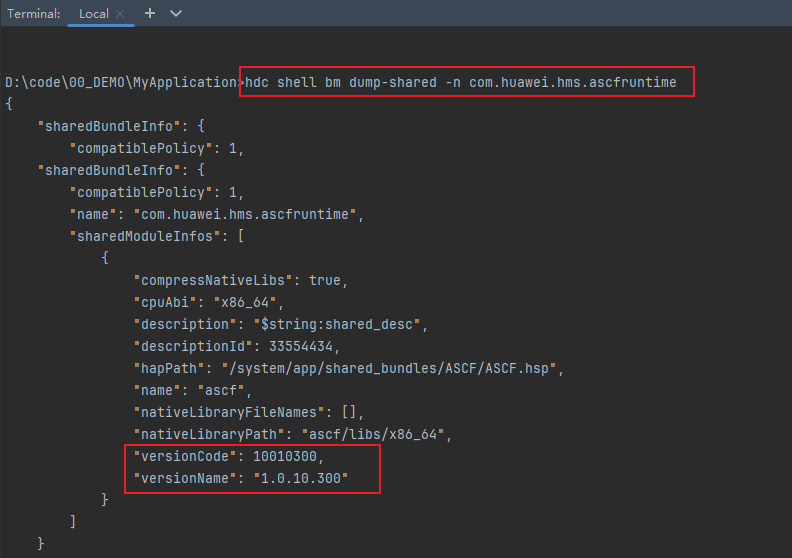
Modify the project configuration.
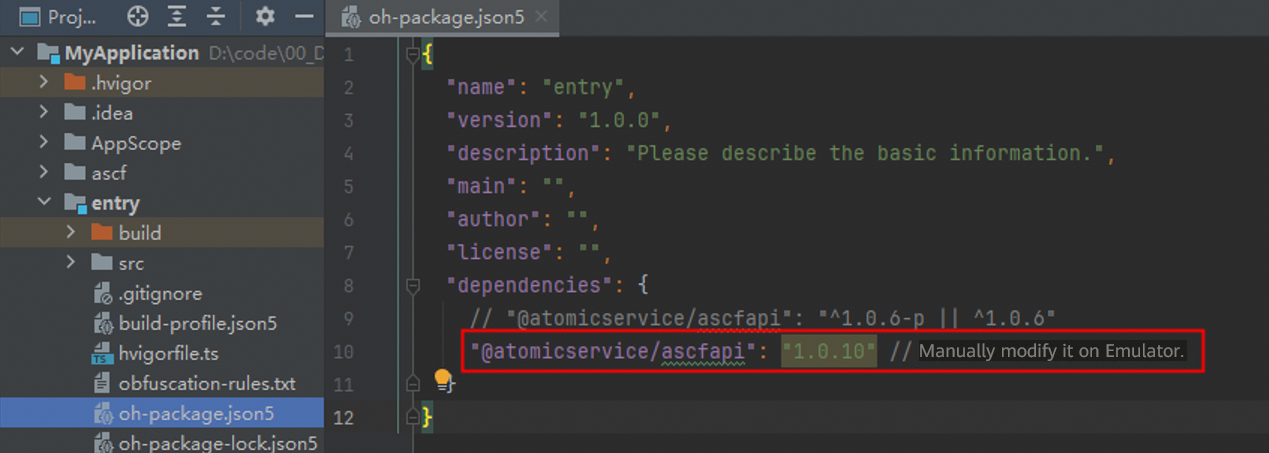
For example, when versionName is 1.0.10.300, change "@atomicservice/ascfapi": "^1.0.6" in the entry/oh-package.json5 configuration file to "@atomicservice/ascfapi": "1.0.10", and then synchronize the project.
To check whether the current environment is the Emulator environment, run the following command:
hdc shell param get const.product.model
If the result is emulator, the current environment is the Emulator environment.