Overview
In large-scale app development, an app is usually divided into multiple service modules, which provide SDK capabilities in the form of HSP or HAR packages. Normally, native APIs are provided for calling the SDK capabilities from HAP modules to implement complex functionalities of the app. One common challenge is making interface calls across HAR/HSP modules on the native side. This topic dives into two typical scenarios for cross-module calls on the native side:
How to Implement
As shown in Figure 1, the process of calling APIs across HAR/HSP modules on the native side involves the following steps:
- In Module 1 (HAP), the ArkTS side calls native APIs using Node-API.
- The native side of Module 1 (HAP) calls native APIs of Module 2 (HSP/HAR) as follows:
- Callee
- In Module 2 (HSP/HAR), create a header file and expose the header file in build-profile.json5.
- In the CMakeLists.txt file of Module 2 (HSP/HAR), add the source file to the .so package.
- Caller
- Import Module 2 (HSP/HAR) to the oh-package.json5 file of Module 1 (HAP).
- In the CMakeLists.txt file of Module 1 (HAP), add the .so file of Module 2.
- Call native methods of Module 2 (HSP/HAR) after the header file of Module 2 (HSP/HAR) is imported.
- Callee
- In Module 2 (HSP/HAR), the native side uses Node-API to load the module and call ArkTS APIs.
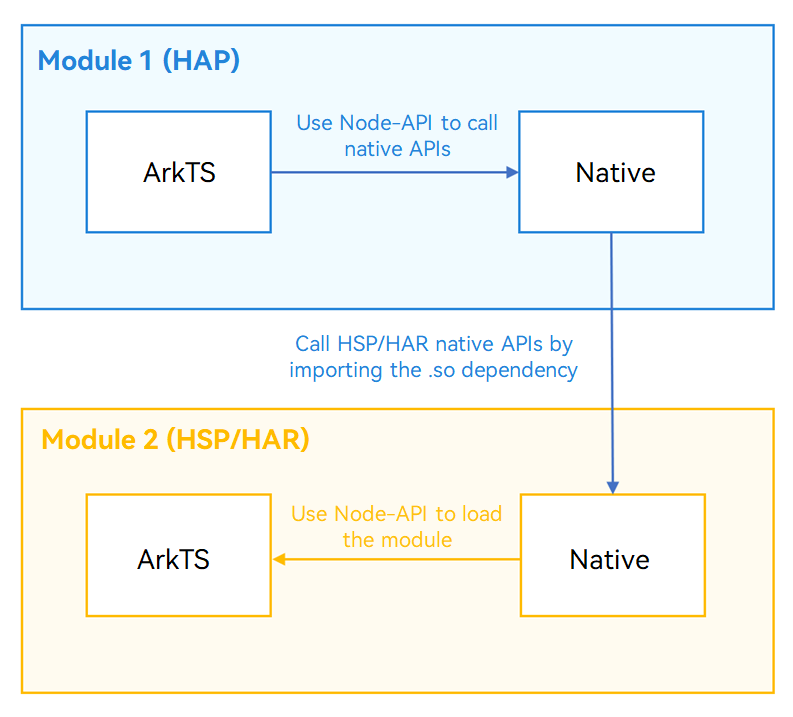
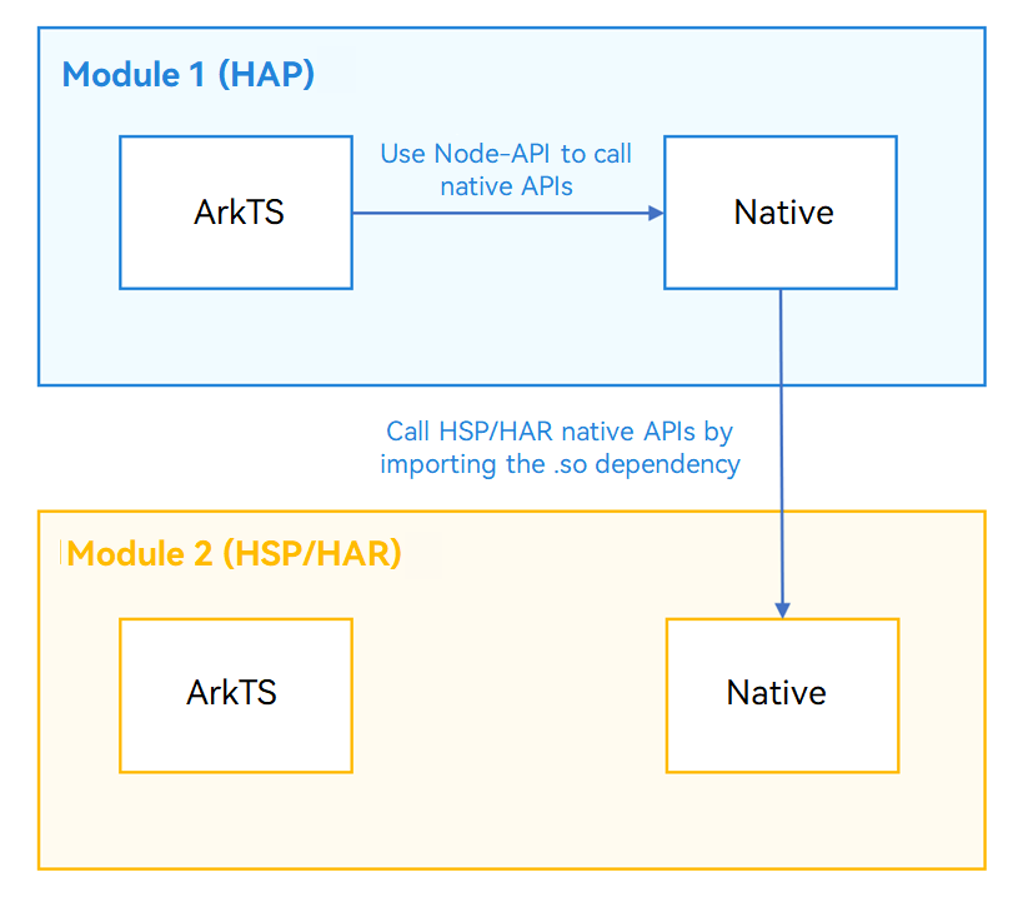
As shown in the following figure, the process of native-to-native call across HAR/HSP modules is Module 1 ArkTS -> Module 1 native -> Module 2 native. In a HarmonyOS project, the native-to-native calls across HAR/HSP modules are actually the calls in C++. You only need to configure the compilation dependencies. The key is to expose the header file in build-profile.json5 of Module 2 (HSP/HAR), and add the source file to the .so package in CMakeLists.txt.
[h2]How to Develop
To implement native-to-native calls across HAR/HSP modules, you need to implement ArkTS-to-native calls in Module 1 (HAP) and native-to-native calls from Module 1 (HAP) to Module 2 (HSP/HAR). In this scenario, the cross-module call procedure is the same for the HAR and HSP modules. The following uses the HAR module as an example.
- Create the staticModule module, which is Module 2 (HAR). For details, see Creating a HAR Module.
- Create the C++ file napi_har.cpp in Module 2, create the header file napi_har.h, and define native methods.
Sample code in napi_har.cpp:
#include "napi/native_api.h"
#include "napi_har.h"

double harNativeAdd(double a, double b) {
    return a + b;
}
Sample code in napi_har.h:
// staticModule\src\main\cpp\napi_har.h
#ifndef CROSSMODULEREFERENCE_NAPI_HAR_H
#define CROSSMODULEREFERENCE_NAPI_HAR_H
#include <js_native_api_types.h>
// ...
double harNativeAdd(double a, double b);
napi_value harArkTSAdd(double a, double b);
#endif //CROSSMODULEREFERENCE_NAPI_HAR_H
- Expose the header file in build-profile.json5 of Module 2. If headerPath is not configured, Module 1 cannot reference the header file of Module 2.
{
  "apiType": "stageMode",
  "buildOption": {
    "externalNativeOptions": {
      "path": "./src/main/cpp/CMakeLists.txt",
      "arguments": "",
      "cppFlags": "",
      "abiFilters": ["x86_64", "arm64-v8a"]
    },
    "nativeLib": {
      "headerPath": "./src/main/cpp"
    },
    // ...
}
- In the CMakeLists.txt file of Module 2, add the source file to the .so package.
# staticModule\src\main\cpp\CMakeLists.txt
add_library(add SHARED napi_init.cpp napi_har.cpp)
- In the oh-package.json5 file of Module 1, configure the dependency on Module 2. In this example, staticModule is the file name of the newly created HAR module, and static_module is the name of the HAR module.
{
  "name": "entry",
  "version": "1.0.0",
  "description": "Please describe the basic information.",
  "main": "",
  "author": "",
  "license": "",
  "dependencies": {
    "libentry.so": "file:./src/main/cpp/types/libentry",
    "static_module": "file:../staticModule",
    // ...
  }
}
- Configure the SO dependency in the CMakeLists.txt file of Module 1.
# entry\src\main\cpp\CMakeLists.txt
target_link_libraries(entry PUBLIC libace_napi.z.so static_module::add shared_module::calc)

In static_module::add, the first parameter static_module is the module name of Module 2, and the second parameter add is the name of the .so file built from Module 2 (there is no need to include "lib"). By default, the module name of Module 2 is the same as the .so file name. In this example, the .so file name is add.
- Import the header file napi_har.h of Module 2 to napi_init.cpp of Module 1, and call harNativeAdd() of Module 2.
- Call invokeHarNative() of Module 2 on the native side of Module 1.
// entry\src\main\cpp\napi_init.cpp
static napi_value invokeHarNative(napi_env env, napi_callback_info info)
{
    size_t argc = 2;
    napi_value args[2] = {nullptr};

    napi_get_cb_info(env, info, &argc, args , nullptr, nullptr);

    napi_valuetype valuetype0;
    napi_typeof(env, args[0], &valuetype0);

    napi_valuetype valuetype1;
    napi_typeof(env, args[1], &valuetype1);

    double value0;
    napi_get_value_double(env, args[0], &value0);

    double value1;
    napi_get_value_double(env, args[1], &value1);

    napi_value sum;

    napi_create_double(env, harNativeAdd(value0, value1), &sum);

    return sum;
}
- Call the native invokeHarNative() method on the ArkTS side of Module 1.
Button($r('app.string.call_har_native_method'))
  .fontSize(16)
  .width('100%')
  .margin({ top: 12 })
  .onClick(() => {
    this.getUIContext().getPromptAction().showToast({
      message: 'HarNative method call succeed, result is ' + napi.invokeHarNative(2, 3).toString()
    });
  })

Native-to-ArkTS Calls Across HAR/HSP Modules
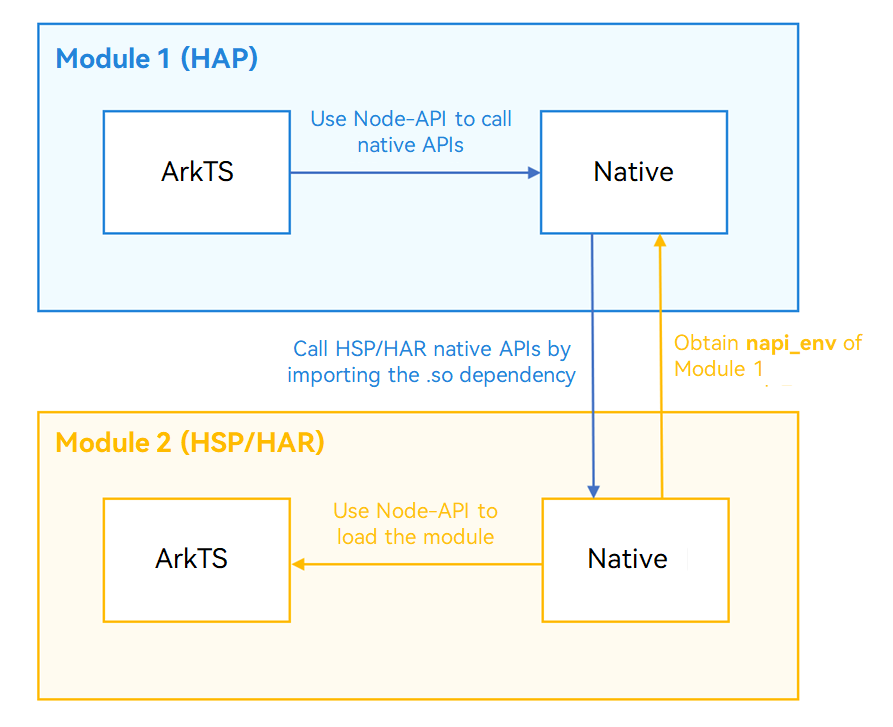
As shown in the following figure, the native-to-ArkTS calls across HAR/HSP modules are calls of ArkTS APIs based on native-to-native calls across HAR/HSP modules. The key is to obtain the napi_env of Module 1 in Module 2, load the module based on the napi_env value, and call ArkTS methods.
[h2]How to Develop
The following walks you through on how to implement native-to-ArkTS calls across HAR/HSP modules.
- Implement native-to-native calls across HAR/HSP modules, and add the invokeHarArkTS() method to Module 1.
- Add the native setHarEnv() method (used to pass napi_env) to Module 2, and add it to the header file.
Sample code in napi_har.h:
// staticModule\src\main\cpp\napi_har.h
#ifndef CROSSMODULEREFERENCE_NAPI_HAR_H
#define CROSSMODULEREFERENCE_NAPI_HAR_H
#include <js_native_api_types.h>
napi_env g_main_env;
void setHarEnv(napi_env env);
double harNativeAdd(double a, double b);
napi_value harArkTSAdd(double a, double b);
#endif //CROSSMODULEREFERENCE_NAPI_HAR_H
Sample code in napi_har.cpp:
// staticModule\src\main\cpp\napi_har.cpp
void setHarEnv(napi_env env) {
    g_main_env = env;
}
- In Init() of napi_init.cpp of Module 1, call setHarEnv() to pass napi_env of Module 1 to Module 2.
// entry\src\main\cpp\napi_init.cpp
EXTERN_C_START
static napi_value Init(napi_env env, napi_value exports)
{
    napi_property_descriptor desc[] = {
        { "add", nullptr, Add, nullptr, nullptr, nullptr, napi_default, nullptr },
        { "invokeHarNative", nullptr, invokeHarNative, nullptr, nullptr, nullptr, napi_default, nullptr },
        { "invokeHarArkTS", nullptr, invokeHarArkTS, nullptr, nullptr, nullptr, napi_default, nullptr },
        { "invokeHspNative", nullptr, invokeHspNative, nullptr, nullptr, nullptr, napi_default, nullptr },
        { "invokeHspArkTS", nullptr, invokeHspArkTS, nullptr, nullptr, nullptr, napi_default, nullptr }
    };
    napi_define_properties(env, exports, sizeof(desc) / sizeof(desc[0]), desc);
    setHarEnv(env);
     // ...
    return exports;
}
EXTERN_C_END
- Create an ArkTS method in Module 2 and expose it to the native side of Module 2.
// staticModule\src\main\ets\utils\Util.ets
export function add(a: number, b: number): number {
  return a + b;
}
- Configure the build-profile.json5 file of Module 2 as follows:
{
  "apiType": "stageMode",
  "buildOption": {
    // ...
    "arkOptions" : {
      "runtimeOnly" : {
        "sources": [
          "./src/main/ets/utils/Util.ets"
        ]
      }
    }
  },
  // ...
}
- Call the ArkTS method from the native side of module 2 and configure the method in the header file.
- Call napi_load_module_with_info() to load the module. The second parameter is the path of the ETS file to be loaded, and the third parameter is bundleName+module_name.
- Call napi_get_named_property() to obtain the add() method exported by the module.
- Use napi_call_function() to call the add() method.
Sample code in napi_har.cpp:
// staticModule\src\main\cpp\napi_har.cpp
napi_value harArkTSAdd(double a, double b) {
    napi_env env = g_main_env;
    napi_value module;
    napi_status status = napi_load_module_with_info(env, "static_module/src/main/ets/utils/Util", "com.example.crossmodulereference/entry", &module);
    if (napi_ok != status) {
        return 0;
    }

    napi_value addFunc;
    napi_get_named_property(env, module, "add", &addFunc);

    napi_value addResult;
    napi_value argv[2] = {nullptr, nullptr};
    napi_create_double(env, a, &argv[0]);
    napi_create_double(env, b, &argv[1]);
    napi_call_function(env, module, addFunc, 2, argv, &addResult);

    return addResult;
}
- Call harArkTSAdd() of Module 2 from the native side of Module 1.
// entry\src\main\cpp\napi_init.cpp
static napi_value invokeHarArkTS(napi_env env, napi_callback_info info)
{
    size_t argc = 2;
    napi_value args[2] = {nullptr};

    napi_get_cb_info(env, info, &argc, args , nullptr, nullptr);

    napi_valuetype valuetype0;
    napi_typeof(env, args[0], &valuetype0);

    napi_valuetype valuetype1;
    napi_typeof(env, args[1], &valuetype1);

    double value0;
    napi_get_value_double(env, args[0], &value0);

    double value1;
    napi_get_value_double(env, args[1], &value1);

    return harArkTSAdd(value0, value1);
}
- Call the native invokeHarArkTS() method on the ArkTS side of Module 1.
Button($r('app.string.call_har_ArkTS_method'))
  .fontSize(16)
  .width('100%')
  .margin({ top: 12 })
  .onClick(() => {
    this.getUIContext().getPromptAction().showToast({ message: 'HarArkTS method call succeed, result is '
      + napi.invokeHarArkTS(2, 3).toString() });
  })

[h2]What is the difference if the called module is an HSP or HAR?
The difference lies in the native-to-ArkTS calls in module 2, where the input parameters for calling napi_load_module_with_info to load the module are different.
- If the called module (Module 2) is a HAR:
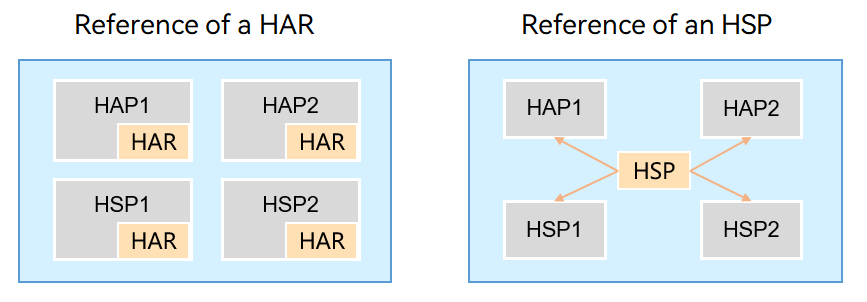
As shown in the following figure, the HAR module built is packaged into each module. Therefore, the entry module is still a HAP module. In napi_load_module_with_info, the second parameter is the name of the dependent HAR defined in the oh-package.json5 file of the HAP module, but not the actual name of the HAR module.
- If the called module (Module 2) is an HSP:
HSP is an independent module, and its entry module is the HSP module. Therefore, the second parameter of napi_load_module_with_info is the name of the HSP module.
[h2]Does the cross-module calls support dependency transitivity, for example, the third-party .so library on which a HAR/HSP depends?
Currently, the HAR and HSP modules do not support dependency transitivity.
[h2]How many copies of the .so file are included in the package if multiple modules depend on the same .so file?
If multiple HAR modules depend on the same .so file, a single copy of the .so file can be retained in the package if the overlay strategy is enabled.
If multiple HSP modules depend on the same .so file, the dependent .so file is packaged into the final build. Therefore, each .hsp file has a .so file.
[h2]What should I do if an error is reported indicating that the ArkTS file of a HAR/HSP module cannot be found?
Symptom
When the ArkTS file of a HAR/HSP module is called, the following error message is displayed:
Error message:Cannot find module 'staticModule/src/main/ets/utils/Util' imported from 'com.xxxx.crossmodulereference/entry'.
Possible Causes
The useNormalizedOHMUrl field in the project-level build-profile.json5 file is set to false.
Solution
Add the following configuration to build-profile.json5 of the calling module:
// ...
  "buildOption": {
    // ...
    "arkOptions" : {
      "runtimeOnly" : {
        "packages": [
          "static_module"
        ]
      }
    }
  },
  // ...