Overview
When a Web component is used to load HTML5 pages, text boxes and videos are often displayed. In these scenarios, the component performance on HTML5 pages is poor. For a smoother experience, native components must be placed on Web components. Use native components on the Web component in the following scenarios:
- High performance and smooth experience are required.
- Native component functions are required.
- Native components have been implemented and can be reused to reduce development costs.
Currently, there are the following solutions for using native components on the Web component (for details, see Component Overview):
Solution 1: Use Stack to stack the components on the HTML5 page.
Solution 2: Enable same-layer rendering. Replace some Web components with native components to improve the interaction experience and performance.
After performance comparison between the foregoing two solutions, performance of same-layer rendering is better than that of non-same-layer rendering.
Same-Layer Rendering
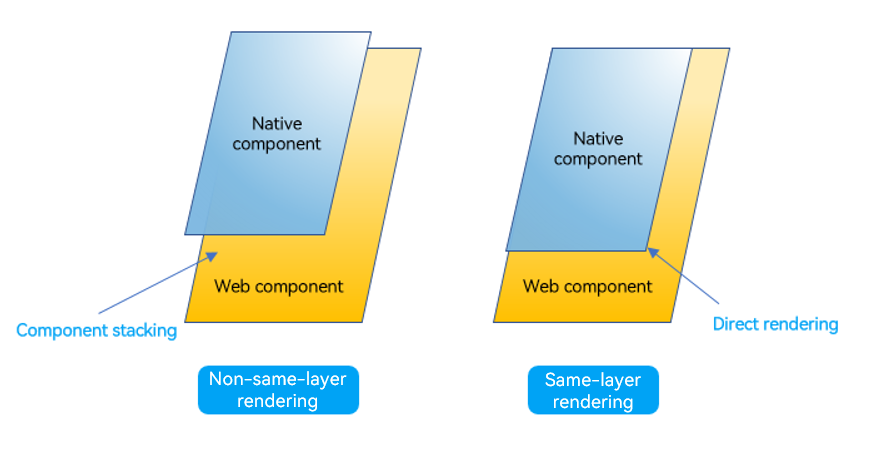
Same-layer rendering is a hybrid rendering technology that embeds native components into the same layer in the DOM tree of Web components, implementing seamless integration between native components and Web components.
The differences between same-layer rendering and non-same-layer rendering are as follows:
- Non-same-layer rendering: Native components are stacked on the Web component based on the Z-order hierarchy. This method is easy to implement and applies to scenarios where the size and location of native components are fixed.
- Same-layer rendering: Renders native components to the Embed tag area of the HTML5 page. This method is complex and is used when the size and position of a native component need to change with the Web component.
Figure 1 Differences between same-layer rendering and non-same-layer rendering
Example Scenario
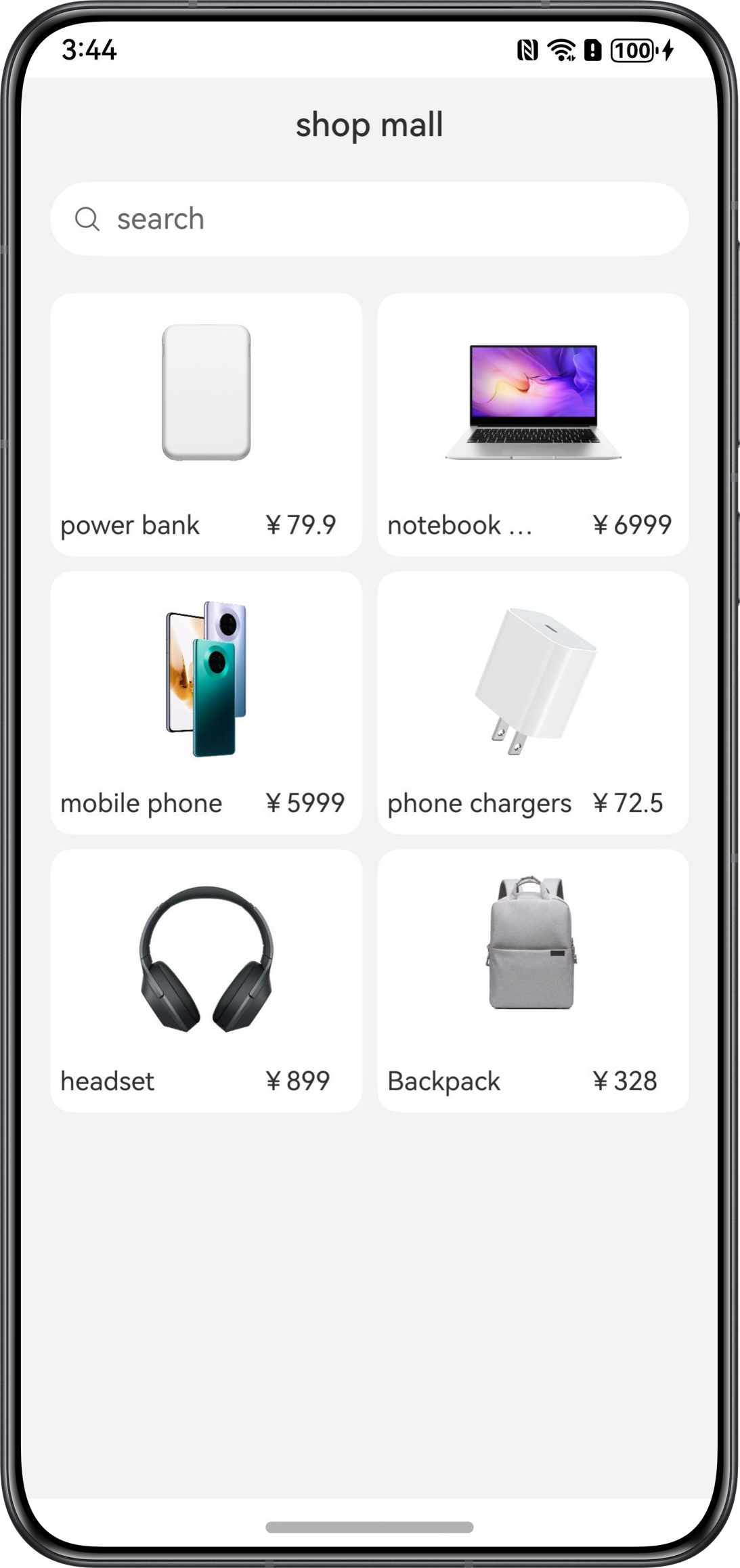
The following describes how to load the same store component to the same HTML5 page and capture traces to compare the differences between the two modes. The core parts of the page effect and instance source code are as follows.
Figure 2 Page effect
The code of the HTML5 page is as follows:
<div>
    <div id="bodyId">
        <!-- On the H5 interface, the same layer elements are identified by the embedded tag, and the native components are rendered to the location of the embedded tag on the H5 page on the application side.-->
        <embed id="nativeSearch" type = "native/component" width="100%" height="100%" src="view"/>
    </div>
</div>
The code of the product data is as follows:
export const PRODUCT_DATA: Array<ProductDataModel> = [
  new ProductDataModel(0, $r('app.media.nativeembed_product000'), $r('app.string.nativeembed_product_title000'),
    $r("app.string.nativeembed_product_price000")),
  new ProductDataModel(1, $r('app.media.nativeembed_product001'), $r('app.string.nativeembed_product_title001'),
    $r('app.string.nativeembed_product_price001')),
  new ProductDataModel(2, $r('app.media.nativeembed_product002'), $r('app.string.nativeembed_product_title002'),
    $r('app.string.nativeembed_product_price002')),
  new ProductDataModel(4, $r('app.media.nativeembed_product003'), $r('app.string.nativeembed_product_title004'),
    $r('app.string.nativeembed_product_price004')),
  new ProductDataModel(0, $r('app.media.nativeembed_product000'), $r('app.string.nativeembed_product_title000'),
    $r("app.string.nativeembed_product_price000")),
  new ProductDataModel(1, $r('app.media.nativeembed_product001'), $r('app.string.nativeembed_product_title001'),
    $r('app.string.nativeembed_product_price001')),
  new ProductDataModel(2, $r('app.media.nativeembed_product002'), $r('app.string.nativeembed_product_title002'),
    $r('app.string.nativeembed_product_price002')),
  new ProductDataModel(4, $r('app.media.nativeembed_product003'), $r('app.string.nativeembed_product_title004'),
    $r('app.string.nativeembed_product_price004')),
  new ProductDataModel(0, $r('app.media.nativeembed_product000'), $r('app.string.nativeembed_product_title000'),
    $r("app.string.nativeembed_product_price000")),
  new ProductDataModel(1, $r('app.media.nativeembed_product001'), $r('app.string.nativeembed_product_title001'),
    $r('app.string.nativeembed_product_price001')),
  new ProductDataModel(2, $r('app.media.nativeembed_product002'), $r('app.string.nativeembed_product_title002'),
    $r('app.string.nativeembed_product_price002')),
  new ProductDataModel(4, $r('app.media.nativeembed_product003'), $r('app.string.nativeembed_product_title004'),
    $r('app.string.nativeembed_product_price004')),
  new ProductDataModel(0, $r('app.media.nativeembed_product000'), $r('app.string.nativeembed_product_title000'),
    $r("app.string.nativeembed_product_price000")),
  new ProductDataModel(1, $r('app.media.nativeembed_product001'), $r('app.string.nativeembed_product_title001'),
    $r('app.string.nativeembed_product_price001')),
  new ProductDataModel(2, $r('app.media.nativeembed_product002'), $r('app.string.nativeembed_product_title002'),
    $r('app.string.nativeembed_product_price002')),
  new ProductDataModel(4, $r('app.media.nativeembed_product003'), $r('app.string.nativeembed_product_title004'),
    $r('app.string.nativeembed_product_price004')),
];
The code of the store component is as follows:
@Component
struct SearchComponent {
  @Prop searchWidth: number;
  @Prop searchHeight: number;

  build() {
    Column({ space: 8 }) {
      Text($r('app.string.nativeembed_mall'))
        .fontSize(16)
      Row() {
        Image($r('app.media.nativeembed_search_icon'))
          .width(14)
          .margin({ left: 14 })
        Text($r('app.string.nativeembed_search_text_placeholder'))
          .fontSize(14)
          .opacity(0.6)
          .fontColor('#000000')
          .margin({ left: 14})
      }
      .width('100%')
      .margin(4)
      .height(36)
      .backgroundColor(Color.White)
      .borderRadius(18)
      .onClick(() => {
        this.getUIContext().getPromptAction().showToast({
          message: $r('app.string.nativeembed_prompt_text')
        });
      })
      Grid() {
        ForEach(PRODUCT_DATA, (item: ProductDataModel, index: number) => {
          GridItem() {
            Column({ space: 8 }) {
              Image(item.uri)
                .width(100)
                .height(100)
              Row({ space: 8 }) {
                Text(item.title)
                  .fontSize(12)
                Text(item.price)
                  .fontSize(12)
              }
            }
            .backgroundColor(Color.White)
            .alignItems(HorizontalAlign.Center)
            .justifyContent(FlexAlign.Center)
            .width('100%')
            .borderRadius(12)
            .padding({ bottom: 12 })
          }
        }, (item: ProductDataModel) => `${item.id}`)
      }
      .columnsTemplate('1fr 1fr')
      .rowsGap(8)
      .columnsGap(8)
      .width('100%')
      .height('90%')
      .backgroundColor('#F1F3F5')
    }
    .padding(10)
    .width(this.searchWidth)
    .height(this.searchHeight)
  }
}
Solution Comparison of Loading Native Components on a Web Component for the First Time
Use HTML5 to implement the native component content and directly use the web component to load the page. However, during page development, JS, CSS, and even some frontend frameworks are used, the animation effect and experience are still not as good as using native components. Therefore, same-layer rendering and non-same-layer rendering are used for comparison.
[h2]Using Non-Same-Layer Rendering
Use a blank HTML5 page at the bottom layer, use any tag as the placeholder, and stack a native component on the top of the HTML5 page. The native component is displayed in the corresponding position after the Web component is loaded and the tag size and position are obtained.
Add the getEmbedSize() method to the HTML5 page to obtain the element size. The code is as follows:
function getEmbedSize() {
    let doc = document.getElementById('nativeSearch');
    return {
      width: doc.offsetWidth,
      height: doc.offsetHeight,
    }
}
Use Stack to arrange the Web component and SearchComponent. The code is as follows:
import { PRODUCT_DATA } from '../mock/GoodsMock';
import { webview } from '@kit.ArkWeb';

@Entry
@Component
struct NonSameLayerRendering {
  @State searchWidth: number = 0;
  @State searchHeight: number = 0;
  @State isWebInit: boolean = false;
  browserTabController: WebviewController = new webview.WebviewController(); // WebviewController controller

  build() {
    Stack() {
      Web({ src: $rawfile('nativeembed_view.html'), controller: this.browserTabController })
        .backgroundColor('#F1F3F5')
        .onPageEnd(() => {
          this.browserTabController.runJavaScript(
            'getEmbedSize()',
            (error, result) => {
              if (result) {
                interface EmbedSize {
                  width: number,
                  height: number
                }
                let embedSize = JSON.parse(result) as EmbedSize;
                this.searchWidth = embedSize.width;
                this.searchHeight = embedSize.height;
                this.isWebInit = true;
              }
            });
        })
      if (this.isWebInit){
        Column() {
          // Because it needs to be displayed according to the actual size of the Web, it needs to wait for the width and height to be obtained after the Web is initialized, and then it needs to be layered on the Web
          SearchComponent({ searchWidth: this.searchWidth, searchHeight: this.searchHeight })
        }
        .zIndex(10)
      }
    }
  }
}

/**
 * Set the data class of the item
 */
class ProductDataModel {
  id: number;
  uri: ResourceStr;
  title: ResourceStr;
  price: ResourceStr;

  constructor(id: number, uri: ResourceStr, title: ResourceStr, price: ResourceStr) {
    this.id = id;
    this.uri = uri;
    this.title = title;
    this.price = price;
  }
}

@Component
struct SearchComponent {
  @Prop searchWidth: number;
  @Prop searchHeight: number;

  build() {
    Column({ space: 8 }) {
      Text($r('app.string.nativeembed_mall'))
        .fontSize(16)
      Row() {
        Image($r('app.media.nativeembed_search_icon'))
          .width(14)
          .margin({ left: 14 })
        Text($r('app.string.nativeembed_search_text_placeholder'))
          .fontSize(14)
          .opacity(0.6)
          .fontColor('#000000')
          .margin({ left: 14})
      }
      .width('100%')
      .margin(4)
      .height(36)
      .backgroundColor(Color.White)
      .borderRadius(18)
      .onClick(() => {
        this.getUIContext().getPromptAction().showToast({
          message: $r('app.string.nativeembed_prompt_text')
        });
      })
      Grid() {
        ForEach(PRODUCT_DATA, (item: ProductDataModel, index: number) => {
          GridItem() {
            Column({ space: 8 }) {
              Image(item.uri)
                .width(100)
                .height(100)
              Row({ space: 8 }) {
                Text(item.title)
                  .fontSize(12)
                Text(item.price)
                  .fontSize(12)
              }
            }
            .backgroundColor(Color.White)
            .alignItems(HorizontalAlign.Center)
            .justifyContent(FlexAlign.Center)
            .width('100%')
            .borderRadius(12)
            .padding({ bottom: 12 })
          }
        }, (item: ProductDataModel) => `${item.id}`)
      }
      .columnsTemplate('1fr 1fr')
      .rowsGap(8)
      .columnsGap(8)
      .width('100%')
      .height('90%')
      .backgroundColor('#F1F3F5')
    }
    .padding(10)
    .width(this.searchWidth)
    .height(this.searchHeight)
  }
}
This solution is used when the HTML5 web page at the bottom layer is simple. If the HTML5 web page is complex, it is difficult to locate the native component. In addition, the Web component is rendered as a whole, and even the part covered by the native component needs to be rendered, which consumes performance.
[h2]Using Same-Layer Rendering
During same-layer rendering, you can set a blank HTML5 page at the bottom layer, use Embed tag as a placeholder for the HTML5 page and NodeContainer for the ArkTS component. Then bind the surfaceId on the Web to the ArkTS component and render it on NodeContainer. Here are some general steps:
- Organize the NodeContainer and Web component using the Stack component, and enable the enableNativeEmbedMode mode.
- Encapsulate a class SearchNodeController inherited from NodeController for the use of NodeContainer.
- Load the nativeembed_view.html file using the Web. When the Embed tag is parsed, the Web notifies the Embed tag to the app through onNativeEmbedLifecycleChange().
- After passing the configuration to searchNodeController based on embed.status in the callback of step 3, execute the rebuild() method to trigger the makeNode() method again.
- After the makeNode() method is triggered, the NodeContainer component obtains the BuilderNode object, and the native component is displayed on the page.
import { PRODUCT_DATA } from '../viewmodel/GoodsViewModel';
import { ProductDataModel } from '../model/GoodsModel';
import { BuilderNode, FrameNode, NodeController, NodeRenderType } from '@kit.ArkUI';
import { webview } from '@kit.ArkWeb';

// Margin vertical
const MARGIN_VERTICAL: number = 8;
// Font weight
const FONT_WEIGHT: number = 500;
// Placeholder
const PLACEHOLDER: ResourceStr = $r('app.string.embed_search');

declare class Params {
  width: number;
  height: number;
}

declare class NodeControllerParams {
  surfaceId: string;
  type: string;
  renderType: NodeRenderType;
  embedId: string;
  width: number;
  height: number;
}

class SearchNodeController extends NodeController {
  private rootNode: BuilderNode<[Params]> | undefined | null = null;
  private embedId: string = "";
  private surfaceId: string = "";
  private renderType: NodeRenderType = NodeRenderType.RENDER_TYPE_DISPLAY;
  private componentWidth: number = 0;
  private componentHeight: number = 0;
  private componentType: string = "";

  /**
   * Set rendering parameters.
   *
   * @param params Rendering parameters.
   */
  setRenderOption(params: NodeControllerParams): void {
    this.surfaceId = params.surfaceId;
    this.renderType = params.renderType;
    this.embedId = params.embedId;
    this.componentWidth = params.width;
    this.componentHeight = params.height;
    this.componentType = params.type;
  }

  /**
   * Create a node.
   *
   * @param uiContext UIContext
   * @returns Node.
   */
  makeNode(uiContext: UIContext): FrameNode | null {
    this.rootNode = new BuilderNode(uiContext, { surfaceId: this.surfaceId, type: this.renderType });
    if (this.componentType === 'native/component') {
      this.rootNode.build(wrapBuilder(searchBuilder), { width: this.componentWidth, height: this.componentHeight });
    }
    return this.rootNode.getFrameNode();
  }

  setBuilderNode(rootNode: BuilderNode<Params[]> | null): void {
    this.rootNode = rootNode;
  }

  getBuilderNode(): BuilderNode<[Params]> | undefined | null {
    return this.rootNode;
  }

  updateNode(arg: Object): void {
    this.rootNode?.update(arg);
  }

  getEmbedId(): string {
    return this.embedId;
  }

  postEvent(event: TouchEvent | undefined): boolean {
    return this.rootNode?.postTouchEvent(event) as boolean;
  }
}
@Component
struct SearchComponent {
  @Prop params: Params;
  controller: SearchController = new SearchController()

  build() {
    Column({ space: MARGIN_VERTICAL }) {
      Text($r("app.string.embed_mall"))
        .fontSize($r('app.string.ohos_id_text_size_body4'))
        .fontWeight(FONT_WEIGHT)
        .fontFamily('HarmonyHeiTi-Medium')
      Row() {
        Search({ placeholder: PLACEHOLDER, controller: this.controller })
          .backgroundColor(Color.White)
      }
      .width($r("app.string.embed_full_percent"))
      .margin($r("app.integer.embed_row_margin"))

      Grid() {
        ForEach(PRODUCT_DATA, (item: ProductDataModel, index: number) => {
          GridItem() {
            Column({ space: MARGIN_VERTICAL }) {
              Image(item.imageRes).width($r("app.integer.embed_image_size"))
              Row({ space: MARGIN_VERTICAL }) {
                Text(item.title)
                  .fontSize($r('app.string.ohos_id_text_size_body1'))
                  .width(100)
                  .maxLines(1)
                  .textOverflow({ overflow: TextOverflow.Ellipsis })
                Text(item.price)
                  .fontSize($r('app.string.ohos_id_text_size_body1'))
                  .width(50)
                  .maxLines(1)
              }
            }
            .backgroundColor($r('app.color.ohos_id_color_background'))
            .alignItems(HorizontalAlign.Center)
            .justifyContent(FlexAlign.Center)
            .width($r("app.string.embed_full_percent"))
            .height($r("app.string.embed_full_percent"))
            .borderRadius($r('app.string.ohos_id_corner_radius_default_m'))
          }
        }, (item: ProductDataModel, index: number) => index.toString())
      }
      .columnsTemplate('1fr 1fr')
      .rowsTemplate('1fr 1fr 1fr')
      .rowsGap($r('app.string.ohos_id_elements_margin_vertical_m'))
      .columnsGap($r('app.string.ohos_id_elements_margin_vertical_m'))
      .width($r("app.string.embed_full_percent"))
      .height($r("app.string.embed_sixty_percent"))
      .backgroundColor($r('app.color.ohos_id_color_sub_background'))
    }
    .padding($r('app.string.ohos_id_card_margin_start'))
    .width(this.params.width)
    .height(this.params.height)
  }
}
@Builder
function searchBuilder(params: Params) {
  SearchComponent({ params: params })
    .backgroundColor($r('app.color.ohos_id_color_sub_background'))
}

@Entry
@Component
struct Index {
  browserTabController: WebviewController = new webview.WebviewController();
  @State componentIdArr: Array<string> = [];
  private nodeControllerMap: Map<string, SearchNodeController> = new Map();

  build() {
    Stack() {
      ForEach(this.componentIdArr, (componentId: string) => {
        NodeContainer(this.nodeControllerMap.get(componentId));
      }, (embedId: string) => embedId)
      Web({ src: $rawfile("embed_view.html"), controller: this.browserTabController })
        .backgroundColor($r('app.color.ohos_id_color_sub_background'))
        .zoomAccess(false)
        .enableNativeEmbedMode(true)
        .onNativeEmbedLifecycleChange((embed) => {
          const componentId = embed.info?.id?.toString() as string
          if (embed.status === NativeEmbedStatus.CREATE) {
            let nodeController = new SearchNodeController();
            nodeController.setRenderOption({
              surfaceId: embed.surfaceId as string,
              type: embed.info?.type as string,
              renderType: NodeRenderType.RENDER_TYPE_TEXTURE,
              embedId: embed.embedId as string,
              width: this.getUIContext().px2vp(embed.info?.width),
              height: this.getUIContext().px2vp(embed.info?.height)
            });
            nodeController.rebuild();
            this.nodeControllerMap.set(componentId, nodeController);
            this.componentIdArr.push(componentId);
          } else if (embed.status === NativeEmbedStatus.UPDATE) {
            let nodeController = this.nodeControllerMap.get(componentId);
            nodeController?.updateNode({
              text: 'update',
              width: this.getUIContext().px2vp(embed.info?.width),
              height: this.getUIContext().px2vp(embed.info?.height)
            } as ESObject);
            nodeController?.rebuild();
          } else {
            let nodeController = this.nodeControllerMap.get(componentId);
            nodeController?.setBuilderNode(null);
            nodeController?.rebuild();
          }
        })
        .onNativeEmbedGestureEvent((touch) => {
          this.componentIdArr.forEach((componentId: string) => {
            let nodeController = this.nodeControllerMap.get(componentId);
            if (nodeController?.getEmbedId() === touch.embedId) {
              nodeController?.postEvent(touch.touchEvent);
            }
          })
        })
    }
  }
}
Performance Comparison of Loading Native Component on the Web Component
Capture the traces for analysis when the Web component loads the native component. In the following figure, the red line indicates that the Web component is loaded and the blue line indicates that the native component is loaded.
[h2]Using Non-Same-Layer Rendering
Figure 3 Trace diagram of non-same-layer rendering
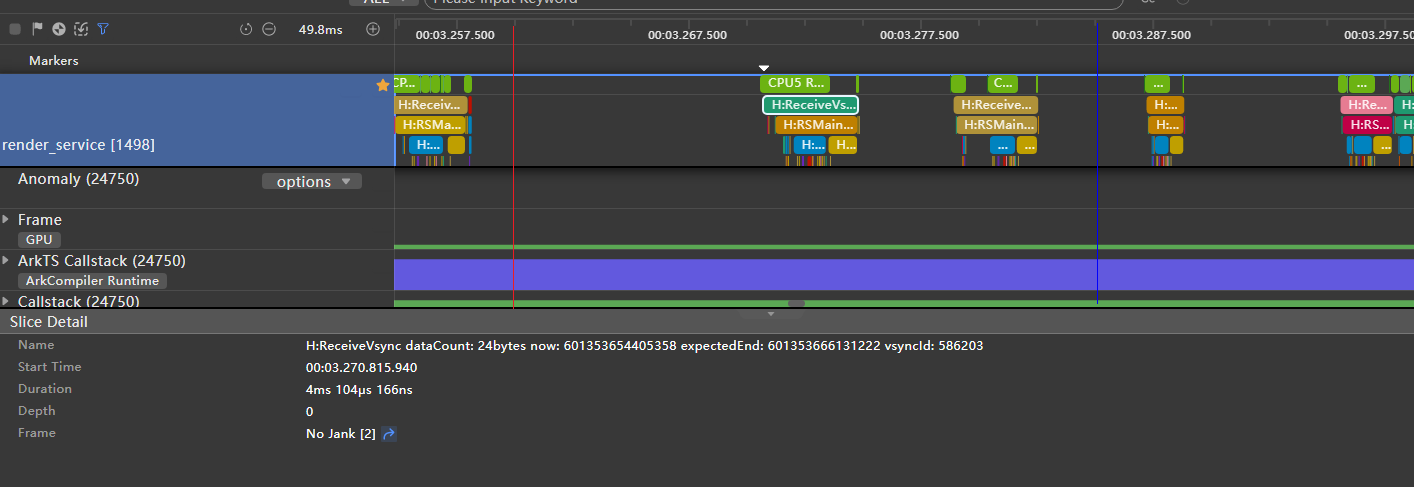
Analysis:
- On the app side, the measurement and computing of the layout are performed between the red and blue lines, and the image loading is delayed beyond the blue line.
- On the render_service side, the time consumed by ReceiveVsync of each frame on the right of the blue line increases greatly.
[h2]Using Same-Layer Rendering
Figure 4 Trace diagram of same-layer rendering
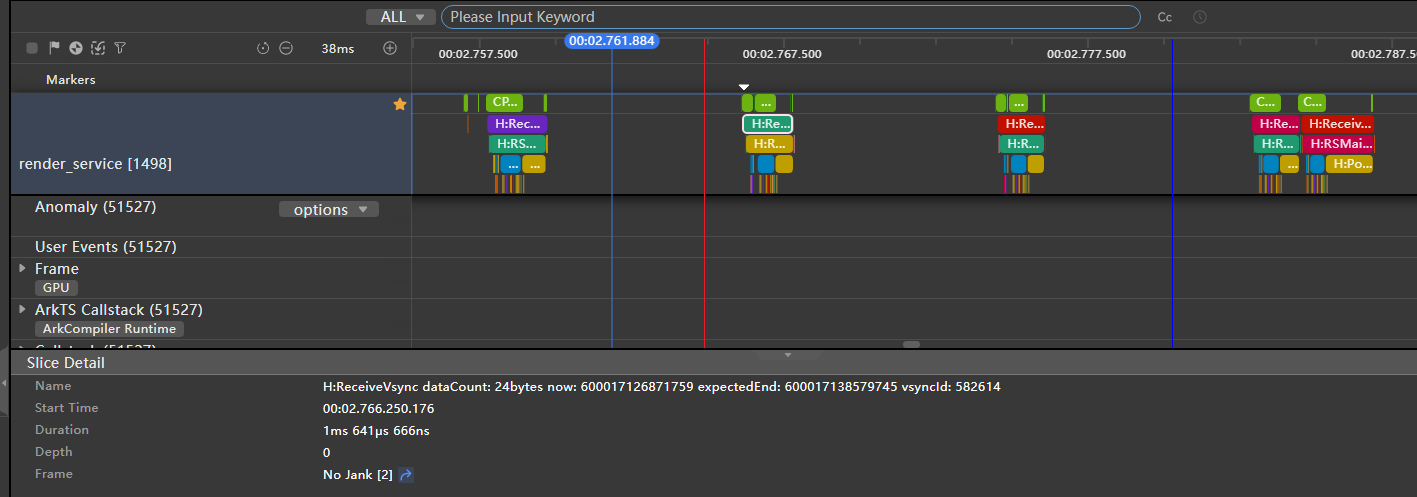
Analysis:
- On the app side, the measurement and drawing of the component layout are divided into two parts due to NodeContainer. In addition, the image loading is moved to the area between the red and blue lines.
- On the render_service side, the time consumed by ReceiveVsync of each frame does not change significantly.
[h2]Summary for Page Loading
The following table lists the time required for each frame when native component is loaded on the render_service side by using two kinds of rendering. (-1 indicates the previous frame, 1 indicates the next frame, and so on.)
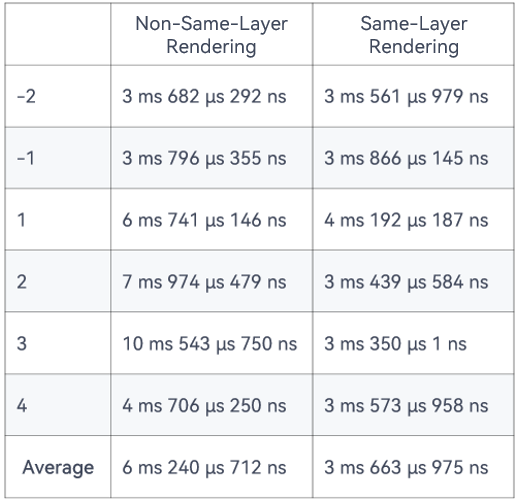
As shown in the table, non-same-layer rendering greatly increases the time consumed by each frame on the render_service side. By contrast, same-layer rendering does not cause significant affect.
Performance Comparison in List Scrolling Scenario
Capture the traces for analysis in the list scrolling scenario. The following describes the differences between the structure of each frame rendered in different modes.
[h2]Using Non-Same-Layer Rendering
Figure 5 Single-frame image during scrolling using non-same-layer rendering
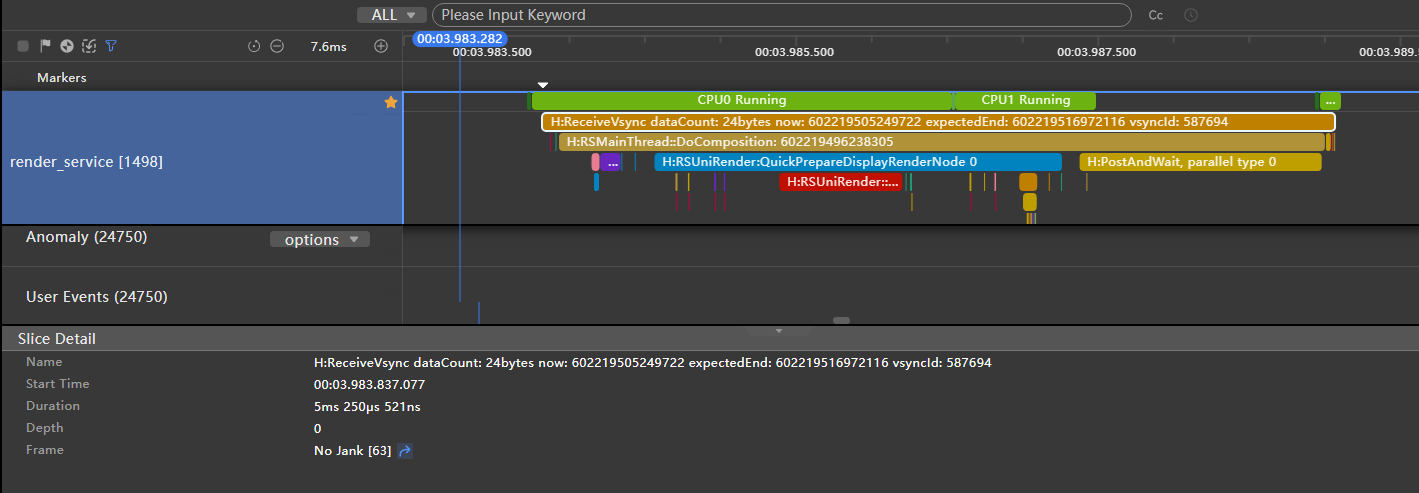
Analysis:
- The ReceiveVsync event indicates that the rendering service receives the vertical synchronization (Vsync) signal. The occurrence of this flag means that the rendering service starts to respond to the rendering task of the new frame. Therefore, the preceding figure shows the rendering of a single frame.
- The rendering of a single frame in the ReceiveVsync event takes 5 ms.
[h2]Using Same-Layer Rendering
Figure 6 Single-frame image during scrolling using same-layer rendering
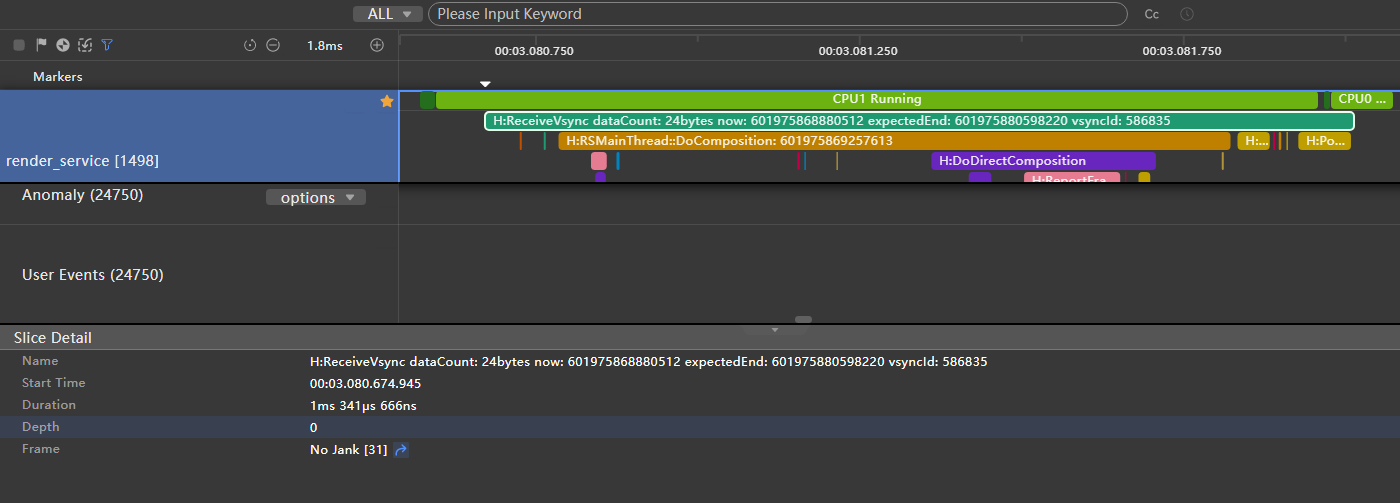
Analysis:
- In the same scenario, the rendering of a single frame in the ReceiveVsync event takes 1 ms.
[h2]Summary for List Scrolling
The time required for each frame of render_service in the non-same-layer rendering mode increases greatly. The conclusion is the same as that in Summary for Page Loading.
Summary
When rendering a native component in a Web component, use the same-layer rendering to render images before the native component is loaded. In addition, render the elements at the same layer together to reduce drawing tasks and improve performance. Using same-layer-rendering can implement more functions, for example, adjusting the component size as required, to simplify operations.