Represents a container that carries a web page.
This component automatically covers the entire page. Only one web-view component can be used in each page.
Since: 1.0.4
Constraints
To use this component, you must complete the development preparations. For details, see Developing the web-view Component.
Properties
Name | Type | Default Value | Mandatory | Description |
|---|---|---|---|---|
src | string | - | Yes | Link to the web page. |
bindload | eventhandler | - | No | Event handler triggered when the web page is successfully loaded, with e.detail = { src }. |
binderror | eventhandler | - | No | Event handler triggered when the web page fails to load, with e.detail = { src }. |
bindmessage | eventhandler | - | No | Event handler triggered at a specific time (for example, upon a web page back navigation or a component destruction) when a web page sends a message to an atomic service using the postMessage method, with e.detail = { data } (data is an array of postMessage parameters). |
Example
HXML file:
<view>
  <web-view
    src="{{url}}"
    binderror="onError"
    bindload="onWebviewLoad"
    bindmessage="onWebviewMessage">
  </web-view>
</view>
JS code:
Page({
  data: {
    url: 'url'
  },
  onWebviewMessage (e) {
    console.log('[DBG][webview test page][onMessage]:', e);
  },
  onError(e) {
    console.log('[DBG][webview test page][onError]:', e);
  },
  onWebviewLoad (e) {
    console.log('[DBG][webview test page][onWebviewLoad]:', e);
  }
}); [h2]has.ascfweb.navigateTo
has.ascfweb.navigateTo(Object object)
Navigates to an in-app page while retaining the current page. This API cannot navigate to the tabBar page. You can use has.ascfweb.navigateBack to return to the original page.
Since: 1.0.4
Parameters
The input parameter is an object containing the following fields.
Name | Type | Mandatory | Description |
|---|---|---|---|
url | string | Yes | Path to the in-app non-tabBar page to open (that is, the code package path defined in app.json). Parameters can be appended to the path in the following format: a question mark (?) between a parameter and the path; an equal sign (=) between a parameter and its value; ampersands (&) between multiple parameters. Supported formats (assuming a page is defined as page/path/path in app.json):
|
success | function | No | Callback to be invoked when the API call is successful. |
fail | function | No | Callback to be invoked when the API call fails. |
complete | function | No | Callback to be invoked when the API call is complete, regardless of success or failure. |
Example
has.ascfweb.navigateTo({
  url: '/page/path/path?key=1',
  success: function(res) {
  },
  fail: function(err) {
  },
  complete(res) {
  }
});
[h2]has.ascfweb.navigateBack
has.ascfweb.navigateBack(Object object)
Closes the current page and navigates back to the previous page or multiple levels up in the page stack.
Since: 1.0.4
Parameters
The input parameter is an object containing the following fields.
Name | Type | Default Value | Mandatory | Description |
|---|---|---|---|---|
delta | number | 1 | No | Number of navigation levels to go back. If delta exceeds the current depth of the navigation stack, the home page is returned. |
success | function | - | No | Callback to be invoked when the API call is successful. |
fail | function | - | No | Callback to be invoked when the API call fails. |
complete | function | - | No | Callback to be invoked when the API call is complete, regardless of success or failure. |
Example
// Note: The page that calls navigateTo is pushed onto the stack while that calls redirectTo is not. For details, see the following sample code.
// Page A
has.ascfweb.navigateTo({
  url: 'B?id=1'
});
// Page B
has.ascfweb.navigateTo({
  url: 'C?id=1'
});
// Calling NavigateBack on page C returns to page A.
has.ascfweb.navigateBack({
  delta: 2
});
[h2]has.ascfweb.reLaunch
has.ascfweb.reLaunch(Object object)
Closes all current pages and opens an in-app page.
Since: 1.0.4
Parameters
The input parameter is an object containing the following fields.
Name | Type | Mandatory | Description |
|---|---|---|---|
url | string | Yes | Path to the in-app page to open (that is, the code package path defined in app.json). Parameters can be appended to the path of non-tabBar pages in the following format: a question mark (?) between a parameter and the path; an equal sign (=) between a parameter and its value; ampersands (&) between multiple parameters. Supported formats (assuming a page is defined as page/path/path in app.json):
|
success | function | No | Callback to be invoked when the API call is successful. |
fail | function | No | Callback to be invoked when the API call fails. |
complete | function | No | Callback to be invoked when the API call is complete, regardless of success or failure. |
Example
has.ascfweb.reLaunch({
  url: 'test?id=1'
});

// options contains the parameters appended to the path.
Page({
  onLoad (option) {
    console.log(option.query)
  }
});
[h2]has.ascfweb.switchTab
has.ascfweb.switchTab(Object object)
Switches between different tabs within the application. If an application defines multiple tabs, that is, there are tabs at the bottom or top of the client window, this API can be used to redirect to the tabBar page and close all other non-tabBar pages.
Since: 1.0.4
Parameters
The input parameter is an object containing the following fields.
Name | Type | Mandatory | Description |
|---|---|---|---|
url | string | Yes | Path of the tabBar page (defined in the tabbar field in app.json) to redirect to. The path cannot contain parameters. For example, if page/tab1/tab1 is defined in the tabbar field in app.json, the following formats are supported:
|
success | function | No | Callback to be invoked when the API call is successful. |
fail | function | No | Callback to be invoked when the API call fails. |
complete | function | No | Callback to be invoked when the API call is complete, regardless of success or failure. |
Example
// app.json{
  "tabBar": {
    "list": [{
      "pagePath": "index",
      "text": "Home"
    },{
      "pagePath": "other",
      "text": "Others"
    }]
  }}
has.ascfweb.switchTab({
url: '/index'
}); [h2]has.ascfweb.redirectTo
has.ascfweb.redirectTo(Object object)
Redirects to an in-app page while closing the current page. This API cannot navigate to the tabBar page.
Since: 1.0.4
Parameters
The input parameter is an object containing the following fields.
Name | Type | Mandatory | Description |
|---|---|---|---|
url | string | Yes | Path to the in-app non-tabBar page to open (that is, the code package path defined in app.json). Parameters can be appended to the path in the following format: a question mark (?) between a parameter and the path; an equal sign (=) between a parameter and its value; ampersands (&) between multiple parameters. Supported formats (assuming a page is defined as page/path/path in app.json):
|
success | function | No | Callback to be invoked when the API call is successful. |
fail | function | No | Callback to be invoked when the API call fails. |
complete | function | No | Callback to be invoked when the API call is complete, regardless of success or failure. |
Example
has.ascfweb.redirectTo({
  url: 'test?id=1'
});
[h2]has.ascfweb.postMessage
has.ascfweb.postMessage(Object object)
Sends messages to an atomic service from a web page. The method bound to bindmessage of the component is triggered at a specific time (upon an atomic service back navigation or a component destruction). The callback parameter of this method is the array queue of the web page's postMessage.
Since: 1.0.4
Parameters
The input parameter is an object containing the following fields.
Name | Type | Mandatory | Description |
|---|---|---|---|
data | string | Object | Yes | Message object or string to send. |
success | function | No | Callback triggered when the data is stored. The data that is successfully stored is sent to the user through bindmessage when an atomic service is navigated back or a component is destroyed. |
fail | function | No | Callback triggered when the data fails to be stored. |
complete | function | No | Callback to be invoked when the API call is complete, regardless of success or failure. |
Example
has.ascfweb.postMessage({ data: 'foo' });
has.ascfweb.postMessage({ data: {foo: 'bar'} });
[h2]has.ascfweb.getEnv
has.ascfweb.getEnv(function callback)
Obtains the current environment. This API uses a callback to return the result.
Since: 1.0.4
Parameters
Name | Type | Mandatory | Description |
|---|---|---|---|
callback | function | No | Callback used to return the result. |
Return value of callback
Object containing the following fields.
Name | Type | Description |
|---|---|---|
ascfweb | boolean | Whether the current environment is ASCF Web. |
systemInfo | object | System information. |
Description of systemInfo
Name | Type | Description |
|---|---|---|
deviceType | string | Device type. |
brand | string | Device brand. |
productModel | string | Product model. |
osFullName | string | OS version. |
Example
has.ascfweb.getEnv(function(res) {
  console.log(res.ascfweb);   // true
  console.log(res.systemInfo);
});
[h2]has.checkJsApi
has.checkJsApi(Object object)
Checks whether the current host supports the specified APIs.
Since: 1.0.4
Parameters
The input parameter is an object containing the following fields.
Name | Type | Mandatory | Description |
|---|---|---|---|
jsApiList | string[] | Yes | Array of API names to check. |
success | function | No | Callback to be invoked when the API call is successful. |
fail | function | No | Callback to be invoked when the API call fails. |
complete | function | No | Callback to be invoked when the API call is complete, regardless of success or failure. |
Example
has.checkJsApi({
  jsApiList: ['chooseImage', 'previewImage', 'compressImage', 'uploadFile'],
  success(res) {
    console.log('checkJsApi fail: ', res);
  },
  fail(res) {
    console.log('checkJsApi fail: ', res);
  }
})
[h2]has.chooseImage
has.chooseImage(Object object)
Selects images from the local album or takes photos using the camera.
Since: 1.0.4
Parameters
The input parameter is an object containing the following fields.
Name | Type | Default Value | Mandatory | Description |
|---|---|---|---|---|
count | number | 9 | No | Maximum number of images that can be selected. The default value is 9, and the maximum value is 20. |
sizeType | string[] | ['original', 'compressed'] | No | Size of the selected image.
|
sourceType | string[] | ['album', 'camera'] | No | Image source.
|
success | function | - | No | Callback to be invoked when the API call is successful. |
fail | function | - | No | Callback to be invoked when the API call fails. |
complete | function | - | No | Callback to be invoked when the API call is complete, regardless of success or failure. |
Return value of success
Name | Type | Description |
|---|---|---|
tempFilePaths | Array<string> | List of local temporary image file paths. |
tempFiles | Array<object> | List of local temporary image files. |
Example
has.chooseImage({
  count: 1, // The default value is 9.
  sizeType: ['original', 'compressed'], // Specify whether the image is an original or a compressed one. By default, both are available.
  sourceType: ['album', 'camera'], // Specify whether the image is chosen from the album or taken using a camera. By default, both are available.
  success: function (res) {
  }
});
[h2]has.previewImage
has.previewImage(Object object)
Previews an image on the new page. During the preview, users can operate the image such as saving it.
Since: 1.0.4
Note: If network resources need to be saved when this API is called, configure the server domain names.
Parameters
The input parameter is an object containing the following fields.
Name | Type | Default Value | Mandatory | Description |
|---|---|---|---|---|
current | string | The first element of urls (that is, the URL of the first image). | No | URL of the current image. |
urls | string[] | - | Yes | List of images to preview. Both network and local images are supported. The local image path starts with internal://. |
showmenu | boolean | true | No | Whether to display the touch and hold menu. |
success | function | - | No | Callback to be invoked when the API call is successful. |
fail | function | - | No | Callback to be invoked when the API call fails. |
complete | function | - | No | Callback to be invoked when the API call is complete, regardless of success or failure. |
Example
has.previewImage({
  current: '', // HTTP link of the currently displayed image.
  urls: [] // List of HTTP links of images to preview.
});
[h2]has.uploadImage
has.uploadImage(Object object)
Uploads a local image to the server.
Since: 1.0.4
Required permissions: ohos.permission.INTERNET, which must be declared in module.json5.
Note: Before calling this API, you need to configure server domain names.
Parameters
The input parameter is an object containing the following fields.
Name | Type | Mandatory | Description |
|---|---|---|---|
url | string | Yes | IP address of your server. |
filePath | string | Yes | Path of files to be uploaded (local path). |
name | string | Yes | Key used to obtain binary file content on the server. |
header | string | No | Header of an HTTP request. The header cannot contain a referer. |
formData | Object | No | Additional form data in the HTTP request. |
success | function | No | Callback to be invoked when the API call is successful. |
fail | function | No | Callback to be invoked when the API call fails. |
complete | function | No | Callback to be invoked when the API call is complete, regardless of success or failure. |
Example
has.chooseImage({
  success (res) {
    const tempFilePaths = res.tempFilePaths
    has.uploadImage({
      url: 'https://www.example.com', // Replace the example URL with the actual URL.
      filePath: tempFilePaths[0],
      name: 'file',
      formData: {
        'user': 'test'
      },
      success (res){
        const data = res.data;
        //do something
      }
    });
 }});
[h2]has.downloadImage
has.downloadImage(Object object)
Downloads an image to the local host.
Since: 1.0.4
Parameters
The input parameter is an object containing the following fields.
Name | Type | Mandatory | Description |
|---|---|---|---|
url | string | Yes | IP address of your server. |
header | string | No | Header of an HTTP request. The header cannot contain a referer. |
filePath | string | No | Path for saving the downloaded file (local path). |
success | function | No | Callback to be invoked when the API call is successful. |
fail | function | No | Callback to be invoked when the API call fails. |
complete | function | No | Callback to be invoked when the API call is complete, regardless of success or failure. |
Example
has.downloadImage({
  url: 'https://www.example.com', // Replace the example URL with the actual URL.
  success(res) {
    // As long as the server has response data, the response content is written into the file and success() is triggered. You need to determine whether the desired content is downloaded based on service requirements.
    if (res.statusCode === 200) {
      let filePath = res.filePath;
    }
  }
});
[h2]has.getNetworkType
has.getNetworkType(Object object)
Obtains the network type.
Since: 1.0.4
Required permissions: ohos.permission.GET_NETWORK_INFO, which must be declared in module.json5.
Parameters
The input parameter is an object containing the following fields.
Name | Type | Mandatory | Description |
|---|---|---|---|
success | function | No | Callback to be invoked when the API call is successful. |
fail | function | No | Callback to be invoked when the API call fails. |
complete | function | No | Callback to be invoked when the API call is complete, regardless of success or failure. |
Return value of success
Name | Type | Description |
|---|---|---|
networkType | string | Network type.
|
Example
has.getNetworkType({
  success (res) {
    var networkType = res.networkType; // Return the network type. The options are 2g, 3g, 4g, and wifi.
  }
});
[h2]has.openLocation
has.openLocation(Object object)
Opens a location using the built-in map of the map engine.
Since: 1.0.4
Parameters
The input parameter is an object containing the following fields.
Name | Type | Default Value | Mandatory | Description |
|---|---|---|---|---|
latitude | number | - | Yes | Latitude of the location to display. The value range is [-90, 90]. A negative value indicates the Southern Hemisphere. NOTE: For regions within the Chinese mainland, Hong Kong (China), and Macao (China), use the GCJ02 coordinate system. For all other regions, use the WGS84 coordinate system. |
longitude | number | - | Yes | Longitude of the location to display. The value range is [-180, 180]. A negative value indicates the Western Hemisphere. The coordinate system to be used is determined by the value of type. NOTE: For regions within the Chinese mainland, Hong Kong (China), and Macao (China), use the GCJ02 coordinate system. For all other regions, use the WGS84 coordinate system. |
name | string | - | Yes | Location name. |
address | string | - | No | Detailed address. |
success | function | - | No | Callback to be invoked when the API call is successful. |
fail | function | - | No | Callback to be invoked when the API call fails. |
complete | function | - | No | Callback to be invoked when the API call is complete, regardless of success or failure. |
Example
has.openLocation({
  latitude: 0, // Latitude, whose value is a floating point number. The value range is [-90, 90].
  longitude: 0, // Longitude, whose value is a floating point number. The value range is [-180, 180].
  name: '', // Location name
  address: '' // Detailed address
});
[h2]has.getLocation
has.getLocation(Object object)
Obtains the current location and speed. Use of high-precision positioning may increase the API response time. You can set highAccuracyExpireTime to specify the timeout duration.
Since: 1.0.4
Required permissions: ohos.permission.LOCATION and ohos.permission.APPROXIMATELY_LOCATION, which must be declared in module.json5.
Parameters
The input parameter is an object containing the following fields.
Name | Type | Default Value | Mandatory | Description |
|---|---|---|---|---|
type | string | wgs84 | No | Type of the coordinate system to use. The value wgs84 means the GPS coordinate system, and gcj02 means the coordinate system of Chinese State Bureau of Surveying and Mapping. |
altitude | boolean | false | No | Whether to return the altitude information. If the value is set to true, the altitude information is returned. Note that this requires high-precision positioning and therefore may increase the API response time. |
isHighAccuracy | boolean | false | No | Whether to enable high-precision positioning. |
highAccuracyExpireTime | number | No | High-precision positioning timeout interval, in ms. The highest precision within the specified time is returned. High-precision positioning takes effect only when the value is greater than 3000 ms. | |
success | function | No | Callback to be invoked when the API call is successful. | |
fail | function | No | Callback to be invoked when the API call fails. | |
complete | function | No | Callback to be invoked when an API call is complete, regardless of success or failure. |
Return value of success
Name | Type | Description |
|---|---|---|
latitude | number | Latitude. The value range is [-90, 90]. A negative value indicates the Southern Hemisphere. The coordinate system to be used is determined by the value of type. |
longitude | number | Longitude. The value range is [-180, 180]. A negative value indicates the Western Hemisphere. The coordinate system to be used is determined by the value of type. |
speed | number | Speed, in m/s. |
accuracy | number | Location accuracy, that is, the degree of proximity between the obtained location and the real location. For example, the value 10 indicates that the difference between the obtained location and the real location is 10 m. A smaller value indicates a higher accuracy. |
altitude | number | Altitude, in m. |
verticalAccuracy | number | Vertical accuracy, in m. |
Example
has.getLocation({
  type: 'wgs84', // The default value is wgs84, which indicates the GPS coordinate system. To return the Mars coordinate used by openLocation, set type to gcj02.
  success: function (res) {
    let latitude = res.latitude; // Latitude, whose value is a floating point number. The value range is [-90, 90].
    let longitude = res.longitude; // Longitude, whose value is a floating point number. The value range is [-180, 180].
    let speed = res.speed; // Speed, in m/s.
    let accuracy = res.accuracy; // Location accuracy.
  }
});
[h2]has.login
has.login(Object object)
Obtains the login credential (code). The credential is used to obtain the user login information, including the unique user identifier in the application (openid), the unique identifier of the platform account (unionid), and the session key of the current login (session_key). The session key is used to encrypt and decrypt user data.
Since: 1.0.9
Parameters
The input parameter is an object containing the following fields.
Name | Type | Default Value | Mandatory | Description |
|---|---|---|---|---|
success | function | - | No | Callback to be invoked when the API call is successful. |
fail | function | - | No | Callback to be invoked when the API call fails. |
complete | function | - | No | Callback to be invoked when the API call is complete, regardless of success or failure. |
Return value of success
Name | Type | Description |
|---|---|---|
code | string | User login credential (valid for 5 minutes). |
idToken | string | User information in JWT format. |
openID | string | Identifier of a HUAWEI ID user in different applications. A user has different OpenIDs for different applications. |
unionID | string | Identifier of a HUAWEI ID user in different applications of the same developer. A user has the same UnionID for different applications of the same developer. |
Example
has.login({
  success: (res) => {
    console.log(`login success, res = ${JSON.stringify(res)}`);
  },
  fail: (err) => {
    console.log(`login fail, err = ${JSON.stringify(err)}`);
  },
  complete: (res) => {
    console.log(`login complete, res = ${JSON.stringify(res)}`);
  }
});
[h2]has.queryIapEnvStatus
has.queryIapEnvStatus(Object object)
Checks whether the logged-in account is located in a country or region where In-App Purchase (IAP) is available. The IAP service is currently available only in the Chinese mainland.
Required permissions: The Client ID and signing certificate fingerprint are configured, the merchant service is enabled, and the IAP service is enabled and activated.
Since: 1.0.10
Parameters
The input parameter is an object containing the following fields.
Name | Type | Default Value | Mandatory | Description |
|---|---|---|---|---|
success | function | - | No | Callback to be invoked when the API call is successful. |
fail | function | - | No | Callback to be invoked when the API call fails. |
complete | function | - | No | Callback to be invoked when the API call is complete, regardless of success or failure. |
Return value of fail
Error Code | Error Message |
|---|---|
401 | Parameter error. |
1001860000 | The operation was canceled by the user. |
1001860001 | System internal error. |
1001860004 | Too frequent API calls. |
1001860005 | Network connection error. |
1001860050 | The HUAWEI ID is not signed in. |
1001860054 | The country or region of the signed-in HUAWEI ID does not support IAP. |
Example
has.queryIapEnvStatus({
  success() {
    console.log('iap is support');
  },
  fail(err) {
    console.log('iap is not support');
  }
});
[h2]has.createIap
has.createIap(Object object)
Initiates a purchase. Consumables, non-consumables, and auto-renewable subscriptions are supported. After creating products in AppGallery Connect, you can use this API to launch the HUAWEI IAP checkout page, displaying the product names, prices, and other information.
Required permissions: The Client ID and signing certificate fingerprint are configured, the merchant service is enabled, and the IAP service is enabled and activated.
Since: 1.0.10
Parameters
The input parameter is an object containing the following fields.
Name | Type | Default Value | Mandatory | Description |
|---|---|---|---|---|
productId | string | - | Yes | ID of the product to purchase. The product IDs come from the product information you have configured in AppGallery Connect. For details, see Configuring Products. |
productType | number | - | Yes | Type of the product to query.
|
developerPayload | string | - | No | Information provided by the merchant. If this field is set, the value will be returned to the application in the callback triggered when the payment is successful. NOTE: The value length is [0, 256]. |
reservedInfo | string | - | No | Additional product information in JSON string format passed in KV pairs. Example: let reservedInfo = "{\"key1\":\"value1\",\"key2\":\"value2\"}"; NOTE: This field is reserved and optional. |
promotionalOfferId | string | - | No | Promotional offer ID. It is the same as that in the product information set in AppGallery Connect. For details, see Setting the Promotional Price. The parameter is valid only when being passed with jwsRepresentation. |
applicationUserName | string | - | No | Obfuscated string associated with a user account, which uniquely identifies a user. You can pass this field when promotionalOfferId is passed. |
jwsRepresentation | string | - | No | Signature data containing purchase parameters, such as the promotion information, in JWS format. For details, see Generating a Signed Purchase Parameter for a Subscription Promotion. |
success | function | - | No | Callback to be invoked when the API call is successful. |
fail | function | - | No | Callback to be invoked when the API call fails. |
complete | function | - | No | Callback to be invoked when the API call is complete, regardless of success or failure. |
Return value of success
Name | Type | Description |
|---|---|---|
purchaseData | string | Purchase result in JSON string format. For details, see PurchaseData. |
Return value of fail
Error Code | Error Message |
|---|---|
102 | Param error |
401 | Parameter error. |
1001860000 | The operation was canceled by the user. |
1001860001 | System internal error. |
1001860002 | The application is not authorized. |
1001860003 | Invalid product information. |
1001860004 | Too frequent API calls. |
1001860005 | Network connection error. |
1001860007 | The app to which the product belongs is not released in a specified location. |
1001860051 | Failed to purchase a product because the user already owns the product. |
1001860054 | The country or region of the signed-in HUAWEI ID does not support IAP. |
1001860056 | The user is not allowed to make purchase. |
1001860059 | Invalid promotional offer id. |
1001860060 | Invalid purchase signature. |
Example
has.createIap({
  // Replace it with the actual product ID.
  productId: 'product_id',
  productType: 0,
  developerPayload: '',
  reservedInfo: JSON.stringify({ key1: 'value1' }),
  promotionalOfferId: '',
  applicationUserName: '',
  jwsRepresentation: '',
  success(res) {
    console.log('createIap success res = ' + JSON.stringify(res));
  },
  fail(err) {
    console.log('createIap fail err = ' + JSON.stringify(err));
  }
});
[h2]has.finishIap
has.finishIap(Object object)
Finalizes the purchase transaction. This API is called after the purchased product is delivered.
Required permissions: The Client ID and signing certificate fingerprint are configured, the merchant service is enabled, and the IAP service is enabled and activated.
Since: 1.0.10
Parameters
The input parameter is an object containing the following fields.
Name | Type | Default Value | Mandatory | Description |
|---|---|---|---|---|
productType | number | - | Yes | Type of the product to query. 0: consumables. 1: non-consumables. 2: auto-renewable subscriptions. 3: non-renewable subscriptions. |
purchaseToken | string | - | Yes | Purchase token returned in the purchase order. For a single purchase, the value corresponds to a purchase order. For a subscription purchase, the value corresponds to a subscription ID. |
purchaseOrderId | string | - | Yes | Purchase order ID returned in the purchase order. |
success | function | - | No | Callback to be invoked when the API call is successful. |
fail | function | - | No | Callback to be invoked when the API call fails. |
complete | function | - | No | Callback to be invoked when the API call is complete, regardless of success or failure. |
Return value of fail
Error Code | Error Message |
|---|---|
102 | Param error |
401 | Parameter error. |
1001860001 | System internal error. |
1001860002 | The application is not authorized. |
1001860004 | Too frequent API calls. |
1001860005 | Network connection error. |
1001860050 | The HUAWEI ID is not signed in. |
1001860052 | The purchase cannot be finished because the user has not paid for it. |
1001860053 | The purchase has been finished and cannot be finished again. |
1001860054 | The country or region of the signed-in HUAWEI ID does not support IAP. |
Example
has.finishIap({
  productType: 0,
  // Replace it with the actual purchaseToken.
  purchaseToken: '***',
  // Replace it with the actual purchaseOrderId.
  purchaseOrderId: '***',
  success() {
    console.log('finishIap success ');
  },
  fail(err) {
    console.log('finishIap fail err = ' + JSON.stringify(err));
  }
});
[h2]has.queryIap
has.queryIap(Object object)
Queries information about the purchased products, including consumables and non-consumables. Only one type of products can be queried per API call.
- For consumables, this API returns only the data of purchased but not consumed products. If purchase data is returned, the product may not be delivered due to certain reasons. The application needs to determine whether the product has been delivered and initiate redelivery if necessary.
- For non-consumables, this API returns information about all purchased products.
Required permissions: The Client ID and signing certificate fingerprint are configured, the merchant service is enabled, and the IAP service is enabled and activated.
Since: 1.0.10
Parameters
The input parameter is an object containing the following fields.
Name | Type | Default Value | Mandatory | Description |
|---|---|---|---|---|
productType | number | - | Yes | Type of the product to query. 0: consumables. 1: non-consumables. 2: auto-renewable subscriptions. 3: non-renewable subscriptions. |
continuationToken | string | - | No | Data locator marker for pagination queries. This parameter is optional for the first query. If a user has a large number of products and the response contains continuationToken, the application must initiate another call on the current API and pass the already received continuationToken. If product query is still incomplete, the application needs to call the API again until no continuationToken is returned, indicating that all products are returned. |
queryType | number | 1 | No | Query type. The default value is 1. 0: all purchase records of consumables, non-consumables, or auto-renewable subscriptions. 1: all purchased consumables, non-consumables, or auto-renewable subscriptions that have not been delivered. 2: purchased non-consumables or active auto-renewable subscriptions. In the sandbox environment: If productType is 1, only information about the purchased non-consumables that have not been delivered is returned. If productType is 2, only information about the active auto-renewable subscriptions is returned. |
success | function | - | No | Callback to be invoked when the API call is successful. |
fail | function | - | No | Callback to be invoked when the API call fails. |
complete | function | - | No | Callback to be invoked when the API call is complete, regardless of success or failure. |
Return value of success
Name | Type | Description |
|---|---|---|
purchaseDataList | string[] | Array of PurchaseData strings. |
continuationToken | string | Data locator marker for pagination queries. If a user has a large number of products and the response contains continuationToken, the application must initiate another call on the current API and pass the already received continuationToken. If product query is still incomplete, the application needs to call the API again until no continuationToken is returned, indicating that all products are returned. |
Return value of fail
Error Code | Error Message |
|---|---|
102 | Param error |
401 | Parameter error. |
1001860001 | System internal error. |
1001860002 | The application is not authorized. |
1001860004 | Too frequent API calls. |
1001860005 | Network connection error. |
1001860050 | The HUAWEI ID is not signed in. |
1001860054 | The country or region of the signed-in HUAWEI ID does not support IAP. |
Example
has.queryIap({
  productType: 0,
  queryType: 1,
  success(res) {
    console.log('queryIap success res = ' + JSON.stringify(res));
  },
  fail(err) {
    console.log('queryIap fail err = ' + JSON.stringify(err));
  }
});
[h2]has.queryIapProducts
has.queryIapProducts(Object object)
Obtains product details configured in AppGallery Connect.
Required permissions: The Client ID and signing certificate fingerprint are configured, the merchant service is enabled, and the IAP service is enabled and activated.
Since: 1.0.10
Parameters
The input parameter is an object containing the following fields.
Name | Type | Default Value | Mandatory | Description |
|---|---|---|---|---|
productType | number | - | Yes | Type of the product to query.
|
productIds | string[] | - | Yes | ID list of products to be queried. Each product ID must exist and be unique in your application. The product IDs come from the product information you have configured in AppGallery Connect. For details, see Configuring Products. NOTE: A maximum of 200 product IDs can be queried at a time. For a large number of products, you are advised to query their IDs in batches. |
success | function | - | No | Callback to be invoked when the API call is successful. |
fail | function | - | No | Callback to be invoked when the API call fails. |
complete | function | - | No | Callback to be invoked when the API call is complete, regardless of success or failure. |
Return value of success
Product array.
Return value of fail
Error Code | Error Message |
|---|---|
102 | Param error |
401 | Parameter error. |
1001860001 | System internal error. |
1001860002 | The application is not authorized. |
1001860003 | Invalid product information. |
1001860004 | Too frequent API calls. |
1001860005 | Network connection error. |
1001860007 | The app to which the product belongs is not released in a specified location. |
1001860050 | The HUAWEI ID is not signed in. |
1001860054 | The country or region of the signed-in HUAWEI ID does not support IAP. |
Example
has.queryIapProducts({
  productType: 0,
  productIds: ['xxx-1', 'xxx-2'],
  success(res) {
    console.log('queryIapProducts success res = ' + JSON.stringify(res));
  },
  fail(err) {
    console.log('queryIapProducts fail err = ' + JSON.stringify(err));
  }
});
[h2]has.isIapSandboxActivated
has.isIapSandboxActivated(Object object)
Checks whether the sandbox environment is available.
Required permissions: The Client ID and signing certificate fingerprint are configured, the merchant service is enabled, and the IAP service is enabled and activated.
Since: 1.0.10
Parameters
The input parameter is an object containing the following fields.
Name | Type | Default Value | Mandatory | Description |
|---|---|---|---|---|
success | function | - | No | Callback to be invoked when the API call is successful. |
fail | function | - | No | Callback to be invoked when the API call fails. |
complete | function | - | No | Callback to be invoked when the API call is complete, regardless of success or failure. |
Return value of success
A Boolean value, indicating whether the sandbox testing capability takes effect.
Return value of fail
Error Code | Error Message |
|---|---|
102 | Param error |
401 | Parameter error. |
1001860001 | System internal error. |
1001860002 | The application is not authorized. |
1001860004 | Too frequent API calls. |
1001860005 | Network connection error. |
1001860050 | The HUAWEI ID is not signed in. |
1001860054 | The country or region of the signed-in HUAWEI ID does not support IAP. |
1001860057 | The app provision type is not debug. |
1001860058 | The HUAWEI ID is not test account. |
Example
has.isIapSandboxActivated({
  success(res) {
    console.log('isIapSandboxActivated success res = ' + JSON.stringify(res));
  },
  fail(err) {
    console.log('isIapSandboxActivated fail err = ' + JSON.stringify(err));
  }
});
[h2]has.showIapManagedSubscriptions
has.showIapManagedSubscriptions(Object object)
Redirects to the subscription status screen or the subscription details screen.
Required permissions: The Client ID and signing certificate fingerprint are configured, the merchant service is enabled, and the IAP service is enabled and activated.
Since: 1.0.10
Parameters
The input parameter is an object containing the following fields.
Name | Type | Default Value | Mandatory | Description |
|---|---|---|---|---|
uiParameter | - | Yes | UIWindowParameter object, which contains the window display mode. | |
groupId | string | - | No | Subscription group ID, which comes from the subscription group configured in AppGallery Connect. For details, see here. NOTE:
|
success | function | - | No | Callback to be invoked when the API call is successful. |
fail | function | - | No | Callback to be invoked when the API call fails. |
complete | function | - | No | Callback to be invoked when the API call is complete, regardless of success or failure. |
Return value of fail
Error Code | Error Message |
|---|---|
102 | Param error |
401 | Parameter error. |
1001860001 | System internal error. |
1001860002 | The application is not authorized. |
1001860004 | Too frequent API calls. |
1001860005 | Network connection error. |
1001860050 | The HUAWEI ID is not signed in. |
1001860054 | The country or region of the signed-in HUAWEI ID does not support IAP. |
Example
has.showIapManagedSubscriptions({
  uiParameter: {
    windowScreenMode: 1
  },
  groupId: 'xxx',
  success() {
    console.log('showIapManagedSubscriptions success');
  },
  fail(err) {
    console.log('showIapManagedSubscriptions fail err = ' + JSON.stringify(err));
  }
});
[h2]has.requestSubscribeMessage
has.requestSubscribeMessage(Object object)
Subscribes to messages.
Since: 1.0.10
Parameters
The input parameter is an object containing the following fields.
Name | Type | Default Value | Mandatory | Description |
|---|---|---|---|---|
tmplIds | Array<string> | - | Yes | IDs of the message templates to be subscribed to. A maximum of three messages can be subscribed to at a time. |
success | function | - | No | Callback to be invoked when the API call is successful. |
fail | function | - | No | Callback to be invoked when the API call fails. |
complete | function | - | No | Callback to be invoked when the API call is complete, regardless of success or failure. |
Return value of success
Name | Type | Description |
|---|---|---|
errMsg | string | 'requestSubscribeMessage:ok' if the API call is successful. |
[TEMPLATE_ID:string] | string | TEMPLATE_ID indicates the template ID. The string can be any of the following: 'accept': The user agrees to subscribe to the message of the specified template. 'reject': The user rejects to subscribe to the message of the specified template. 'ban': The template is banned by the background. 'filter': The template is filtered out by the background due to duplicate template titles. |
Example
has.requestSubscribeMessage({
  tmplIds: [''],
  success: (res) => {
    console.log(`requestSubscribeMessage success, res = ${JSON.stringify(res)}`);
  },
  fail: (err) => {
    console.log(`requestSubscribeMessage fail, err = ${JSON.stringify(err)}`);
  },
  complete: (res) => {
    console.log(`requestSubscribeMessage complete, res = ${JSON.stringify(res)}`);
  }
});
[h2]has.getPhoneNumber
has.getPhoneNumber(Object object):void
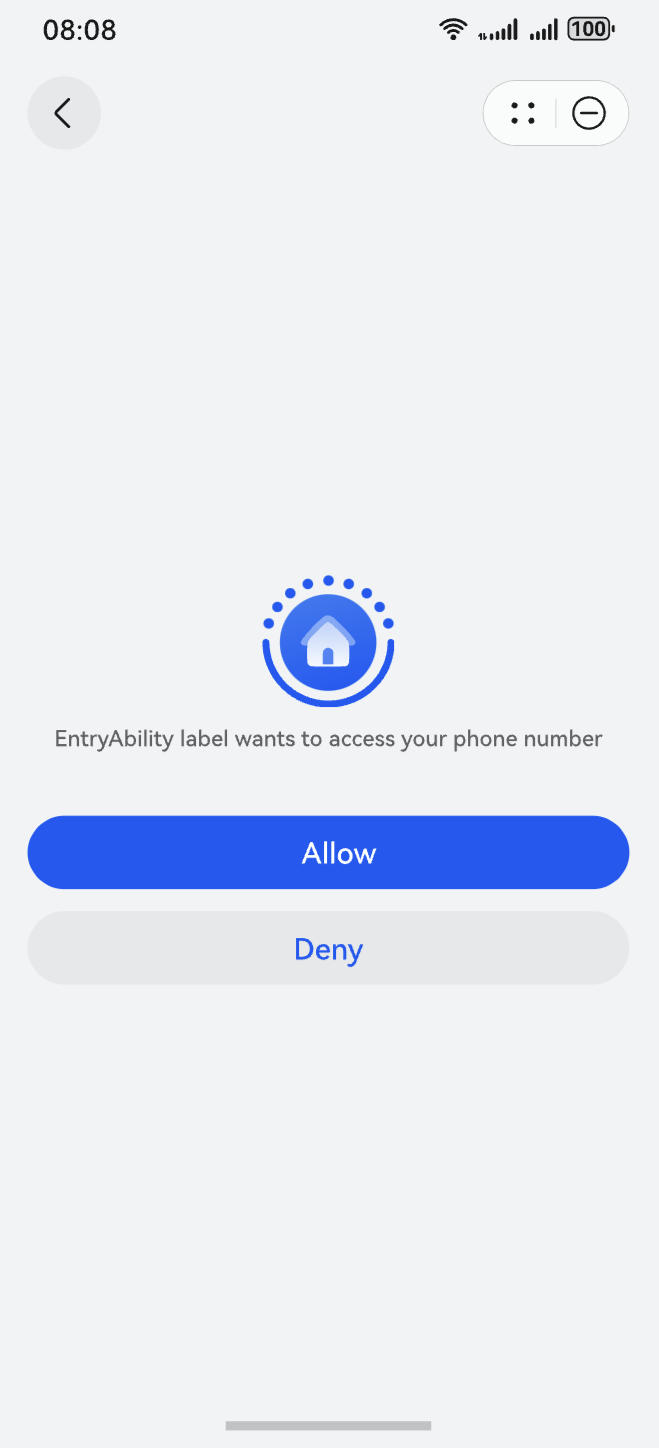
Launches the function page for obtaining a user's phone number. Before using this method, see Getting Started - Obtaining the Mobile Number for details.
Since: 1.0.12
Parameters
The input parameter is an object containing the following fields.
Name | Type | Default Value | Mandatory | Description |
|---|---|---|---|---|
success | function | - | No | Callback to be invoked when the API call is successful. |
fail | function | - | No | Callback to be invoked when the API call fails. |
complete | function | - | No | Callback to be invoked when the API call is complete, regardless of success or failure. |
Return value of success
Name | Type | Description |
|---|---|---|
code | string | Phone number of a user. |
Example
has.getPhoneNumber({
  success: (res) => {
    console.log(`getPhoneNumber success, res = ${JSON.stringify(res)}`);
  },
  fail: (err) => {
    console.log(`getPhoneNumber fail, err = ${JSON.stringify(err)}`);
  },
  complete: (res) => {
    console.log(`getPhoneNumber complete, res = ${JSON.stringify(res)}`);
  }
});
Below shows the UI effect.
[h2]has.getAvatarInfo
has.getAvatarInfo(Object object): void
Launches the function page for obtaining a user's profile photo. Before using this API, configure the client ID.
Since: 1.0.12
Parameters
The input parameter is an object containing the following fields.
Name | Type | Default Value | Mandatory | Description |
|---|---|---|---|---|
success | function | - | No | Callback to be invoked when the API call is successful. |
fail | function | - | No | Callback to be invoked when the API call fails. |
complete | function | - | No | Callback to be invoked when the API call is complete, regardless of success or failure. |
Return value of success
Name | Type | Description |
|---|---|---|
avatarUri | string | Local path of the profile photo. |
Example
has.getAvatarInfo({
  success: (res) => {
    console.log(`getAvatarInfo success, res = ${JSON.stringify(res)}`);
  },
  fail: (err) => {
    console.log(`getAvatarInfo fail, err = ${JSON.stringify(err)}`);
  },
  complete: (res) => {
    console.log(`getAvatarInfo complete, res = ${JSON.stringify(res)}`);
  }
});
Below shows the UI effect.

[h2]has.getInvoiceTitle
has.getInvoiceTitle(Object object): void
Launches the function page for obtaining a user's invoice title. Before using this API, configure the client ID.
Since: 1.0.12
Parameters
The input parameter is an object containing the following fields.
Name | Type | Default Value | Mandatory | Description |
|---|---|---|---|---|
success | function | - | No | Callback to be invoked when the API call is successful. |
fail | function | - | No | Callback to be invoked when the API call fails. |
complete | function | - | No | Callback to be invoked when the API call is complete, regardless of success or failure. |
Return value of success
Name | Type | Description |
|---|---|---|
type | string | Invoice title type. |
title | string | Invoice title name. |
taxNumber | string | Taxpayer identification number. |
companyAddress | string | Company address. |
telephone | string | Phone number of a company. |
bankName | string | Bank name of a company. |
bankAccount | string | Bank account of a company. |
Example
has.getInvoiceTitle({
  success: (res) => {
    console.log(`getInvoiceTitle success, res = ${JSON.stringify(res)}`);
  },
  fail: (err) => {
    console.log(`getInvoiceTitle fail, err = ${JSON.stringify(err)}`);
  },
  complete: (res) => {
    console.log(`getInvoiceTitle complete, res = ${JSON.stringify(res)}`);
  }
});
Below shows the UI effect.

[h2]has.getDeliveryAddress
has.getDeliveryAddress(Object object): void
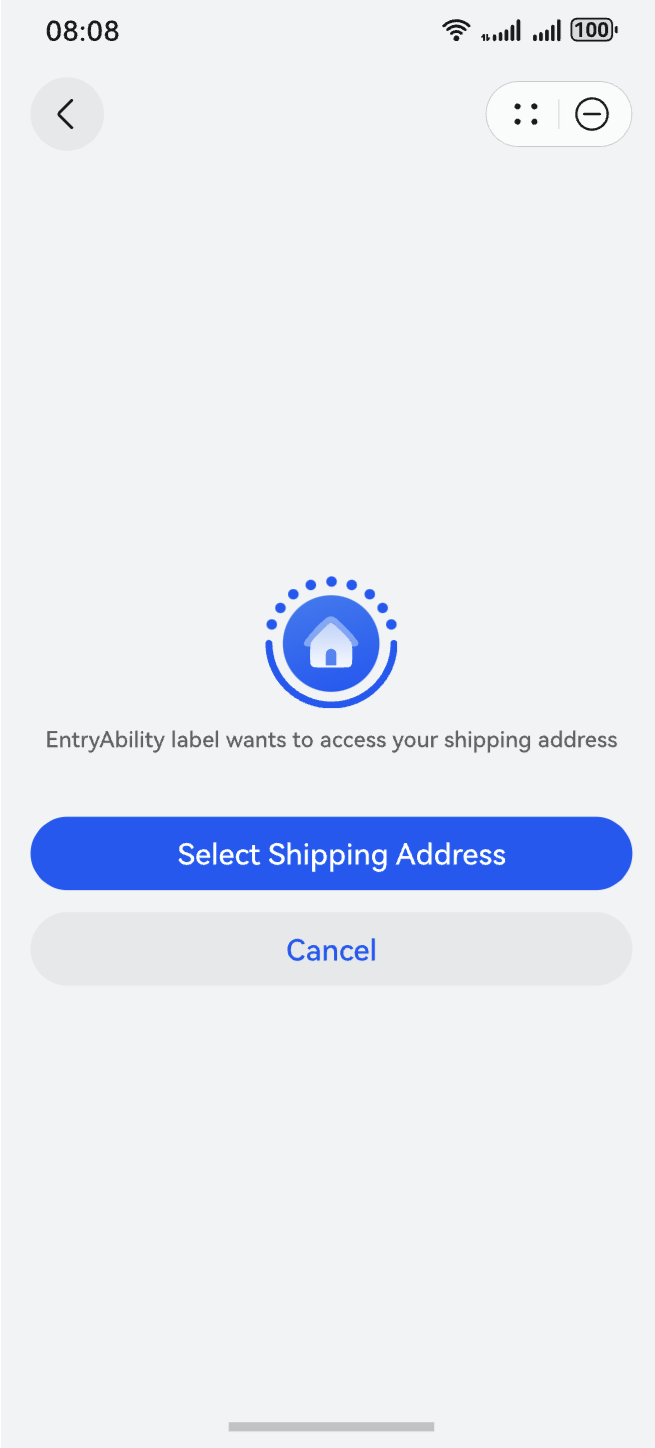
Launches the function page for obtaining a user's shipping address. Before using this API, configure the client ID.
Since: 1.0.12
Parameters
The input parameter is an object containing the following fields.
Name | Type | Default Value | Mandatory | Description |
|---|---|---|---|---|
success | function | - | No | Callback to be invoked when the API call is successful. |
fail | function | - | No | Callback to be invoked when the API call fails. |
complete | function | - | No | Callback to be invoked when the API call is complete, regardless of success or failure. |
Return value of success
Name | Type | Description |
|---|---|---|
userName | string | Recipient name. |
telNumber | string | Phone number of the recipient. |
postalCode | string | Postal code. |
nationalCode | string | Country code. |
provinceName | string | Province name. |
cityName | string | City name. |
countyName | string | District name. |
streetName | string | Street name. |
detailInfo | string | Detailed address. |
Example
has.getDeliveryAddress({
  success: (res) => {
    console.log(`getDeliveryAddress success, res = ${JSON.stringify(res)}`);
  },
  fail: (err) => {
    console.log(`getDeliveryAddress fail, err = ${JSON.stringify(err)}`);
  },
  complete: (res) => {
    console.log(`getDeliveryAddress complete, res = ${JSON.stringify(res)}`);
  }
});
Below shows the UI effect.
[h2]has.getServiceSubscription
has.getServiceSubscription(Object object): void
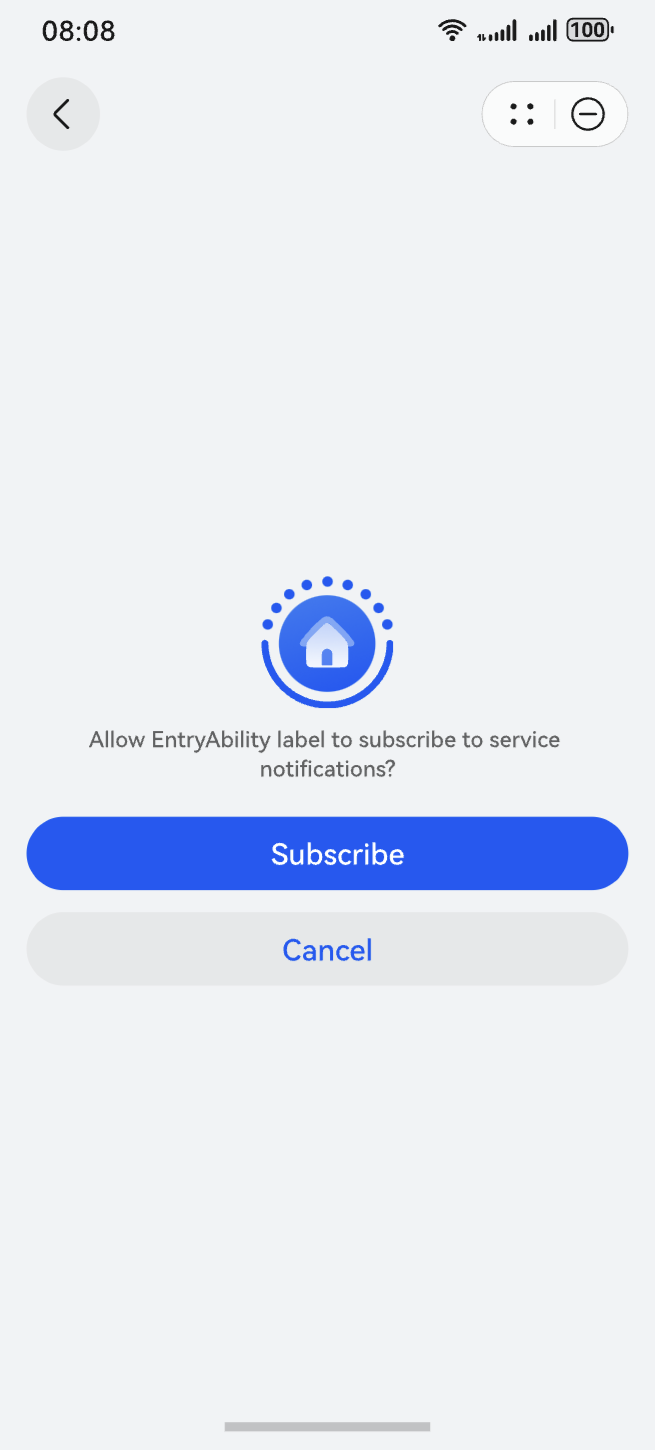
Launches the subscription service page. Before using this API, enable Push Kit and select a subscription template.
Since: 1.0.12
Parameters
The input parameter is an object containing the following fields.
Name | Type | Default Value | Mandatory | Description |
|---|---|---|---|---|
tmplIds | Array<string> | - | Yes | IDs of the message templates to be subscribed to. A maximum of three messages can be subscribed to at a time. |
success | function | - | No | Callback to be invoked when the API call is successful. |
fail | function | - | No | Callback to be invoked when the API call fails. |
complete | function | - | No | Callback to be invoked when the API call is complete, regardless of success or failure. |
Return value of success
Name | Type | Description |
|---|---|---|
errMsg | string | Call result. 'requestSubscribeMessage:ok' is returned if the API call is successful. |
Example
has.getServiceSubscription({
  tmplIds: [''],
  success: (res) => {
    console.log(`getServiceSubscription success, res = ${JSON.stringify(res)}`);
  },
  fail: (err) => {
    console.log(`getServiceSubscription fail, err = ${JSON.stringify(err)}`);
  },
  complete: (res) => {
    console.log(`getServiceSubscription complete, res = ${JSON.stringify(res)}`);
  }
});
Below shows the UI effect.
PurchaseData
Represents the order information and subscription status information in JWS format.
Since: 1.0.10
Name | Type | Mandatory | Description |
|---|---|---|---|
type | number | Yes | Product type.
|
jwsPurchaseOrder | string | No | Order information in JWS format. For details about how to obtain the purchase order data in JSON string format, see Verifying the Signature in the Returned Result. For details about the parameters in the JSON string, see PurchaseOrderPayload. |
jwsSubscriptionStatus | string | No | Subscription status information in JWS format. For details about how to obtain the subscription status information in JSON string format, see Verifying the Signature in the Returned Result. |
PurchaseOrderPayload
Represents the purchase order model, which supports consumables, non-consumables, and auto-renewable subscriptions.
Since: 1.0.10
Name | Type | Mandatory | Description |
|---|---|---|---|
environment | string | Yes | Environment type.
|
purchaseOrderId | string | Yes | Identifier of a purchase order. |
purchaseToken | string | Yes | Purchase token. In a consumable/non-consumable purchase, each purchase token matches a specific order. In an auto-renewable subscription purchase, each purchase token matches a subscription ID. |
applicationId | string | Yes | Application ID. |
productId | string | Yes | Product ID. |
productType | string | Yes | Product type. The options are as follows:
|
purchaseTime | number | Yes | Time when the product is purchased. The value is a UTC timestamp, in milliseconds. If the purchase is not complete, this parameter is left empty. |
finishStatus | string | No | Delivery status. The options are as follows:
|
needFinish | boolean | No | Whether the delivery should be acknowledged to complete the purchase process. The options are as follows:
|
price | number | Yes | Price in currency sub-units. The specific sub-unit, like cents, varies by currency. |
currency | string | Yes | Currency. For details, see ISO 4217. Example values are CNY, USD, and MYR. |
developerPayload | string | No | Parameter passed in when the payment API is called. It is reserved for use by the merchant. |
purchaseOrderRevocationReasonCode | string | No | Reason for revoking the purchase order.
|
revocationTime | number | No | Time when the purchase order is revoked. The value is a UTC timestamp, in milliseconds. |
offerTypeCode | string | No | Promotional offer type.
|
offerId | string | No | Promotional offer ID. |
countryCode | string | Yes | Country or region code. For details, see ISO 3166. |
signedTime | number | Yes | Time when the purchase data is signed. The value is a UTC timestamp, in milliseconds. |
SubGroupStatusPayload
Represents the subscription status information related to a subscription group.
Since: 1.0.10
Name | Type | Mandatory | Description |
|---|---|---|---|
environment | string | Yes | Environment type.
|
applicationId | string | Yes | Application ID. |
packageName | string | Yes | Application bundle name. |
subGroupId | string | Yes | Subscription group ID. |
lastSubscriptionStatus | object | No | Final subscription status (SubscriptionStatus) of the subscription group. For example, if a user switches from subscription A to B and then to C, this parameter specifies the status of subscription C. |
historySubscriptionStatusList | object[] | No | List of latest historical subscription statuses (SubscriptionStatus) of a subscription group. For example, if a user switches from subscription A to B and then to C, this parameter specifies the statuses of subscriptions C, B, and A. |
SubscriptionStatus
Represents subscription status information.
Since: 1.0.10
Name | Type | Mandatory | Description |
|---|---|---|---|
subGroupGenerationId | string | Yes | Subscription group generation ID.
|
subscriptionId | string | Yes | Subscription ID. The subscription ID changes in the following scenarios:
|
purchaseToken | string | Yes | Purchase token. In a consumable/non-consumable purchase, each purchase token matches a specific order. In a subscription purchase, each purchase token matches a subscription ID. |
status | string | Yes | Subscription status.
|
expiresTime | number | Yes | Time when the subscription expires. The value is a UTC timestamp, in milliseconds. |
lastPurchaseOrder | object | No | Latest purchase order for a subscription. For details about the parameters contained in the purchase order, see PurchaseOrderPayload. |
recentPurchaseOrderList | object[] | No | List of the recently purchased subscriptions, including the purchase orders generated upon renewal and balance conversion. For details about the parameters contained in the purchase order, see PurchaseOrderPayload. |
renewalInfo | object | No | Latest renewal plan for a subscription. For details about the parameters, see SubRenewalInfo. |
SubRenewalInfo
Represents the renewal information about a subscription.
Since: 1.0.10
Name | Type | Mandatory | Description |
|---|---|---|---|
environment | string | Yes | Environment type.
|
subGroupGenerationId | string | Yes | Subscription group generation ID.
|
nextRenewPeriodProductId | string | No | ID of the product to be renewed in the next charging period. |
productId | string | Yes | ID of the product that is active currently. |
autoRenewStatusCode | string | Yes | Auto-renewal status.
|
hasInBillingRetryPeriod | boolean | Yes | Whether the system still attempts to charge.
|
priceIncreaseStatusCode | string | No | Price increase status code.
|
offerTypeCode | string | No | Promotional offer type.
|
offerId | string | No | Promotional offer ID. |
renewalPrice | number | No | Price for the next renewal, in currency sub-units. The specific sub-unit, like cents, varies by currency. This field is not returned if the subscription is revoked. |
currency | string | No | Currency. For details, see ISO 4217. Example values are CNY, USD, and MYR. |
renewalTime | number | No | Time when the subscription is renewed. The value is a UTC timestamp, in milliseconds. |
expirationIntent | string | No | Reason for subscription renewal failure.
|
UIWindowParameter
Represents window parameters.
Since: 1.0.10
Name | Type | Mandatory | Description |
|---|---|---|---|
windowScreenMode | number | Yes | Window display mode.
|
Product
Represents details of a product.
Since: 1.0.10
Name | Type | Mandatory | Description |
|---|---|---|---|
id | string | Yes | Product ID. |
type | number | Yes | Product type.
|
name | string | Yes | Product name, which you set when adding the product. The name is displayed on the cashier of IAP Kit. |
description | string | Yes | Product description, which you set when adding a product. |
price | string | Yes | Displayed price of a product, in the format of Currency+Price, for example, EUR 0.15. In some countries or regions, the value is Currency symbol+Price, for example, ¥0.15 in the Chinese mainland. The price includes the tax.
NOTE: This parameter has been deprecated. You are advised to use localPrice instead. |
localPrice | string | No | Displayed price of a product, in the format of Currency+Price, for example, EUR 0.15. In some countries or regions, the value is Currency symbol+Price, for example, ¥0.15 in the Chinese mainland. The price includes the tax.
|
microPrice | number | Yes | Product price in micro unit, which equals the actual product price multiplied by 1,000,000. For example, if the actual price of a product is US$1.99, the product price in micro unit is 1,990,000 (1.99 × 1,000,000).
|
originalLocalPrice | string | Yes | Original price of a product, in the format of Currency+Price, for example, EUR 0.15. In some countries or regions, the value is Currency symbol+Price, for example, ¥0.15 in the Chinese mainland. The price includes the tax.
|
originalMicroPrice | number | Yes | Original price in micro unit of a product. It equals the original product price multiplied by 1,000,000. For example, if the original price of a product is US$1.99, the product price in micro unit is 1,990,000 (1.99 × 1,000,000).
|
currency | string | Yes | Currency used to pay for a product, for example, CNY. |
status | number | No | Product status.
|
subscriptionInfo | No | Information about an auto-renewable subscription. | |
promotionalOffers | No | List of promotional offers supported by a subscription. | |
jsonRepresentation | string | No | Original JSON string of the product details. |
SubscriptionInfo
Represents the subscription information.
Since: 1.0.10
Name | Type | Mandatory | Description |
|---|---|---|---|
periodUnit | number | Yes | Unit of the subscription billing cycle.
|
periodCount | number | Yes | Number of billing cycles for a subscription. |
groupId | string | Yes | Subscription group ID. |
groupLevel | number | Yes | Product level. |
hasEligibilityForIntroOffer | boolean | No | Whether a user has already enjoyed the promotion of a subscription in the same group. The options are as follows:
|
introductoryOffer | No | Promotion information. |
SubscriptionOffer
Represents promotion information.
Since: 1.0.10
Name | Type | Mandatory | Description |
|---|---|---|---|
paymentMode | number | Yes | Payment method of a promotion.
|
periodUnit | number | Yes | Unit of the subscription billing cycle.
|
periodCount | number | Yes | Number of promotional periods. |
localPrice | string | Yes | Promotional price of a product, in the format of Currency+Price, for example, EUR 0.15. In some countries or regions, the value is Currency symbol+Price, for example, ¥0.15 in the Chinese mainland. |
microPrice | number | Yes | Promotional price in micro unit. It equals the promotional price multiplied by 1,000,000. |
offerType | number | Yes | Promotion type.
|
PromotionalOffer
Represents the promotional offer information that you can define for a subscription.
Since: 1.0.10
Name | Type | Mandatory | Description |
|---|---|---|---|
offerId | string | Yes | Promotional offer ID. |
paymentMode | number | Yes | Payment method of a promotion.
|
periodUnit | number | No | Unit of the subscription billing cycle.
|
periodCount | number | No | Number of billing cycles for a subscription. |
localPrice | string | Yes | Discounted price of a product, in the format of Currency+Price, for example, EUR 0.15. In some countries or regions, the value is Currency symbol+Price, for example, ¥0.15 in the Chinese mainland. |
microPrice | number | Yes | Discounted price in micro unit, which equals the actual product price multiplied by 1,000,000. For example, if the actual price of a product is US$1.99, the product price in micro unit is 1,990,000 (1.99 × 1,000,000). |